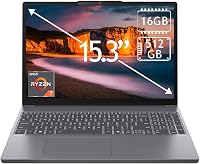
Best 2 in 1 Laptops for Home and School: Top 8 Picks (November 2026)
The best 2 in 1 laptops for home and school include the Lenovo Yoga 7i 2-in-1 16-inch for shared home desks, the Lenovo IdeaPad 5 2-in-1 16-inch for handwritten class notes, and the HP OmniBook X Flip 16-inch 2-in-1 for bright large screens.
On this page (5 sections)
The Lenovo Yoga 7i 2-in-1 16-inch is the best 2 in 1 laptop for home and school if you want Windows, a large touchscreen and four modes. The Lenovo IdeaPad 5 adds an included pen and 1TB SSD, while the 14-inch Dell offers a smaller screen.
A convertible can serve as a regular laptop for essays and spreadsheets, then fold into a tablet or tent position for reading and video. Start with our guide to what a 2 in 1 laptop is and who needs one if you are deciding whether the hinge suits your routine.
Our picks at a glance
-
1

-
2

-
3

- 4
 Check it
Dell 14 2-in-1 (Ryzen 7, 16GB)
Best for daily commuting - 5
 Check it
HP OmniBook X Flip 14-inch 2-in-1 (32GB)
Best for many open apps - 6
 Check it
HP OmniBook 5 Flip 14-inch 2-in-1
Best for everyday Windows work - 7
 Check it
Lenovo Chromebook 2-in-1 14-inch
Best for Google-based classes - 8
 Check it
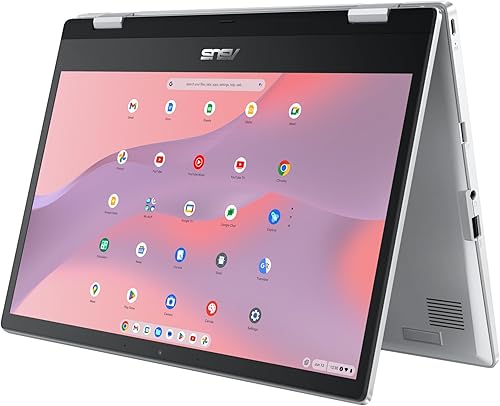
ASUS Chromebook Flip CX1 14-inch
Best for simple browser tasks
Which best 2 in 1 laptop fits home and school use?
The Lenovo Yoga 7i leads this group for a shared home desk because its large screen, four modes and useful ports cover common tasks. Other choices trade screen size, pen support, memory or operating system to fit different needs.
Lenovo Yoga 7i 2-in-1 16-inch: Best for shared home desks
- 16-inch 1920 x 1200 touchscreen
- Laptop, tablet, tent and stand modes
- Wi-Fi 6E
- USB-A, USB-C, HDMI and microSD ports
A 16-inch touchscreen and four convertible modes suit a shared home desk, schoolwork and media. Its ports include HDMI, USB-A, USB-C and microSD.
Pros
- Four modes
- Multiple built-in ports
- Wi-Fi 6E
Cons
- Larger 16-inch format may be less convenient to carry
- Memory and storage are not specified here
The Yoga 7i suits a home desk that doubles as a schoolwork station. Its 16-inch 1920 x 1200 touchscreen leaves room for documents and browser windows, while the 360-degree hinge switches among laptop, tablet, tent and stand modes.
The port mix helps when you connect a monitor, drive or other accessories. It includes two USB-A ports, two USB-C ports, HDMI, a microSD reader and a headphone/microphone combo jack.
Choose it if you value a large Windows touchscreen and want several ways to connect accessories. Skip it if you carry your laptop all day and prefer a more compact 14-inch size.
Lenovo IdeaPad 5 2-in-1 16-inch: Best for handwritten class notes
- 16-inch 1920 x 1200 touchscreen
- 16GB RAM
- 1TB SSD
- Digital Pen included
The included digital pen supports notes, sketches and signatures, while 16GB RAM and a 1TB SSD cover common school and home files. The 360-degree hinge adds tablet, tent and stand positions.
Pros
- Digital pen included
- 1TB SSD
- 16GB RAM
Cons
- 16-inch size takes more room in a bag
- The memory is soldered
The IdeaPad 5 is the clearest choice here if handwritten notes are part of your routine. Lenovo includes a digital pen for sketching, signing documents and taking notes, alongside 16GB RAM and a 1TB SSD.
Its hinge supports laptop, tablet, tent and stand positions. The 16-inch IPS touchscreen has a 1920 x 1200 resolution, and Windows 11 Home supports the familiar desktop app environment.
Choose this model if you want a pen in the box and room for many local files. Skip it if you need an upgradeable memory configuration, since its 16GB RAM is soldered, or if a 16-inch computer feels too large for your bag.
HP OmniBook X Flip 16-inch 2-in-1: Best for bright large screens
- 16-inch 1920 x 1200 touchscreen
- 400-nit brightness
- 16GB RAM
- 512GB SSD
A 16-inch touch display rated at 400 nits gives home and school work a large viewing area. The configuration pairs 16GB RAM with a 512GB SSD.
Pros
- 400-nit touchscreen
- 16GB RAM
- Windows 11 Home
Cons
- 16-inch screen is less compact
- Battery life varies with use
The HP OmniBook X Flip 16-inch suits buyers who want a large touch display with a stated brightness of 400 nits. Its 1920 x 1200 panel, 16GB RAM and 512GB SSD make a balanced setup for classes, home documents and streaming.
It runs Windows 11 Home and includes a backlit keyboard and 5MP IR camera. The 16-inch screen is more comfortable for a fixed desk than a crowded backpack, so choose it for viewing space rather than frequent travel.
Pick this HP if screen brightness matters and you expect to work mostly at a desk. Skip it if you want a compact convertible or need the included pen and larger storage found with the IdeaPad 5.
Dell 14 2-in-1 (Ryzen 7, 16GB): Best for daily commuting
- 14-inch convertible design
- AMD Ryzen 7 8840HS
- 16GB RAM
- Four modes
This 14-inch Dell folds into laptop, tablet, tent and stand modes, making it a practical size for class and home use. An optional active pen supports handwriting, but it is not included in the stated configuration.
Pros
- 14-inch convertible
- 16GB RAM
- Optional active pen support
Cons
- Pen is optional
- Few customer reviews are available
The Dell 14 2-in-1 is a compact Windows pick for students moving between home and class. It combines an AMD Ryzen 7 8840HS processor and 16GB RAM with a 14-inch 1920 x 1200 display.
The 360-degree hinge supports laptop, tablet, tent and stand modes. Dell describes an active pen as optional, so confirm that the package includes one if handwriting is central to your coursework.
Choose this model if you want a smaller Windows convertible with 16GB RAM. Skip it if you need a pen included by default; for more school-specific buying help, see our guide to choosing a laptop for high school students.
HP OmniBook X Flip 14-inch 2-in-1 (32GB): Best for many open apps
- 14-inch touchscreen
- 32GB RAM
- 512GB SSD
- Stylus pen bundled
The 32GB configuration suits buyers who keep many school or work apps open. It includes a stylus pen and a 14-inch touchscreen with a 360-degree design.
Pros
- 32GB RAM
- Stylus pen bundled
- 14-inch convertible
Cons
- Customized configuration
- Battery life depends on use
The 14-inch OmniBook X Flip is aimed at buyers who keep many apps open at once. This configuration combines 32GB RAM with a 512GB SSD, touchscreen and bundled stylus.
Its 360-degree hinge supports flexible viewing and writing positions. The computer is professionally upgraded and customized, and it comes with a 12-month warranty.
Choose it when multitasking capacity and a pen matter more than a big screen. Skip it if your needs are limited to a browser, documents and video calls, where a 16GB model may already be enough.
HP OmniBook 5 Flip 14-inch 2-in-1: Best for everyday Windows work
- 14-inch 1920 x 1200 touchscreen
- 16GB DDR5 RAM
- 512GB SSD
- Windows 11 Home
The 14-inch touchscreen and 16GB RAM suit everyday typing, browsing and school tasks. Its screen rotates for tablet or tent use, and it has a backlit keyboard.
Pros
- 16GB RAM
- 512GB SSD
- Touchscreen
Cons
- Exact weight should be checked before travel
- Battery life is not specified here
The OmniBook 5 Flip suits everyday browsing, writing and video calls on a 14-inch touchscreen. It has 16GB DDR5 RAM, a 512GB SSD and Windows 11 Home.
The screen rotates for tablet or tent use, and the keyboard is backlit. Its 1920 x 1200 resolution gives you a taller workspace than a standard 16:9 screen.
Choose it if you want a conventional Windows setup with touch input and mid-size storage. Skip it if a published battery figure or a pen in the box is important to your decision.
Our laptop RAM guide can help you match memory to your apps.
Lenovo Chromebook 2-in-1 14-inch: Best for Google-based classes
- 14-inch WUXGA IPS touchscreen
- ChromeOS
- 128GB UFS storage
- Two USB-C, two USB-A and HDMI ports
This Chromebook flips between laptop, tent and tablet modes and includes Google apps. Its 4GB RAM and ChromeOS make it a better fit for web-based school and home tasks than demanding desktop software.
Pros
- ChromeOS with Google apps
- Touchscreen convertible
- USB-A, USB-C and HDMI ports
Cons
- 4GB RAM limits heavier multitasking
- 128GB storage
The Lenovo Chromebook 2-in-1 fits browser-centered schoolwork and home use. It comes with ChromeOS, Google apps, a 14-inch WUXGA IPS touchscreen and 128GB storage.
The convertible design supports laptop, tent and tablet positions. A physical webcam shutter and a selection of USB-C, USB-A and HDMI ports make it easier to connect common accessories.
Choose it if your assignments use browser tools and Google apps. Skip it if you need demanding desktop software or regularly keep many apps open, since this configuration has 4GB RAM.
If Office compatibility is essential, read our guide to Microsoft Office on Chromebooks.
ASUS Chromebook Flip CX1 14-inch: Best for simple browser tasks
- 14-inch 1920 x 1080 touchscreen
- ChromeOS
- 8GB RAM
- 128GB eMMC storage
The ASUS Chromebook Flip CX1 combines a 14-inch touchscreen with four modes and ChromeOS. Its 8GB RAM and 128GB eMMC storage suit browser-centered tasks and Google apps.
Pros
- 8GB RAM
- Four modes
- USB-C, USB-A and microSD connections
Cons
- 128GB eMMC storage
- ChromeOS may not support every desktop app
The ASUS Chromebook Flip CX1 is a simple convertible for browser-based work and Google apps. Its 14-inch touchscreen turns through laptop, tent, stand and tablet positions, with 8GB RAM and 128GB eMMC storage.
It has two USB-C ports, two USB-A ports, Wi-Fi 6 and a microSD reader. The 1920 x 1080 display has less vertical resolution than the 1920 x 1200 panels on several other picks.
Choose it if your routine stays in ChromeOS and you want four ways to position the screen. Skip it if you need Windows desktop programs or large local storage.
Check school software requirements before committing to a Chromebook.
How do you choose the best 2 in 1 laptop?
Choose a convertible by matching its operating system, size, memory and pen support to your actual routine. The hinge is useful only when the tablet or tent positions solve a task you do often.
Which best 2 in 1 laptop operating system suits your apps?
Windows is the safer starting point when school or work requires desktop applications. A Chromebook can handle browser-based assignments, Google apps, online research and many everyday tasks, but it cannot run every Windows program.
Write down the apps your school or employer requires before choosing. If you depend on a specific desktop program, check its supported operating system and any offline requirements.
Is a 14-inch or 16-inch convertible easier for you?
A 14-inch model takes less room in a bag and is easier to use on a small desk or tray. A 16-inch display gives more screen area for split windows, longer documents and side-by-side reference material.
Think about where you will use the laptop most. For a mostly stationary home setup, a 16-inch screen can be a comfortable workspace.
For daily commuting, compare the smaller Dell and HP options. Our laptop size guide covers the other tradeoffs.
Do you need an included pen?
A pen can make handwritten notes, diagrams, signatures and quick annotations feel more natural on a touchscreen. It is useful for students who write directly on class materials or people who sketch, but it adds little value if you mostly type.
Check whether the pen is included or optional. The IdeaPad 5 includes a digital pen, the 14-inch HP OmniBook X Flip includes a stylus, and the Dell describes pen support as optional.
How much memory and storage should you choose?
Memory affects how comfortably a laptop handles several open apps, tabs and documents at once. For basic browsing and writing, modest configurations can be enough, while heavier multitasking benefits from more memory; this selection ranges from 4GB to 32GB.
Storage determines how much you can keep locally, including documents, downloads and media. These choices include 128GB, 512GB and 1TB options.
If you keep large files on the laptop, compare the capacity with your habits using our guide to laptop storage needs.
Which screen and ports make daily use easier?
A 1920 x 1200 display offers more vertical room than 1920 x 1080, which can mean less scrolling through documents and webpages. Brightness, panel type and screen size also affect how comfortable a display feels in your usual workspace.
Check the connections you use before buying. HDMI can connect a display, USB ports can connect accessories, and a card reader can help if you regularly move photos or files from memory cards.
Is a 2 in 1 worth it if you rarely use tablet mode?
A convertible makes sense when touch, tent or tablet use is part of your week. If you expect to leave the screen open as a regular laptop all the time, a standard clamshell may meet your needs with less focus on a hinge you won't use.
Try to name two or three tasks that benefit from folding the screen. Reading recipes in tent mode, marking up notes with a pen or viewing a video hands-free are clear use cases; an occasional novelty flip is a weak reason to prioritize the format.
How should you set up and care for a 2 in 1 laptop?
Set up a convertible in its normal laptop position first, then test its other modes before relying on them for class or work. A few minutes spent arranging accounts, updates and accessories can prevent avoidable interruptions.
Start by connecting to a trusted Wi-Fi network, signing in to the operating system and installing available system updates. Add only the apps you need, turn on a screen lock, and check that your files sync or back up where you expect.
Open and close the display with two hands near the center of the lid rather than twisting one corner. Keep the hinge area clear of pens, cables and other objects, and avoid forcing the screen past its natural stop.
Before using tablet mode, save your work and disconnect cables that could pull against the ports. Put the computer on a stable surface in tent or stand mode, and keep drinks away from the keyboard and hinge.
Use a soft, clean microfiber cloth for the display. Avoid spraying liquid directly onto the touchscreen.
Follow the maker's care instructions if you need a screen-safe cleaner. Our guide to cleaning a laptop screen safely explains a careful routine.
Battery life changes with brightness, apps, wireless use and workload. Lower the display brightness when practical, close apps you are not using, and bring the charger when you expect a long school or travel day.
More battery suggestions are in our laptop battery guide.
What mistakes should you avoid when buying a 2 in 1?
The most common buying mistakes are choosing an operating system before checking required apps, overestimating how often you'll use tablet mode, and overlooking what is included in the box. Check each detail against your everyday tasks.
Don't assume every convertible includes a pen. The Lenovo IdeaPad 5 and 14-inch HP OmniBook X Flip include one, while the Dell's active pen is optional.
Don't equate a 16-inch screen with better portability or a 14-inch screen with poor productivity. Decide whether screen space at a desk or a smaller bag footprint will matter more most days.
Don't overlook memory and storage when comparing similar-looking laptops. The Chromebook choices have 128GB storage, while several Windows models include 512GB or 1TB; memory varies widely too, so consider your open apps and local files.
Don't assume ChromeOS and Windows are interchangeable. Confirm that your school platforms, office tools, printers and any specialized apps work with the operating system you choose.
Finally, don't pay attention to hinge positions you will not use while ignoring the keyboard, screen size and ports you'll rely on every day. A convertible should fit your routine in laptop mode first, then earn its place with useful touch or folding features.
Which best 2 in 1 laptop should you choose?
Choose the Lenovo Yoga 7i 16-inch for a large Windows touchscreen, four modes and a broad set of ports. Choose the IdeaPad 5 if an included pen and 1TB SSD matter more, or the Dell 14 if you want a smaller Windows laptop for class and commuting.
Pick the HP OmniBook X Flip 14-inch for 32GB memory and a bundled stylus, or the HP OmniBook 5 Flip for everyday Windows work in a 14-inch format. Choose a Chromebook only when ChromeOS supports your required apps: the Lenovo suits Google-based schoolwork, while the ASUS offers 8GB RAM for straightforward browser tasks.
If you are still comparing laptop types, visit our laptops for home, school and work guide for more options.
| Product | Best for | Screen | Memory | Operating system | Our score |
|---|---|---|---|---|---|
| Lenovo Yoga 7i 2-in-1 16-inch | shared home desks | 16 in, 1920 x 1200 | Not specified | Windows 11 | 9.1 |
| Lenovo IdeaPad 5 2-in-1 16-inch | handwritten class notes | 16 in, 1920 x 1200 | 16GB | 8.8 | |
| HP OmniBook X Flip 16-inch 2-in-1 | bright large screens | 16 in, 1920 x 1200, 400 nits | 16GB | 8.6 | |
| Dell 14 2-in-1 (Ryzen 7, 16GB) | daily commuting | 14 in, 1920 x 1200 | 16GB | Windows 11 Home | 8.5 |
| HP OmniBook X Flip 14-inch 2-in-1 (32GB) | many open apps | 14 in, 1920 x 1200 | 32GB | 8.3 | |
| HP OmniBook 5 Flip 14-inch 2-in-1 | everyday Windows work | 14 in, 1920 x 1200 | 16GB | 8.0 | |
| Lenovo Chromebook 2-in-1 14-inch | Google-based classes | 14 in, 1920 x 1200 | 4GB | ChromeOS | 7.7 |
| ASUS Chromebook Flip CX1 14-inch | simple browser tasks | 14 in, 1920 x 1080 | 8GB | ChromeOS | 7.2 |
Our top 3 picks at a glance
-
1
-
2
-
3
Frequently asked questions
What is the best 2 in 1 laptop for home and school?
The Lenovo Yoga 7i 2-in-1 16-inch is a strong fit if you want Windows, a large touchscreen and laptop, tablet, tent and stand modes. For a smaller Windows option, consider the Dell 14 2-in-1.
If your schoolwork runs in a browser or Google apps, a Chromebook can be enough.
Are 2 in 1 laptops good for students?
Yes, a 2 in 1 can switch between typing assignments and using the touchscreen in tablet mode. A model with a pen can help with handwritten notes, but check whether the pen is included.
Choose the operating system around the apps your school requires.
Should I choose a Windows 2 in 1 or a Chromebook?
Choose Windows if you need desktop programs or broader software compatibility. Choose a Chromebook if your work mainly uses a browser and Google apps.
Check required school software before you buy, since ChromeOS and Windows do not run all the same programs.
Is a 16-inch 2 in 1 too large for school?
A 16-inch laptop gives you more screen area, but it takes more space in a backpack and on a small desk than a 14-inch model. Think about how often you carry it between classes.
For frequent travel, compare the 14-inch Dell and HP options here.