What Size Laptop Do I Need?
For most home use, a 14 or 15.6 inch laptop balances screen space with portability. Choose 13 inches for frequent travel, or 17.3 inches if you want a larger view and mostly work at a desk.
On this page (8 sections)
- What size laptop do I need for home use?
- How do 13, 14, 15.6, and 17.3 inch screens compare?
- Is a 15.6 inch laptop right for everyday tasks?
- Is a 17.3 inch laptop too big to carry?
- What should I check besides screen size?
- How should you set up and care for a new laptop?
- What mistakes should you avoid when choosing a laptop size?
- Which laptop screen size should you choose?
For what size laptop do I need for home, school, or work, start with 14 or 15.6 inches if you want a useful balance of screen room and portability. Choose 13 inches if you carry it often, or 17.3 inches if a larger view matters more than fitting the laptop into a small bag.
Screen size measures the display diagonally. It doesn't tell you the full width or depth of the laptop, so also check the body dimensions, weight, keyboard layout, and the space where you'll use it.
What size laptop do I need for home use?
For everyday home use, 14 or 15.6 inches is a sensible starting range. A 14 inch screen keeps the device easier to move, while 15.6 inches gives you more room for documents, browsing, and video calls.
Think about the place you use your laptop most. A device that stays on a desk can be larger, while one that moves from room to room or goes to class should fit your bag and feel manageable to carry.
Text size and viewing distance also affect comfort. You can enlarge text in the operating system or connect a monitor at a desk, so a smaller built-in display doesn't have to serve every situation by itself.
What size laptop do I need if I travel often?
If you carry your laptop often, look first at 13 or 14 inches, then compare each model's weight and body dimensions. Smaller screens often make for a more compact setup, but two laptops with the same diagonal measurement can still pack differently.
The Apple MacBook Neo is a compact option for people who favor a smaller screen and move between classes, rooms, or workspaces. It has a 13 inch Liquid Retina display, weighs 2.71 lb, and Apple says it offers up to 16 hours of battery life.
Choose a larger device if you regularly split the screen between several windows or want a broad view without a separate monitor. If a small display is your main concern, increase text size before buying up to a larger, heavier laptop.
How do 13, 14, 15.6, and 17.3 inch screens compare?
13 inches favors portability, 14 inches balances size and mobility, 15.6 inches offers a roomier everyday workspace, and 17.3 inches suits desk use. Treat those as starting points, then consider how much screen area your tasks need.
| Screen size | Often suits | Consider |
|---|---|---|
| 13 in | Frequent travel and tight spaces | Less room for side-by-side windows |
| 14 in | General home use and occasional travel | May feel small for multitasking |
| 15.6 in | Everyday work, browsing, and entertainment | Takes up more desk and bag space |
| 17.3 in | Desk use and a larger built-in view | Check weight and dimensions before carrying |
The diagonal number is only one part of the fit. Screen resolution, aspect ratio, frame size, and keyboard placement can make two laptops with the same screen measurement feel different.
A taller display can show more lines of a document at once. The Acer Aspire 14 has a 14 inch, 1920 x 1200 touch display, which provides more vertical pixels than a Full HD 16:9 screen.
Is a 14 inch laptop big enough for work and school?
A 14 inch laptop is big enough for email, browsing, documents, online classes, and video calls. It can also be a good choice if you want a touchscreen and a display that remains practical to move.
The Acer Aspire 14 suits students and home workers who want a compact Windows laptop with a touch display and room for multitasking. It includes 16 GB of memory and a 1 TB SSD, so it has more memory and storage than the 8 GB, 256 GB MacBook Neo configuration.
This model may be more than you need if your work is mostly basic browsing and writing, or if you prefer a simpler laptop without touch input. Before choosing, check whether the software you need runs on Windows and whether the display size works for the documents you handle.
Is a 15.6 inch laptop right for everyday tasks?
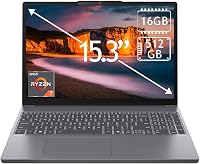
A 15.6 inch laptop suits you if you want a larger everyday screen and a roomy keyboard. It gives you more display area for spreadsheets, writing, and video calls, while remaining easier to move than many larger desktop focused laptops.
The Dell 15.6 inch laptop suits home users who enter numbers often because it has a separate numeric keypad and calculator hotkey. Its lifted hinges provide a typing angle, and adaptive thermals adjust performance and heat for desk or lap use.
Skip this size if you have a small desk, a compact backpack, or expect to carry the laptop for long stretches. Compare the laptop's full dimensions and weight, and check the keyboard and touchpad layout before deciding.
Is a 17.3 inch laptop too big to carry?
A 17.3 inch laptop is best suited to a home desk where a large built-in display matters. The HP OmniBook 3 gives you a Full HD IPS display for documents, streaming, and video calls without requiring a separate monitor.
This size is a poor fit if you move between classes, commute with your laptop, or store it in a small space. Measure your desk and check your bag's usable dimensions before buying, because screen diagonal alone doesn't show whether the whole laptop will fit.
For additional choices at this size, see our guide to best 17 inch laptops. If a laptop will travel with you, compare the actual weight and dimensions of each option.
What should I check besides screen size?
Check the laptop's weight, dimensions, resolution, screen shape, keyboard, and available workspace. These details help you decide whether a model's screen size will suit your routine.
- Weight and dimensions: Check these against your bag, desk, and storage space.
- Resolution: Affects the detail you see and how much can fit on screen.
- Screen shape: A taller display can show more lines of text at once.
- Keyboard and touchpad: Consider whether the layout fits your typing and number entry.
- External monitor: A monitor can add workspace at home without making your laptop larger when you travel.
Don't assume a larger screen automatically makes text easier to read. Adjust display scaling and text size to suit your eyes, and check the screen's resolution before deciding.
Our guide to what to look for when buying a laptop covers other features to compare. If you haven't decided what kind of computer suits your routine, start with what laptop should I buy?.
How should you set up and care for a new laptop?
Set up the laptop where you plan to use it, then adjust the display and arrange the workspace around it. A few minutes spent checking fit and settings can prevent daily discomfort.
Place the screen at a comfortable distance, set text scaling so you can read without leaning forward, and use a stable surface that leaves room for your hands. If you spend long stretches at a desk, a separate monitor, keyboard, or mouse can help you work with a smaller laptop more comfortably.
Before carrying it, make sure the laptop fits inside the bag with room for its charger and other items. Use a padded compartment or sleeve, and avoid placing heavy objects on top of the screen.
Keep the display clean with a soft, clean cloth and follow the laptop maker's care guidance. Don't press hard on the panel, and avoid spraying liquid directly onto the screen or keyboard.
For a guided first-day checklist, see how to set up a new laptop step by step. If you carry your laptop between locations, tips to make laptop battery last longer can help you manage power away from an outlet.
What mistakes should you avoid when choosing a laptop size?
The most common mistake is choosing by screen diagonal alone. Check the whole device and picture how you'll use it before committing to a size.
- Buying the biggest screen by default: A large display is useful at a desk, but it can be awkward to carry or store.
- Choosing the smallest screen to save space: A compact laptop can feel cramped if your work uses several windows or long documents.
- Ignoring the keyboard: A larger screen doesn't guarantee a keyboard layout that suits your hands or number entry.
- Forgetting desk depth: A laptop may fit across your desk but leave too little space for your hands or other equipment.
- Assuming one size suits every room: If you work at home and travel, consider whether portability or desk comfort matters more on most days.
A monitor can solve the need for more workspace at home, but it won't help when you're away from your desk. Choose the built-in screen for the place where you use the laptop most.
Which laptop screen size should you choose?
Pick 13 inches if you carry your laptop often, 14 inches for a portable all-purpose choice, 15.6 inches for a roomier daily workspace, or 17.3 inches for a mostly fixed desk. Then verify dimensions, weight, and keyboard fit before deciding.
The Apple MacBook Neo is the compact pick for frequent travel, while the Acer Aspire 14 suits people who want touch input and a taller display. Choose the Dell for a larger everyday screen with a number pad, or the HP OmniBook 3 if you want the biggest built-in view for a home desk.
To compare options by task and routine, browse laptops for people and tasks. The right answer to what size laptop do I need is the one that fits both your typical work and the space where you use it.
Frequently asked questions
What size laptop is best for home use?
A 14 or 15.6 inch laptop suits many home users because it gives you room for browsing, documents, and video calls while remaining practical to move. Choose 13 inches if you carry it often, or 17.3 inches if you mainly use it at a desk and value a larger view.
Is a 14 inch laptop big enough?
A 14 inch laptop is big enough for common tasks such as email, web browsing, documents, and video calls. It may feel cramped if you often keep several windows side by side, so consider a larger screen or an external monitor for that setup.
Should I get a 15 or 17 inch laptop?
Choose 15 or 15.6 inches for a middle ground between viewing space and moving the laptop around. A 17.3 inch model gives you a larger display for desk use, but check its full dimensions and weight if you plan to carry it.
Does laptop screen size affect portability?
Yes. A larger screen usually means a larger laptop body, though weight and thickness vary by model.
Check the device's dimensions and weight, then consider whether it needs to fit a backpack, small desk, or shared household space.