How Much RAM Do I Need in a Laptop?
For how much RAM you need in a laptop, 8GB can suit light browsing and documents, while 16GB is a better target for school, work, and multitasking. Choose more when your specific apps require it, and check upgrade options before buying.
On this page (8 sections)
- How much RAM do you need in a laptop for everyday use?
- Is 8GB RAM enough for school or work?
- When should you choose 16GB or more?
- Can you upgrade laptop RAM later?
- How should you set up and care for laptop RAM?
- Does RAM affect laptop speed and battery life?
- What are common mistakes when choosing laptop RAM?
- How much laptop RAM should you choose?
For how much RAM you need in a laptop, 8GB can be enough for light browsing and documents, while 16GB is a better target for multitasking, school, and work. Your choice should reflect the apps you use together and whether you can upgrade the laptop later.
For many people, 16GB is a sensible starting point when their budget allows. If you mostly browse, check email, stream video, and write simple documents, 8GB may do the job.
With video calls, several browser tabs, and multiple apps, 16GB leaves more working room.
RAM is temporary space for the apps and files in use right now. Storage keeps your files when the laptop is off, so more RAM does not automatically mean more room for photos or documents.
Our guide to how much storage you need on a laptop explains how to choose that capacity separately.
How much RAM do you need in a laptop for everyday use?
Choose 8GB for a small number of light tasks and 16GB if you often switch among apps. The useful question is not only what you do, but how many programs and browser tabs you keep open at once.
With one or two tabs, email, and a word processor, 8GB can be a practical fit. Add a video call, a large spreadsheet, and many open tabs, and 16GB offers more breathing room.
If you keep a laptop for several years, consider how your workload may grow. Paying for capacity you won't use may not help, but memory that can't be upgraded can make a low-capacity choice harder to live with later.
Is 8GB RAM enough for school or work?
8GB can handle basic school and office tasks, while 16GB suits frequent multitasking better. Match memory to your actual workload instead of choosing based only on labels like “student laptop” or “work laptop.”
A student who writes papers, reads course pages, and streams lessons may be comfortable with 8GB. If you also join video calls, use large files, or keep many tabs open, 16GB is a safer fit.
For office tasks such as email and documents, 8GB can work. Choose 16GB if you regularly move between meetings and spreadsheets.
This also suits users who run several work apps. Our guide to laptops for work and small offices covers other features that can affect your choice.
The Acer Aspire 3 configuration has 8GB of onboard LPDDR5 memory. It suits lighter everyday work, but buyers who expect heavier multitasking should check the exact model's upgrade options before choosing it.
When should you choose 16GB or more?
Choose 16GB for everyday multitasking; go higher when the software you rely on calls for it. Large creative projects, development tools, datasets, and virtual machines can need more, but the right amount varies with the apps and project size.
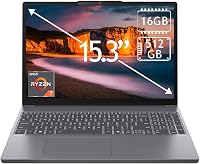
The Lenovo IdeaPad Slim 3 configuration has 16GB of DDR4 memory and a 512GB SSD. It fits a buyer looking for a touchscreen laptop for everyday school or office use, though someone who needs more than 16GB should verify the configuration and upgrade options first.
The ThinkPad E16 Gen 3 configuration pairs 16GB of DDR5 memory with a 512GB SSD. Its 16-inch WUXGA display and Ryzen 7 250 processor make it a suitable option for a buyer who wants a work-focused laptop with room for common apps and heavier everyday multitasking.
Skip it if your required software calls for more memory than 16GB.
Before paying for more RAM, check the requirements for your most demanding program and think about how you use it. A single light app rarely calls for the same capacity as several large projects open at once.
Can you upgrade laptop RAM later?
Some laptops accept a RAM upgrade, but others use memory soldered in place. Before buying a laptop or module, check the exact model's support information for its memory type, slots, and maximum capacity.
Don't assume that two laptops in the same product family have the same memory layout. One configuration may have an open SODIMM slot, while another may use onboard memory or a different module type.
The Crucial 16GB DDR4 SODIMM is an option for a compatible laptop with an available slot. Crucial offers a system scanner and upgrade selector to help check compatibility.
Before ordering a module, confirm the laptop supports DDR4 SODIMM memory and check the module's speed and capacity. This Crucial module uses 260 pins and is rated at 3200MHz, with support for lower speeds on compatible systems.
It won't fit a laptop that uses another memory generation or has no slot.
Our guide to what to look for when buying a laptop covers RAM alongside the processor, storage, and screen.
How should you set up and care for laptop RAM?
Check compatibility before upgrading, then handle the module carefully and follow the laptop maker's service steps. A module that looks similar can still use the wrong generation, form factor, or capacity for your laptop.
Back up important files before opening a laptop and shut it down fully. Disconnect its power adapter, follow the model's service manual, and avoid touching the module's contacts.
Don't force it into a slot. If the laptop's instructions call for professional service, use that route.
After installation, start the laptop and check its system settings to confirm the expected memory is recognized. If it isn't, shut down and revisit the model's instructions rather than repeatedly pressing the module into place.
For a new computer, follow our step-by-step guide to setting up a new laptop. You can confirm the memory shown by the system during setup and install the apps you plan to use.
Does RAM affect laptop speed and battery life?
Enough RAM can help keep several apps open, but adding capacity does not make every task faster. An upgrade matters most when the laptop is short on memory during the work you do.
When memory runs low, the system may use storage to help manage active work, and switching among apps can feel slower. More RAM can reduce that pressure if the laptop supports an upgrade.
It won't fix slowdowns caused by a demanding processor workload or limited storage space.
RAM capacity alone doesn't determine battery life. Screen brightness, wireless activity, processor use, and the apps running in the background also affect power consumption.
What are common mistakes when choosing laptop RAM?
The main mistake is buying based on capacity alone without checking compatibility or your workload. A larger number helps only when the laptop and your everyday tasks can use it.
- Confusing RAM with storage: RAM supports active work; storage holds files. Decide how much of each you need.
- Assuming every laptop can be upgraded: Some memory is soldered, and some models have no open slot.
- Matching only the capacity: Confirm generation, form factor, speed support, and the model's maximum capacity.
- Buying more than your apps need: Check software requirements before paying extra for memory you may not use.
- Ignoring the complete configuration: A laptop's processor, storage, and screen also shape how well it fits your work.
How much laptop RAM should you choose?
Pick 8GB if your work stays light, and 16GB if you regularly multitask for school, home, or office use. Choose more only when your software requirements or projects give you a clear reason.
For an 8GB option aimed at light tasks, consider the Acer Aspire 3 after checking its upgrade limits. For a 16GB laptop, compare the IdeaPad Slim 3 and ThinkPad E16 based on the screen and processor.
Also consider the features you want. If your current laptop is upgradeable and memory is the constraint, the Crucial module may fit after you confirm compatibility.
If you're still comparing complete systems, use our plain guide to what laptop you should buy to weigh memory against your other needs.
Frequently asked questions
Is 8GB RAM enough for a laptop?
Yes, 8GB can suit basic browsing, email, streaming, and document editing, especially if you keep only a few apps open. It can feel limiting when you switch among many browser tabs, video calls, and larger programs.
Choose 16GB if those tasks are part of your regular routine.
Is 16GB RAM enough for a laptop?
For most home, school, and office users, 16GB is a practical target. It gives common apps more room to run together than 8GB, though demanding creative work, large datasets, and virtual machines may call for more.
Check the RAM requirements for the specific software and projects you use.
Can I add RAM to any laptop?
No. Some laptops have memory soldered to the motherboard, while others have slots for upgrades.
Check the exact model's service information for its memory type, available slots, and maximum capacity before buying a module.
A removable module must also match the laptop's generation and form factor.
Does more RAM make a laptop faster?
More RAM can help when your laptop runs out of memory while you work, since it gives apps more room to stay open. It won't speed up every task or replace a capable processor and storage drive.
First identify whether memory is actually limiting the work that feels slow.