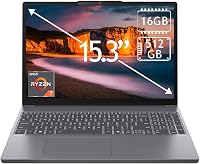
Best 17 Inch Laptops for a Bigger Screen: Top 7 Picks (November 2026)
The best 17 inch laptops for home use include the ASUS Vivobook 17.3-inch Slim (Core 7 for home multitasking, the HP 17.3-inch Touchscreen Laptop (Core Ultra 7 for touch input, and the HP 17.3-inch Laptop (Core i5 for a Full HD IPS screen.
On this page (7 sections)
- Which 17 inch laptop is the best fit?
- How we chose these 17 inch laptops
- The best 17 inch laptops for home use
- What should you check before choosing a 17 inch laptop?
- How should you set up a new 17 inch laptop?
- What mistakes should you avoid when buying a 17 inch laptop?
- Which 17 inch laptop should you choose?
The best 17 inch laptop for most home users is the ASUS Vivobook 17.3-inch Slim, with 16GB memory, a 512GB SSD and a Full HD display. If touch input matters, consider the HP touchscreen model; if you want a Full HD IPS screen and 16GB RAM, the standard HP 17.3-inch is another strong fit.
A 17.3 in laptop gives you more screen area for documents, video calls and streaming than a compact model. The tradeoff is a larger chassis, so think about desk space and how often you'll carry it.
For other household and work needs, see our guide to laptops for people and tasks. If screen size is still an open question, our laptop size guide explains how to match a display to your space and routine.
Our picks at a glance
-
1
 Best for home multitasking
ASUS Vivobook 17.3-inch Slim (Core 7, 16GB)
8.5/10 our score
See it on Amazon -
2
 Best for touch input
HP 17.3-inch Touchscreen Laptop (Core Ultra 7, 16GB)
8.4/10 our score
See it on Amazon -
3
 Best for a Full HD IPS screen
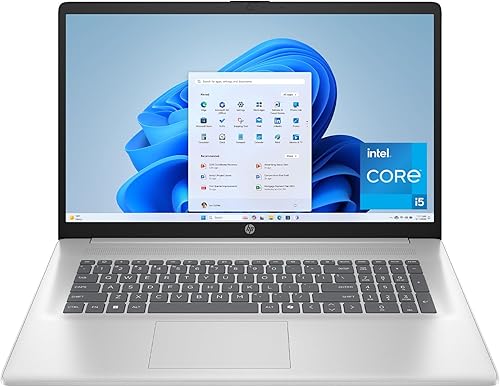
HP 17.3-inch Laptop (Core i5, 16GB, 512GB)
8.3/10 our score
See it on Amazon
- 4
 Check it
HP OmniBook 3 17.3-inch (Core Ultra 5, 8GB, 512GB)
Best for video calls - 5
 Check it
HP OmniBook 3 17.3-inch (Ryzen 3, 8GB, 512GB)
Best for everyday streaming - 6
 Check it
ASUS Vivobook 17 (Core 3, 8GB, 512GB)
Best for a numeric keypad - 7
 Check it
HP 17.3-inch Laptop (Ryzen 5, 8GB, 512GB)
Best for a lift-hinge keyboard
Which 17 inch laptop is the best fit?
The ASUS Vivobook 17.3-inch Slim is the best all-around pick here because it combines Full HD resolution with 16GB memory and 512GB storage. The other laptops stand out for touch input, video calls, or specific keyboard and screen features.
How we chose these 17 inch laptops
We compared screen resolution, memory, storage and useful features against common home, school and everyday work needs. We favored configurations that balance a large display with enough memory for typical multitasking, then considered extras such as touch input, camera privacy and keyboard layout.
A large diagonal alone doesn't tell you whether a laptop will suit your routine. Check how clearly you want text and windows displayed, what apps you keep open together, and whether you mostly work at one desk or move between rooms.
If office work is your main priority, our guide to laptops for work covers options for small offices and home workspaces.
| Product | Best for | Display | Memory | Storage | Our score |
|---|---|---|---|---|---|
| ASUS Vivobook 17.3-inch Slim (Core 7, 16GB) | home multitasking | 17.3 in, 1920 x 1080 | 16GB | 512GB SSD | 8.5 |
| HP 17.3-inch Touchscreen Laptop (Core Ultra 7, 16GB) | touch input | 17.3 in, 1600 x 900 touchscreen | 16GB RAM | 512GB SSD | 8.4 |
| HP 17.3-inch Laptop (Core i5, 16GB, 512GB) | a Full HD IPS screen | 17.3 in, Full HD IPS | 16GB RAM | 512GB SSD | 8.3 |
| HP OmniBook 3 17.3-inch (Core Ultra 5, 8GB, 512GB) | video calls | 17.3 in, Full HD IPS | 8GB RAM | 512GB SSD | 8.0 |
| HP OmniBook 3 17.3-inch (Ryzen 3, 8GB, 512GB) | everyday streaming | 17.3 in, Full HD IPS | 8GB RAM | 512GB SSD | 7.8 |
| ASUS Vivobook 17 (Core 3, 8GB, 512GB) | a numeric keypad | 17.3 in, 1920 x 1080 | 8GB RAM | 512GB SSD | 7.7 |
| HP 17.3-inch Laptop (Ryzen 5, 8GB, 512GB) | a lift-hinge keyboard | 17.3 in, Full HD IPS | 8GB DDR5 RAM | 512GB SSD | 7.5 |
The best 17 inch laptops for home use
The ASUS Vivobook 17.3-inch Slim is the strongest all-around pick for home use, with Full HD resolution, 16GB memory and 512GB storage. The remaining options suit narrower needs, from touch controls to video calls and a raised typing angle.
ASUS Vivobook 17.3-inch Slim (Core 7, 16GB): Best for home multitasking
- 17.3 in Full HD display
- 16GB memory
- 512GB SSD
- Numeric keypad
A Full HD screen, 16GB memory and 512GB storage make this the most balanced choice here for everyday home tasks. Its full-sized keyboard includes a numeric keypad.
Pros
- Full HD resolution
- 16GB memory
- Fingerprint sensor
Cons
- Just over 4.5 lb
- No touchscreen
The ASUS Vivobook 17.3-inch Slim is the most balanced choice for a home laptop that will handle several everyday tasks. Its 16GB memory gives you room to keep more work open at once, while the 512GB SSD provides space for apps, documents and personal files.
The Full HD display gives you a broad workspace for side-by-side windows, and the full-sized keyboard includes a numeric keypad for data entry. A fingerprint sensor provides another sign-in option, while the HD front camera works for routine calls.
At just over 4.5 lb, this is a laptop you can move between rooms, though it is larger to carry than a compact model. Choose it if you want one computer for home, study and general work, and skip it if touch controls are a priority.
HP 17.3-inch Touchscreen Laptop (Core Ultra 7, 16GB): Best for touch input
- 17.3 in touchscreen
- 16GB RAM
- Windows 11 Pro
- Fingerprint reader
The touchscreen and fingerprint reader suit buyers who want direct screen input and a sign-in option. Its 1600 x 900 resolution is lower than the Full HD displays on several other picks.
Pros
- Touchscreen
- Fingerprint reader
- Backlit keyboard
Cons
- 1600 x 900 resolution
- 512GB SSD with a 512GB external docking set
The HP 17.3-inch touchscreen is for people who prefer tapping or swiping on the display. It adds a fingerprint reader, backlit keyboard, numeric keypad and camera privacy shutter, useful features for a desk that serves both work and personal tasks.
Its 1600 x 900 screen resolution is lower than Full HD, so text and images have fewer pixels than on the other Full HD picks. The configuration includes Windows 11 Pro, 16GB RAM, a 512GB SSD and a separate 512GB external docking set.
Choose it if direct screen input is a regular part of your routine and the resolution suits your work. Skip it if you want the sharpest screen in this group or never use touch input.
HP 17.3-inch Laptop (Core i5, 16GB, 512GB): Best for a Full HD IPS screen
- 17.3 in FHD IPS display
- 16GB RAM
- 512GB SSD
- Camera shutter
This HP pairs a Full HD IPS display with 16GB RAM and a 512GB SSD. A physical camera shutter gives you a simple way to cover the camera between calls.
Pros
- Full HD IPS display
- 16GB RAM
- Camera shutter
Cons
- No touchscreen
- Windows 11 Home
This HP 17.3-inch laptop is a strong choice for buyers who want a Full HD IPS screen and 16GB RAM. The display's wide viewing angles suit a shared workspace or a desk where you sometimes lean back or shift position.
The 512GB SSD gives you space for everyday applications and files. A physical camera shutter covers the webcam when it is not in use, and the lift-hinge design raises the keyboard while you type.
Choose this model if screen clarity and memory matter more than touch input. Skip it if you specifically want a touchscreen or need Windows 11 Pro, since this configuration uses Windows 11 Home.
HP OmniBook 3 17.3-inch (Core Ultra 5, 8GB, 512GB): Best for video calls
- 17.3 in Full HD IPS display
- 1080p FHD camera
- 512GB SSD
- Wi-Fi 6
The FHD camera, noise reduction features and Full HD IPS screen suit video calls and everyday browsing. Its 8GB RAM is less than the 16GB configurations above.
Pros
- 1080p FHD camera
- Full HD IPS display
- 512GB SSD
Cons
- 8GB RAM
- No touchscreen
The HP OmniBook 3 with the Intel Core Ultra 5 is the best fit here for frequent video calls. Its 1080p camera, HDR auto-switch and noise reduction features pair with a Full HD IPS screen for calls, browsing and documents.
The 512GB SSD offers room for a typical collection of files, but the 8GB RAM is less suited to keeping many demanding apps open together. HP says battery life can reach up to 16 hours and 15 minutes; actual time varies with use and settings.
Choose it if camera quality and everyday portability matter more than memory headroom. If your routine involves many browser tabs, spreadsheets and communication apps at once, a 16GB pick is a safer fit.
HP OmniBook 3 17.3-inch (Ryzen 3, 8GB, 512GB): Best for everyday streaming
- 17.3 in Full HD IPS display
- 8GB RAM
- 512GB SSD
- FHD camera
A Full HD IPS display, FHD camera and 512GB SSD cover common streaming, browsing and video-call needs. It has 8GB RAM, so compare memory needs if you often keep many apps open.
Pros
- Full HD IPS display
- FHD camera
- 512GB SSD
Cons
- 8GB RAM
- No touchscreen
This HP OmniBook 3 pairs an AMD Ryzen 3 30 processor with 8GB RAM and a 512GB SSD. The Full HD IPS screen and 1080p camera make it a sensible option for streaming, browsing and regular video calls.
The camera includes HDR auto-switch, and the laptop supports Wi-Fi 6 and Bluetooth 5.4. HP says battery life can reach up to 14 hours and 15 minutes, though your apps, brightness and connection can affect runtime.
Choose it for everyday tasks if you keep your open workload moderate and prefer a lower-memory configuration. Skip it if you often edit large projects or run several demanding apps together.
ASUS Vivobook 17 (Core 3, 8GB, 512GB): Best for a numeric keypad
- 17.3 in Full HD display
- 8GB RAM
- 512GB SSD
- Numeric keypad
This ASUS combines a Full HD screen and numeric keypad with 512GB SSD storage. The webcam shield and lay-flat hinge add practical touches for home use.
Pros
- Full HD resolution
- Numeric keypad
- Webcam shield
Cons
- 8GB RAM
- No touchscreen
The ASUS Vivobook 17 is a practical everyday choice for buyers who value a numeric keypad and privacy shutter. The Full HD screen, 512GB SSD and numeric keys suit home documents, browsing, study and common office tasks.
Its webcam shield slides over the camera, and the hinge opens flat to 180 degrees for sharing the screen across a table. This model has 8GB RAM, which is best for a modest set of open apps rather than heavy multitasking.
Choose it if the keyboard layout and privacy cover match your routine. Skip it if you regularly keep many tabs and applications open, or want a touchscreen.
HP 17.3-inch Laptop (Ryzen 5, 8GB, 512GB): Best for a lift-hinge keyboard
- 17.3 in Full HD IPS display
- 8GB DDR5 RAM
- 512GB SSD
- Lift-hinge design
The lift-hinge design raises the keyboard while you type, and the Full HD IPS display gives you a large workspace. It has 8GB RAM and a 512GB SSD.
Pros
- Full HD IPS display
- Lift-hinge design
- 512GB SSD
Cons
- 8GB RAM
- No touchscreen
The HP 17.3-inch laptop suits a desk setup where a raised keyboard angle is welcome. Its lift-hinge design raises the keyboard, while the Full HD IPS screen gives you a large area for documents, study materials and video.
The configuration has 8GB DDR5 RAM and a 512GB SSD, plus a private HD camera and Wi-Fi 6. It also comes with an accessory bundle and a 64GB SD card.
Choose it if the raised typing position and included accessories are useful to you. Skip it if you need 16GB memory for heavier multitasking or want a touchscreen.
What should you check before choosing a 17 inch laptop?
Start with screen resolution, memory and where you'll use the laptop. These choices affect how much detail you see, how many tasks you can keep open and whether the larger chassis fits your everyday routine.
Is the screen resolution right for your 17.3 inch laptop?
Full HD means 1920 x 1080 pixels, and six of these seven picks use that resolution. The HP touchscreen model uses 1600 x 900, a tradeoff to consider if touch input matters more to you than having the same pixel count as the Full HD options.
For documents and browsing, Full HD gives you a useful baseline on a large display. An IPS panel can also help when you view the screen from different angles, such as when sharing a page with someone beside you.
How much memory should a 17 inch laptop have?
Choose 16GB RAM if you often switch among many browser tabs, spreadsheets and communication apps. The 8GB models can suit a simpler routine, but they leave less room for a busy set of open applications.
Think about your normal day rather than a single task. If you use a few apps at a time and close what you no longer need, 8GB may be enough.
If you multitask heavily, consider the ASUS Slim or one of the 16GB HP configurations. See our guide to how much RAM a laptop needs for more detail.
Is a 17 inch laptop practical for your space?
A 17.3 in laptop needs more desk and bag space than a smaller-screen model. Measure the spot where you plan to use it, and compare a laptop's dimensions and weight with your bag if you expect to carry it.
For a computer that stays at a desk, a large built-in screen can make a separate monitor less necessary. If you work in cafes, classrooms or several rooms, consider whether the extra screen area is worth moving a larger computer.
How much storage should you choose?
All seven picks have a 512GB SSD, enough to start with a typical mix of apps, documents and personal files. The HP touchscreen configuration also includes a 512GB external docking set, which is separate from the laptop's internal SSD.
Before choosing, list the files you expect to keep on the computer, such as photos, video, course materials or work documents. If you already rely on cloud storage or an external drive, your internal needs may be lower; our laptop storage guide explains how to estimate space.
Do you need touch input or extra privacy features?
A touchscreen helps if you regularly tap, swipe or point directly at on-screen controls. The HP touchscreen option is the only pick here with that feature, while several models instead focus on camera privacy with a shutter or webcam shield.
Choose based on habits you already have. If you rarely touch a laptop display, a regular screen can be a better fit; if you often join calls, a physical camera cover can be useful when the camera is idle.
How should you set up a new 17 inch laptop?
Set it up on a stable surface, connect to Wi-Fi, finish the operating system setup and install the apps you rely on. Then arrange the screen, keyboard and power cord so you can work comfortably without crowding your desk.
A large laptop benefits from a clear workspace with room for a mouse, notebook or external drive. Keep drinks away from the keyboard, and avoid placing the computer where a bag strap or cable can pull it off the edge.
During setup, review sign-in and privacy options, including the fingerprint reader on select models and the webcam shutter or shield where available. Our step-by-step new laptop setup guide covers the first tasks to complete after unboxing.
What mistakes should you avoid when buying a 17 inch laptop?
The most common mistake is choosing by screen size alone. A large display does not guarantee the resolution, memory or features you need, so compare the configuration before deciding.
Don't assume every 17.3 in laptop has the same screen quality: the HP touchscreen model has a lower resolution than the Full HD options. Don't choose 8GB memory if your daily work already involves many open apps, and don't overlook the physical size if you plan to carry the laptop every day.
Another mistake is paying attention to a feature you will rarely use while overlooking one you need daily. Decide whether touch, a numeric keypad, camera privacy, a particular operating system or extra memory has real value in your routine.
Which 17 inch laptop should you choose?
Choose the ASUS Vivobook 17.3-inch Slim for the best balance of Full HD resolution, 16GB memory and everyday home use. Pick the HP touchscreen if tapping the display matters, or choose the Full HD HP with 16GB if you want an IPS screen and camera shutter.
For regular video calls, the Intel Core Ultra 5 OmniBook 3 has a 1080p camera and noise reduction features. If you mostly stream and browse, either 8GB OmniBook can fit a lighter routine; for broader advice on the best 17 inch laptop size and tradeoffs, compare our guide to choosing a laptop size before you buy.
Our top 3 picks at a glance
-
1
Best for home multitasking
ASUS Vivobook 17.3-inch Slim (Core 7, 16GB)
8.5/10 our score
See it on Amazon -
2
Best for touch input
HP 17.3-inch Touchscreen Laptop (Core Ultra 7, 16GB)
8.4/10 our score
See it on Amazon -
3
Best for a Full HD IPS screen
HP 17.3-inch Laptop (Core i5, 16GB, 512GB)
8.3/10 our score
See it on Amazon
Frequently asked questions
Is a 17 inch laptop good for home use?
Yes, a 17.3 in laptop can suit home use when you want a large built-in screen for browsing, documents, streaming or video calls. It takes more desk and bag space than a smaller laptop, so consider where you will use and store it.
For mostly stationary use, the larger display can reduce the need for an external monitor.
Is Full HD enough for a 17.3 inch laptop?
Full HD resolution is 1920 x 1080, which appears on several 17.3 in picks here. One touchscreen option has 1600 x 900 resolution instead, so text and images have fewer pixels to work with.
If screen detail matters, compare resolution as well as diagonal size.
How much RAM should a 17 inch laptop have?
For everyday browsing, documents and video calls, 8GB can cover basic use, while 16GB gives you more room for several apps and browser tabs at once. The laptops here come with either 8GB or 16GB, so match memory to the number of tasks you keep open.
Read our guide to how much laptop RAM you need for more detail.
Are 17 inch laptops hard to carry?
They can be less convenient to carry than smaller laptops because their larger screens need a wider chassis. The ASUS Vivobook 17.3-inch Slim weighs just over 4.5 lb, but weight varies by model.
If you expect to move your laptop often, compare the exact weight and dimensions with your bag and commute.
Should I buy a 17 inch laptop or an external monitor?
Choose a 17.3 in laptop if you want a large screen that travels with the computer. An external monitor can provide a bigger or more adjustable workspace at a desk, but it needs a separate display and a place to set it up.
Your work location and available desk space should guide the choice.