8 Best Laptop for High School Students (November 2026)
The best laptops for high school students include the Apple MacBook Neo 13-inch for all-day school schedules, the Acer Aspire 14 AI Touch (Core Ultra 5) for Windows school apps, and the Lenovo Chromebook Plus 2-in-1 14-inch for notes and tablet mode.
On this page (9 sections)
- Which laptop is best for high school students?
- The best laptops for high school students
- Should a high school student choose Windows, Mac or Chromebook?
- How much memory and storage does a student laptop need?
- What screen size works well for school?
- How should you set up a high school laptop?
- How can a student care for a school laptop?
- What common laptop-buying mistakes should families avoid?
- Which is the best laptop for high school students for your needs?
The best laptop for high school students overall is the Apple MacBook Neo 13-inch for students who want macOS, a compact screen and a 1080p camera for calls or presentations. If schoolwork requires Windows, choose the Acer Aspire 14 AI Touch; if classes run in a browser, a Chromebook may be the better fit.
Start by checking the school's app and exam requirements. A laptop that handles documents and web research can still be the wrong choice if a class needs software for another operating system.
For a broader starting point, read what laptop to buy for home and school. If you already know you want a convertible screen, compare these picks with our best 2-in-1 laptops for home and school.
Our picks at a glance
-
1

-
2
 Best for Windows school apps
Acer Aspire 14 AI Touch (Core Ultra 5)
8.6/10 our score
See it on Amazon -
3
 Best for notes and tablet mode
Lenovo Chromebook Plus 2-in-1 14-inch
8.2/10 our score
See it on Amazon
- 4
 Check it
ASUS Chromebook Plus CX34 14-inch
Best for a straightforward Chromebook - 5
 Check it
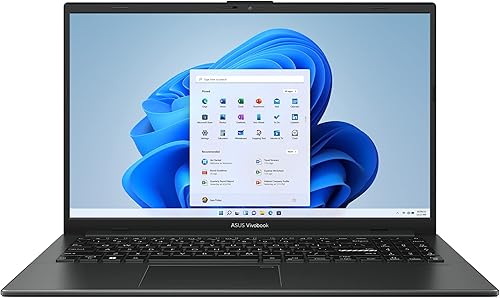
ASUS Vivobook Go 15 (Ryzen 5 7520U, 8GB, 512GB)
Best for a larger Windows screen - 6
 Check it
Lenovo Chromebook 2-in-1 14-inch
Best for basic tablet-style study - 7
 Check it
Acer Aspire Go 15 (Ryzen 3 30, 8GB)
Best for a roomy screen and simple tasks - 8
 Check it
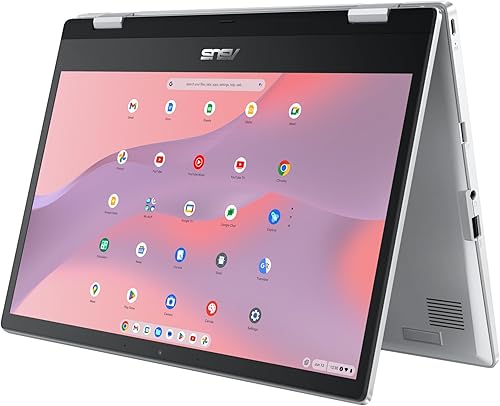
ASUS Chromebook Flip CX1 14-inch
Best for a flexible Chromebook
Which laptop is best for high school students?
The best laptop for high school students is one that runs required school software, has enough memory and storage for daily work, and fits the student's routine. These 8 picks cover macOS, Windows and ChromeOS, with compact, larger-screen and convertible options.
The scores reflect how each model's features fit common school tasks. A high score cannot confirm compatibility with a particular school's apps, so check those requirements before choosing.
| Product | Best for | Display | Memory | Storage | Our score |
|---|---|---|---|---|---|
| Apple MacBook Neo 13-inch | all-day school schedules | 13-inch Liquid Retina | 8GB unified memory | 256GB SSD | 8.8 |
| Acer Aspire 14 AI Touch (Core Ultra 5) | Windows school apps | 14-inch WUXGA touchscreen | 16GB LPDDR5X | 1TB SSD | 8.6 |
| Lenovo Chromebook Plus 2-in-1 14-inch | notes and tablet mode | 14-inch WUXGA IPS touchscreen | 8GB | 256GB UFS | 8.2 |
| ASUS Chromebook Plus CX34 14-inch | a straightforward Chromebook | 14-inch Full HD IPS | 8GB | 128GB UFS flash | 8.0 |
| ASUS Vivobook Go 15 (Ryzen 5 7520U, 8GB, 512GB) | a larger Windows screen | 15.6-inch Full HD | 8GB | 512GB SSD | 7.8 |
| Lenovo Chromebook 2-in-1 14-inch | basic tablet-style study | 14-inch WUXGA IPS touchscreen | 4GB | 128GB UFS | 7.7 |
| Acer Aspire Go 15 (Ryzen 3 30, 8GB) | a roomy screen and simple tasks | 15.6-inch Full HD IPS | 8GB LPDDR5 | 128GB SSD | 7.6 |
| ASUS Chromebook Flip CX1 14-inch | a flexible Chromebook | 14-inch Full HD touchscreen | 8GB | 128GB eMMC | 7.2 |
The best laptops for high school students
The MacBook Neo is a strong fit for students who want a compact Mac, while the Acer Aspire 14 AI Touch suits Windows-first classes and larger projects. The Chromebook choices work best for students whose assignments rely on browser tools and Google apps.
Apple MacBook Neo 13-inch: Best for all-day school schedules
- 13-inch Liquid Retina display
- A18 Pro chip
- 8GB unified memory
- 256GB SSD storage
- 1080p FaceTime HD camera
- Apple says battery life is up to 16 hours
A portable Mac with a 13-inch display, aluminum enclosure and 1080p camera. Apple says battery life is up to 16 hours.
Pros
- Portable 13-inch design
- 1080p camera
- 256GB SSD
Cons
- 8GB unified memory
- macOS may not fit every school's required software
The Apple MacBook Neo is a strong pick for a student who wants a 13-inch Mac with a 1080p camera for calls and presentations. Its A18 Pro chip, 8GB unified memory and 256GB SSD suit everyday assignments, documents and web research.
Apple says battery life is up to 16 hours. Actual runtime depends on how the student uses the laptop, so plan for charging access during a long day.
The recycled aluminum enclosure weighs 2.71 lb, making this one of the more compact choices for a student carrying a laptop between home and school. The Liquid Retina display supports 1 billion colors, and the Mac can work with iPhone features such as moving an email or photo between devices.
Choose it for portability, macOS and standard school tasks. Skip it if a class requires Windows-only software or if the student needs more than 8GB of memory.
Acer Aspire 14 AI Touch (Core Ultra 5): Best for Windows school apps
- Intel Core Ultra 5 226V
- 14-inch WUXGA touchscreen
- 16GB LPDDR5X memory
- 1TB SSD
- 1080p FHD IR webcam
This Windows laptop pairs a touchscreen with 16GB memory and a 1TB SSD, giving school files and projects room to grow.
Pros
- 16GB memory
- 1TB SSD
- 1080p IR webcam
Cons
- Touchscreen is not essential for every student
- Confirm that required class software works on Windows 11
The Acer Aspire 14 AI Touch is the Windows pick for students who want 16GB memory and 1TB of storage. It has more capacity for apps and saved projects than the other Windows models in this group.
Its 14-inch WUXGA touchscreen has a 1920 x 1200 resolution, and its hinge can lie flat. The 1080p FHD IR webcam suits video calls, while Windows 11 Home supports desktop apps that may be part of a school's curriculum.
Acer's battery estimate of up to 22 hours comes from video playback under specific conditions. Treat it as a maker estimate rather than a guarantee for a full day of mixed school use.
Choose this model when Windows compatibility, memory and storage are priorities. Skip it if the student needs a smaller, lighter option or would not use the touchscreen.
Lenovo Chromebook Plus 2-in-1 14-inch: Best for notes and tablet mode
- 14-inch WUXGA IPS touchscreen
- Convertible 2-in-1 design
- 8GB memory
- 256GB UFS storage
- Physical webcam shutter
A touchscreen Chromebook that flips between laptop, tent and tablet modes. Its webcam has a physical shutter.
Pros
- Flexible 2-in-1 hinge
- 8GB memory and 256GB storage
- Webcam shutter and fingerprint reader
Cons
- ChromeOS may not run required Windows or macOS apps
- Check school software needs before choosing
The Lenovo Chromebook Plus 2-in-1 suits a student who wants a touchscreen for reading, viewing material or switching between typing and tablet use. Its 14-inch WUXGA IPS screen flips into laptop, tent or tablet modes, and a physical shutter covers the webcam.
It has 8GB memory and 256GB UFS storage, a useful combination for school files and browser-based work. A fingerprint reader can speed up sign-in, and Gemini is available from the home screen.
Lenovo states battery life of 11 hours. The device weighs 3.3 lb and is 0.69 in thick, so consider how it will fit in the student's bag alongside books and other supplies.
Choose it for ChromeOS, Google apps and the convertible format. Skip it if a class requires Windows or macOS desktop software, or if the student mainly types and has no need for tablet mode.
ASUS Chromebook Plus CX34 14-inch: Best for a straightforward Chromebook
- 14-inch Full HD IPS display
- Intel Core i3-1215U
- 8GB memory
- 128GB UFS flash storage
- ChromeOS
This Chromebook Plus has a 14-inch Full HD screen, an Intel Core i3 processor and 8GB memory for web-based schoolwork.
Pros
- 14-inch Full HD display
- 8GB memory
- ChromeOS
Cons
- 128GB storage gives less room than larger drives
- Check compatibility with school-required apps
The ASUS Chromebook Plus CX34 is a straightforward pick for browser-based schoolwork on a 14-inch screen. It pairs a Full HD IPS display with an Intel Core i3-1215U and 8GB memory, which suits documents, research and online classroom tools.
Its 128GB UFS flash storage is enough for some students, but it leaves less room for local files than the 256GB and 512GB options. Students who regularly save videos, photos or larger projects should keep that difference in mind.
Choose the CX34 if a simple Chromebook fits the school's workflow and a standard laptop design is enough. Skip it if the student needs Windows desktop programs or expects to store a lot of work on the device.
For Microsoft 365, check Microsoft's current Chromebook guidance and confirm which apps the school requires.
ASUS Vivobook Go 15 (Ryzen 5 7520U, 8GB, 512GB): Best for a larger Windows screen
- 15.6-inch Full HD display
- AMD Ryzen 5 7520U
- 8GB memory
- 512GB SSD
- Windows 11 Home
A Windows laptop with a 15.6-inch Full HD display and 512GB SSD. The larger screen may suit students who want room for split-screen work.
Pros
- 15.6-inch Full HD display
- 512GB SSD
- Windows 11 Home
Cons
- Larger screen means a bigger carry-around laptop
- 8GB memory may limit heavier multitasking
The ASUS Vivobook Go 15 is the larger-screen Windows choice for students who like room to read and type. Its 15.6-inch Full HD display can make split-screen work more comfortable, such as keeping research open beside a document.
It combines a Ryzen 5 7520U processor and 8GB memory with a 512GB SSD. Windows 11 Home supports many desktop apps, but check for any course-specific software before buying.
The physical webcam shield gives the student a way to cover the camera, and AI Noise-Canceling Technology is designed for calls. USB-A, USB-C and HDMI ports support compatible accessories and displays.
Choose it when screen space and Windows app support matter more than easy portability. Skip it if the student carries a laptop all day and prefers a smaller screen.
Lenovo Chromebook 2-in-1 14-inch: Best for basic tablet-style study
- 14-inch WUXGA IPS touchscreen
- Convertible 2-in-1 design
- 4GB memory
- 128GB UFS storage
- Physical webcam shutter
A convertible Chromebook with a touchscreen and a webcam shutter. Its 4GB memory makes it a better fit for lighter school tasks.
Pros
- Tablet, tent and laptop modes
- Webcam shutter
- 128GB UFS storage
Cons
- 4GB memory is the lowest in this group
- ChromeOS may not support required desktop software
The Lenovo Chromebook 2-in-1 is for lighter school tasks where a touchscreen and flexible hinge are useful. Its 14-inch WUXGA IPS display folds into tablet, tent or laptop mode.
This model has 4GB memory and 128GB UFS storage, the lowest capacities among these picks. It is best for a modest workload such as web browsing, documents and online coursework, rather than many open tabs alongside video calls.
A physical webcam shutter covers the camera when it is not in use. ChromeOS includes Google apps, and Gemini is available from the home screen.
Choose it when the school confirms ChromeOS compatibility and the student's work is light. Skip it if the student multitasks heavily, needs desktop software or expects to keep many files on the laptop.
Acer Aspire Go 15 (Ryzen 3 30, 8GB): Best for a roomy screen and simple tasks
- 15.6-inch Full HD IPS display
- AMD Ryzen 3 30 processor
- 8GB LPDDR5 memory
- 128GB SSD
- Windows 11 Home
This Windows laptop combines a 15.6-inch IPS screen with 8GB memory and a 128GB SSD for everyday school tasks.
Pros
- 15.6-inch Full HD IPS display
- Windows 11 Home
- USB-C and HDMI connections
Cons
- 128GB SSD leaves less space for saved files
- Check app and storage needs before buying
The Acer Aspire Go 15 suits students who want a 15.6-inch Full HD IPS screen for everyday Windows schoolwork. Its Ryzen 3 30 processor and 8GB memory are a reasonable match for documents, web research and routine online tasks.
The 128GB SSD is the smallest storage capacity among the Windows picks here. Students who install several apps or save large projects should compare that limit with the Vivobook Go 15's 512GB SSD or the Aspire 14 AI Touch's 1TB SSD.
The laptop has USB-C ports and HDMI for compatible accessories and displays. Its 720p camera has a lower stated resolution than the 1080p cameras on the MacBook Neo and Acer Aspire 14 AI Touch.
Choose it for a large screen and straightforward Windows use. Skip it if the student needs more local storage, a higher-resolution camera or frequent multitasking with many demanding apps.
ASUS Chromebook Flip CX1 14-inch: Best for a flexible Chromebook
- 14-inch Full HD touchscreen
- 360-degree convertible design
- 8GB memory
- 128GB eMMC storage
- Up to 11-hour battery life
A 14-inch Chromebook that folds into tablet, tent or stand mode. ASUS states battery life is up to 11 hours.
Pros
- 360-degree touchscreen hinge
- 8GB memory
- Four work modes
Cons
- 128GB eMMC storage
- Confirm ChromeOS works with school software
The ASUS Chromebook Flip CX1 suits students who want a Chromebook that can shift between typing and touchscreen use. Its 14-inch Full HD touchscreen and 360-degree hinge allow laptop, tent, stand and tablet modes.
It has 8GB memory, 128GB eMMC storage and an Intel Celeron N4500 processor. That combination is aimed at web-based schoolwork and everyday browsing, rather than large local projects or demanding desktop programs.
ASUS states battery life of up to 11 hours, though actual use affects runtime. Wi-Fi 6 and a microSD card reader add connection and storage options for compatible devices and cards.
Choose the Flip CX1 if the school uses ChromeOS-compatible tools and the student will use its convertible modes. Skip it if required courses need Windows or macOS apps, or if 128GB storage is too limited.
Should a high school student choose Windows, Mac or Chromebook?
Choose the operating system that matches the school's required apps and exam tools. Windows supports a broad selection of desktop software, macOS fits students who want a Mac, and ChromeOS works well when assignments are web-based.
A Chromebook can handle web research, online documents and classroom platforms. It may not run desktop programs made for Windows or macOS, so confirm compatibility with the school before buying.
A Windows laptop is the safer direction when the school names Windows software or a course requires a desktop app. The Acer Aspire 14 AI Touch has the most memory and storage here, while the Vivobook Go 15 offers a larger screen.
A Mac can suit students who prefer macOS or already use iPhone features. The MacBook Neo is the most compact screen option in this group, but school compatibility should still guide the decision.
For more on Google's platform, read how long a Chromebook lasts. If Microsoft Office is part of the student's workflow, review whether Chromebooks can run Microsoft Office.
How much memory and storage does a student laptop need?
For browser tabs, documents and video calls, 8GB memory is a useful starting point among these options. Students who use heavier apps or keep many tasks open should consider the Acer Aspire 14 AI Touch, which has 16GB.
The Lenovo Chromebook 2-in-1 has 4GB memory, so its best use is lighter work with fewer active tasks. See our guide to how much RAM a laptop needs for more help matching memory to a student's workload.
Storage in this group ranges from 128GB to 1TB. A student who keeps most files in cloud services may be comfortable with less local space, while downloaded media, creative projects and installed apps can fill a small drive sooner.
The Aspire 14 AI Touch has a 1TB SSD, and the Vivobook Go 15 has a 512GB SSD. The MacBook Neo and Lenovo Chromebook Plus 2-in-1 each have 256GB, while several other picks have 128GB.
What screen size works well for school?
A 13- or 14-inch laptop can be easier to carry, while a 15.6-inch screen gives more room for reading and split-screen work. The student's commute, bag and study space help determine which size makes sense.
The MacBook Neo has a 13-inch display, and several other options have 14-inch screens. The Acer Aspire Go 15 and ASUS Vivobook Go 15 are 15.6-inch laptops for students who want a larger view.
A touchscreen helps when a student plans to tap, swipe or use tablet mode. The Lenovo and ASUS convertible Chromebooks fold into different positions, while the Acer Aspire 14 AI Touch has a touchscreen in a clamshell design.
If tablet-style use is a priority, compare the best 2-in-1 laptops for home and school. If the laptop will mostly stay open on a desk for typing, a standard screen may be the simpler choice.
How should you set up a high school laptop?
Set up the laptop before classes begin, then confirm that school accounts, apps and files work. This gives the student time to resolve sign-in or compatibility issues before an assignment is due.
Connect to a trusted Wi-Fi network and install system updates. Add the school account, set a strong sign-in method, and check that the student's required browser, classroom tools and office apps open correctly.
Set up cloud file storage or another backup method the school supports. Create a simple folder system for subjects and assignments, and save a test document to confirm it can be found again.
Check the webcam, microphone and speakers in a practice call. If the laptop has a physical webcam shutter, make sure the student knows how to open it for class and close it afterward.
For a step-by-step checklist, use our guide to setting up a new laptop.
How can a student care for a school laptop?
Use a padded bag or sleeve and keep the laptop away from drinks, loose pens and heavy books that could press on it. Shut the screen gently and avoid carrying the laptop by its display.
Keep vents clear while the computer is in use, and place it on a stable surface. A charger and a regular charging spot at home can help the student start each school day prepared.
Save work as you go and keep a backup of important assignments. For battery habits that can help extend time away from an outlet, see how to make a laptop battery last longer.
Clean the display with a soft, suitable cloth and avoid spraying liquid directly onto the screen. Our guide explains how to clean a laptop screen safely.
What common laptop-buying mistakes should families avoid?
The biggest mistake is choosing by brand or screen size before checking school requirements. Confirm the operating system, required apps, exam tools and any school device rules first.
Don't assume every Chromebook runs desktop Microsoft Office or Windows programs. Browser versions may work for many assignments, but a course-specific tool can change which laptop is suitable.
Don't buy a small drive just because cloud storage is available. Check whether the student must save files locally, install apps, or work without an internet connection.
A touchscreen is also not automatically useful to every student. If the student mainly writes essays and uses a trackpad, paying attention to memory, storage and comfort may matter more than convertible modes.
Which is the best laptop for high school students for your needs?
Choose the MacBook Neo for a compact Mac and everyday assignments, provided the school supports macOS. Pick the Acer Aspire 14 AI Touch for Windows classes, 16GB memory and 1TB of storage.
Choose the Lenovo Chromebook Plus 2-in-1 for Google-based schoolwork and tablet flexibility. The ASUS Chromebook Plus CX34 is a simpler Chromebook option, while the Vivobook Go 15 suits a student who wants a larger Windows screen.
Before buying, match the operating system, memory, storage and size to the student's actual classes and daily carry. Then set up school access and backups before the first assignment.
Our top 3 picks at a glance
-
1
-
2
Best for Windows school apps
Acer Aspire 14 AI Touch (Core Ultra 5)
8.6/10 our score
See it on Amazon -
3
Best for notes and tablet mode
Lenovo Chromebook Plus 2-in-1 14-inch
8.2/10 our score
See it on Amazon
Frequently asked questions
What is the best laptop for high school students?
The best laptop depends on the software and websites your school uses. The MacBook Neo is a portable option for students who want macOS, while the Acer Aspire 14 AI Touch provides Windows 11, 16GB memory and a 1TB SSD.
If classes rely on web apps, a Chromebook may cover the work.
Is a Chromebook enough for high school?
A Chromebook can be enough when assignments use browser-based tools, Google apps or compatible Android apps. Ask the school whether classes require desktop software, special exam tools or printing features before you choose ChromeOS.
For Microsoft 365 on a Chromebook, check Microsoft's current guidance for supported web and mobile apps.
How much memory should a student laptop have?
For schoolwork with several browser tabs, documents and video calls open, 8GB is a useful starting point in this group. The Acer Aspire 14 AI Touch has 16GB, while the Lenovo Chromebook 2-in-1 has 4GB and suits lighter tasks better.
Match memory to the apps your student needs.
Is a 2-in-1 laptop useful for school?
A 2-in-1 can be useful if your student wants to switch between typing and touchscreen use. The Lenovo Chromebook Plus 2-in-1 and the ASUS Chromebook Flip CX1 have convertible designs.
If the student mainly types essays, a standard laptop may be simpler to choose.
How much storage does a high school laptop need?
Storage needs depend on how many files, apps, photos and videos the student keeps on the laptop. In this group, options range from 128GB to 1TB, with cloud storage potentially helping for files that do not need to stay on the device.
Check the school's file and app requirements before deciding.


