8 Best Chromebooks for Everyday Use (November 2026)
The best Chromebooks for everyday use include the Acer Chromebook Plus 514 Touch for everyday work and calls, the Lenovo Chromebook Plus 15.3-inch Touchscreen for a large, fast display, and the Acer Chromebook Plus 515 15.6-inch Touch for a roomy Full HD screen.
On this page (8 sections)
- The best Chromebook picks for everyday use
- How do you choose the best Chromebook screen size?
- How much Chromebook memory and storage do you need?
- Can a Chromebook handle school and work?
- What should you set up first on a new Chromebook?
- What common Chromebook buying mistakes should you avoid?
- How can you care for and use a Chromebook well?
- Which Chromebook should you choose for your routine?
The best Chromebook for most everyday users is the Acer Chromebook Plus 514 Touch, with a 14-inch touchscreen, 8GB RAM and a 256GB SSD. For a bigger screen, choose the Lenovo Chromebook Plus 15.3-inch Touchscreen; for a convertible, consider the Lenovo Chromebook 2-in-1.
A Chromebook fits best when your regular work can happen in ChromeOS, browser tabs and compatible apps. Before comparing screens, make a short list of the programs and files you rely on, then check that each one works the way you need.
Our picks at a glance
-
1

-
2
 Best for a large, fast display
Lenovo Chromebook Plus 15.3-inch Touchscreen
8.3/10 our score
See it on Amazon -
3
 Best for a roomy Full HD screen
Acer Chromebook Plus 515 15.6-inch Touch
8.1/10 our score
See it on Amazon
- 4
 Check it
ASUS Chromebook Plus CX34 14-inch
Best for a compact Chromebook Plus - 5
 Check it
Lenovo Chromebook 2-in-1 14-inch
Best for switching to tablet mode - 6
 Check it
ASUS Chromebook CM15 (8GB, 128GB)
Best for a large everyday display - 7
 Best for a light 14-inch setupCheck it
 - 8
 Check it
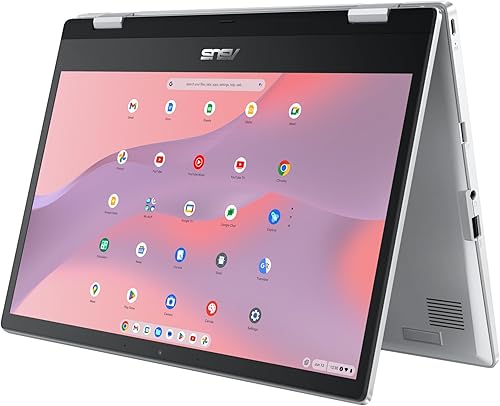
ASUS Chromebook Flip CX1 14-inch
Best for a convertible touch screen
The best Chromebook picks for everyday use
The Acer Chromebook Plus 514 Touch is the strongest all-around fit in this group, while the other models serve different screen, storage and touch preferences. Start with the use case that matters most to you, then compare the tradeoffs in the table.
| Product | Best for | Display | Memory and storage | Ports | Our score |
|---|---|---|---|---|---|
| Acer Chromebook Plus 514 Touch | everyday work and calls | 14-inch WUXGA IPS touchscreen | 8GB LPDDR5, 256GB SSD | USB-C, USB-A and HDMI | 8.5 |
| Lenovo Chromebook Plus 15.3-inch Touchscreen | a large, fast display | 15.3-inch WUXGA touchscreen, 120Hz | 8GB LPDDR5X, 256GB combined storage | USB-C, USB-A, HDMI and microSD | 8.3 |
| Acer Chromebook Plus 515 15.6-inch Touch | a roomy Full HD screen | 15.6-inch Full HD IPS touchscreen | 8GB LPDDR5X, 256GB SSD | USB-C, USB-A and HDMI | 8.1 |
| ASUS Chromebook Plus CX34 14-inch | a compact Chromebook Plus | 14-inch Full HD IPS | 8GB LPDDR5, 128GB UFS | USB and HDMI | 8.0 |
| Lenovo Chromebook 2-in-1 14-inch | switching to tablet mode | 14-inch WUXGA IPS touchscreen | 4GB RAM, 128GB UFS | 7.7 | |
| ASUS Chromebook CM15 (8GB, 128GB) | a large everyday display | 15.6-inch Full HD | 8GB RAM, 128GB storage | USB-C, USB-A and HDMI | 7.5 |
| Lenovo Chromebook m 14-inch | a light 14-inch setup | 14-inch WUXGA IPS | 8GB RAM, 64GB UFS | USB-C, USB-A and HDMI | 7.4 |
| ASUS Chromebook Flip CX1 14-inch | a convertible touch screen | 14-inch Full HD touchscreen | 8GB RAM, 128GB eMMC | 7.2 |
Acer Chromebook Plus 514 Touch: Best for everyday work and calls
- 14-inch WUXGA touch display
- 8GB LPDDR5 memory
- 256GB SSD
- FHD camera
A 14-inch touch display, 8GB memory and 256GB SSD make this a well-rounded choice for documents, browsing and video calls. Its FHD camera has a privacy shutter.
Pros
- WUXGA touch display with anti-glare coating
- FHD camera with privacy shutter
- Includes a protective sleeve
Cons
- Memory is onboard
- Battery life varies with use and conditions
The Acer Chromebook Plus 514 Touch balances a practical 14-inch size with a WUXGA touch display, 8GB RAM and 256GB SSD. Its matte anti-glare screen is rated at 300 nits, and its FHD camera includes a privacy shutter.
Two USB-C ports, two USB-A ports and HDMI let you connect displays and common accessories. Acer includes a protective sleeve, which helps if the laptop moves between home, school or work.
Choose this if you want a Chromebook Plus for documents, browser work and calls, with room to keep files locally. Skip it if you want a larger screen for split views or expect to run desktop software that requires Windows or macOS.
Lenovo Chromebook Plus 15.3-inch Touchscreen: Best for a large, fast display
- 15.3-inch WUXGA touchscreen
- 120Hz refresh rate
- 400-nit brightness
- 8GB LPDDR5X memory
Its 15.3-inch touch display has a 120Hz refresh rate and 400-nit brightness. Storage includes 128GB UFS and a 128GB SD card.
Pros
- Large 120Hz touch display
- Privacy shutter for the 5MP camera
- Auto Update Expiration date is January 2036
Cons
- Larger display means a larger laptop
- Storage includes a 128GB SD card
The Lenovo Chromebook Plus 15.3-inch Touchscreen is the large-screen pick, with a 120Hz WUXGA display rated at 400 nits. The touchscreen gives you direct control, while the wide display leaves more room for split-screen documents and video.
It has 8GB LPDDR5X memory and storage made up of 128GB UFS plus a 128GB SD card. A privacy shutter covers the 5MP camera, and ports include USB-C, USB-A, HDMI and microSD.
Pick it if the laptop will spend much of its time on a desk and you want extra screen space. Skip it if you carry your device often and prefer a smaller bag-friendly footprint; its Auto Update Expiration date is January 2036, a useful point to compare with our Chromebook lifespan guide.
Acer Chromebook Plus 515 15.6-inch Touch: Best for a roomy Full HD screen
- 15.6-inch Full HD touchscreen
- 8GB LPDDR5X memory
- 256GB SSD
- Wi-Fi 6E
The 15.6-inch Full HD touchscreen gives you a larger workspace for documents and video. Its 8GB memory and 256GB SSD suit everyday browsing, schoolwork and streaming.
Pros
- Large touch display
- 256GB SSD
- USB-C, USB-A and HDMI ports
Cons
- 720p webcam
- Larger chassis takes more desk and bag space
The Acer Chromebook Plus 515 offers a 15.6-inch Full HD touchscreen for buyers who want a broad display for video and documents. Its 8GB RAM and 256GB SSD give you room for everyday files and offline downloads.
You get USB-C, USB-A and HDMI ports, plus Wi-Fi 6E. The webcam records at 720p, so choose the Acer 514 if camera detail is a priority for frequent calls.
This model suits a home or office desk where the screen can stay open for longer work sessions. Skip it if you need a compact travel computer or don't need touch input; compare the 15.6-inch format with our laptop size guide before deciding.
ASUS Chromebook Plus CX34 14-inch: Best for a compact Chromebook Plus
- 14-inch Full HD IPS display
- Intel Core i3-1215U
- 8GB LPDDR5 memory
- 128GB UFS storage
The 14-inch size and Chromebook Plus features suit buyers who want a compact screen with an Intel Core i3 processor. Its 128GB UFS storage is less than the 256GB SSD picks above.
Pros
- 14-inch IPS display
- Intel Core i3 processor
- 180-degree lay-flat hinge
Cons
- 128GB UFS storage
- Battery life details are limited
The ASUS Chromebook Plus CX34 is a compact 14-inch choice with an Intel Core i3 processor and 8GB memory. Its 128GB UFS storage is less than the two Acer Chromebook Plus options, so it fits better if you keep most files online.
The 180-degree lay-flat hinge can make it easier to share the screen across a table. Its IPS display has Full HD resolution, and it includes USB and HDMI connectivity.
Choose the CX34 if you prefer a smaller Chromebook Plus and don't need as much local storage. Skip it if your work depends on a big offline media library; for schoolwork built around Microsoft apps, read our guide to using Microsoft Office on a Chromebook.
Lenovo Chromebook 2-in-1 14-inch: Best for switching to tablet mode
- 14-inch WUXGA IPS touchscreen
- Convertible 2-in-1 design
- 128GB UFS storage
- Physical webcam shutter
The convertible hinge lets you use it as a laptop, tent or tablet. Its 4GB RAM is lower than the other listed choices, so keep your workload modest.
Pros
- Three modes with a touchscreen
- FHD webcam with physical shutter
- USB-C, USB-A and HDMI ports
Cons
- 4GB RAM
- 128GB storage
The Lenovo Chromebook 2-in-1 turns into tablet, tent or laptop modes, with a 14-inch WUXGA IPS touchscreen. That flexibility suits reading, viewing and sharing, though its 4GB RAM is more limited than the 8GB choices.
Its 128GB UFS storage, physical webcam shutter and USB-C, USB-A and HDMI ports cover common everyday needs. Lenovo describes it as 3.3 lb and 0.69 in thick.
Pick it if you will actually use the convertible modes for touch tasks or tablet-style reading. Skip it if you keep many tabs and apps open at once; for more on the format, see what a 2-in-1 laptop is and who needs one.
ASUS Chromebook CM15 (8GB, 128GB): Best for a large everyday display
- 15.6-inch Full HD display
- 8GB RAM
- 128GB storage
- MediaTek Kompanio 540 processor
A 15.6-inch Full HD screen and 8GB RAM suit browsing, documents and video. The 128GB storage is less than several other picks here.
Pros
- Large Full HD display
- 8GB RAM
- USB-C, USB-A and HDMI
Cons
- 128GB storage
- Touchscreen status is unspecified
The ASUS Chromebook CM15 combines a 15.6-inch Full HD display with 8GB RAM for everyday browsing, streaming and documents. It uses a MediaTek Kompanio 540 processor and has 128GB storage.
Its ports include USB-C, USB-A and HDMI, so you can connect an external display or common accessories. Touchscreen status is unspecified, so check this feature if touch input matters to you.
Choose it if you want a large screen and 8GB RAM without needing a Chromebook Plus model. Skip it if you need more built-in storage for offline files, or if a touchscreen is essential to your workflow.
Lenovo Chromebook m 14-inch: Best for a light 14-inch setup
- 14-inch WUXGA IPS display
- 8GB RAM
- 64GB UFS storage
- Physical webcam shutter
This 14-inch Lenovo has 8GB RAM and a physical webcam shutter. Its 64GB UFS storage makes it a better fit for cloud-first use than a large offline media collection.
Pros
- 8GB RAM
- Physical webcam shutter
- USB-C, USB-A and HDMI
Cons
- 64GB UFS storage
- Touchscreen status is unspecified
The Lenovo Chromebook m 14-inch is a light everyday option with 8GB RAM and a 14-inch WUXGA screen. Its 64GB UFS storage is the main tradeoff, so it's best for people who rely on cloud files and keep downloads modest.
A physical webcam shutter, USB-C, USB-A and HDMI add useful everyday details. Lenovo describes the design as just under 3 lb and built to military-grade standards.
Pick this when portability and memory matter more than local storage space. Skip it if you save lots of video, photos or school files offline; one of the 128GB or 256GB options will give you more room.
ASUS Chromebook Flip CX1 14-inch: Best for a convertible touch screen
- 14-inch Full HD touchscreen
- 360-degree hinge
- 8GB RAM
- 128GB eMMC storage
The 360-degree hinge and touch display make it easy to switch between typing and tablet-style use. Its Intel Celeron N4500 processor is suited to lighter everyday tasks.
Pros
- Four viewing modes
- 8GB RAM
- Up to 11-hour battery life claim
Cons
- 128GB eMMC storage
- Intel Celeron N4500 processor
The ASUS Chromebook Flip CX1 suits buyers who want a touchscreen that folds into tablet, tent or stand modes. Its 14-inch Full HD display, 8GB RAM and 128GB eMMC storage cover typical browsing and document work.
The Intel Celeron N4500 is a lower-tier processor than the Core i3 options earlier in this list, so keep expectations to lighter tasks. ASUS states up to 11 hours of battery life, though actual time depends on working conditions.
Choose the Flip CX1 for touch input and a flexible hinge on a budget-minded workload. Skip it if you regularly juggle demanding apps or many open tabs; a Chromebook Plus with a Core i3 processor gives you a better fit for heavier multitasking.
How do you choose the best Chromebook screen size?
A 14-inch Chromebook is a useful middle ground for home, school and travel, while a 15.3-inch or 15.6-inch screen gives you more viewing area at a desk. Think about where you'll use it most and whether you'll carry it every day.
A larger display can make two windows easier to read side by side, but it takes more desk and bag space. Choose a touchscreen only if direct taps, drawing, or convertible modes will be part of your routine.
The Lenovo Chromebook Plus 15.3-inch is the choice for screen area and a faster refresh rate. The Acer 515 and ASUS CM15 suit buyers who want a 15.6-inch display, while the 14-inch models are easier to fit into a mixed home-and-travel routine.
How much Chromebook memory and storage do you need?
For a Chromebook used across several tabs and documents, 8GB RAM gives more headroom than the 4GB Lenovo 2-in-1. Storage depends on whether you keep files online or download documents, photos and media for offline access.
The options here range from 64GB to 256GB, with the 15.3-inch Lenovo's storage split between UFS and an SD card. A cloud-first user can make the 64GB Lenovo m work, but people who travel offline or keep media locally should favor more built-in capacity.
Think about the largest files you want available without internet and leave room for future downloads. Our laptop storage guide offers a broader way to estimate your needs.
Can a Chromebook handle school and work?
Yes, a Chromebook can handle school and work when your tools run in a browser or have ChromeOS-compatible apps. Check any required desktop software and whether your school or employer supports Chromebook access before you buy.
Microsoft 365 is available through web apps, but features can differ from the Windows desktop versions. If Word, Excel or PowerPoint are central to your day, review our Microsoft Office Chromebook guide and confirm which features your work requires.
For school, also check how assignments are submitted, whether video calls work in the required service, and whether you need files available offline. A Chromebook can be a simple choice for browser-based classes, but a required Windows-only program is a reason to choose another operating system.
What should you set up first on a new Chromebook?
Start with your Google account, Wi-Fi and system updates, then install only the apps and extensions you need. This keeps the first setup focused and lets you confirm that your school or work accounts open correctly.
Before relying on it away from home, save a document for offline access and test the services you need for class or work. Add a screen lock, review privacy settings, and learn where downloads are stored so you can find files later.
If you plan to connect a monitor, mouse, printer or headset, set those up while you have time to troubleshoot. Our step-by-step new laptop setup guide covers a broader checklist that also helps with a Chromebook.
What common Chromebook buying mistakes should you avoid?
The most common mistake is buying by screen size alone and overlooking software compatibility. Confirm your must-have apps first, especially if you use a specialized desktop program, a school system, or a work tool that depends on a particular operating system.
Another mistake is treating all storage as the same. The Lenovo 15.3-inch model combines internal UFS storage with an SD card, while the Acer Plus 514 and 515 have SSD storage; consider which files you want internal and immediately available.
Don't pay for a touchscreen or convertible hinge if you will only type and browse. Also avoid choosing the 4GB model for a habit of keeping many tabs open, or a 64GB Chromebook if you expect a large offline library.
How can you care for and use a Chromebook well?
Keep your Chromebook on a stable surface when charging and avoid blocking its vents. Use a padded sleeve when carrying it, especially if it shares a bag with books, chargers or other items.
Install updates when prompted and remove apps or extensions you no longer use. For longer battery life during a school or travel day, lower screen brightness when comfortable, close unused tabs and disconnect accessories you aren't using.
Back up important files to cloud storage or another safe location rather than relying on one device. If you often work without internet, confirm that your documents and entertainment are available offline before leaving a connected network.
Which Chromebook should you choose for your routine?
Choose the Acer Chromebook Plus 514 Touch for a balanced 14-inch setup, local SSD storage and a higher-resolution camera. Choose the Lenovo Chromebook Plus 15.3-inch if the large 120Hz screen is your priority, or the Acer Chromebook Plus 515 if you want a 15.6-inch touchscreen with 256GB SSD.
Pick the Lenovo Chromebook 2-in-1 or ASUS Flip CX1 if you will use tablet and tent modes. The Lenovo has less memory, while the ASUS uses a Celeron processor, so neither is the right choice for demanding multitasking.
For a compact Chromebook Plus with less storage, consider the ASUS CX34; for a large display and 8GB RAM, the ASUS CM15 is another straightforward everyday option. The Lenovo Chromebook m fits a cloud-first buyer who values 8GB RAM and a lighter 14-inch setup over local storage capacity.
The best Chromebook is the one that supports your apps, has enough storage for your offline files and fits how you use a screen. Check compatibility first, then choose the size and features that match your actual routine.
Our top 3 picks at a glance
-
1
-
2
Best for a large, fast display
Lenovo Chromebook Plus 15.3-inch Touchscreen
8.3/10 our score
See it on Amazon -
3
Best for a roomy Full HD screen
Acer Chromebook Plus 515 15.6-inch Touch
8.1/10 our score
See it on Amazon
Frequently asked questions
What should you look for in a Chromebook?
Start with your daily tasks, then compare screen size, memory, storage and ports. For everyday browsing and documents, 8GB RAM gives you more room for several tabs and apps than 4GB.
Check whether you need a touchscreen, a larger display or more local storage before choosing.
Is a Chromebook Plus better for everyday use?
Chromebook Plus models add features aimed at productivity, including stronger base specifications and access to Google AI features on eligible devices. The Acer Chromebook Plus 514 Touch combines 8GB RAM with a 256GB SSD.
A standard Chromebook can still fit a routine centered on browsing, streaming and basic documents.
Can a Chromebook replace a Windows laptop?
A Chromebook can replace a Windows laptop if the apps and files you use work in ChromeOS, web apps or Android apps. Check special software, printers and school or workplace systems before switching.
Our Chromebook vs Windows laptop guide compares the main differences.
How much storage do you need on a Chromebook?
Choose storage based on how much you keep on the laptop instead of online. A 64GB model can suit a cloud-first routine, while 128GB or 256GB gives more room for downloaded files and offline use.
See our laptop storage guide for a broader way to estimate your needs.


