ASUS vs Acer Laptops: Which Is the Better Buy? (November 2026)
For an ASUS vs Acer laptop choice, pick the ASUS Vivobook Go 15 for 512GB storage, the Acer Aspire Go 15 for an IPS screen, or the Aspire 14 AI for 16GB memory, 1TB storage and touch. Choose by the work you do and the space you need.
On this page (8 sections)
- ASUS vs Acer laptop: which offers more for everyday use?
- Which screen size fits your routine?
- Which laptop suits school, home or work?
- What ports and travel features should you compare?
- How do you set up a new laptop well?
- What common buying mistakes should you avoid?
- Are ASUS and Acer laptops reliable?
- How should you choose between ASUS and Acer?
For an ASUS vs Acer laptop choice, pick the ASUS Vivobook Go 15 for 512GB storage, the Acer Aspire Go 15 for an IPS screen, or the Aspire 14 AI for a touchscreen and larger memory and storage capacity. The right fit depends on your files, screen preference and daily workload.
These three laptops show why the model matters more than the brand name. The ASUS and one Acer are 15.6-inch options, while the Aspire 14 AI trades some screen area for a compact touchscreen and a larger configuration.

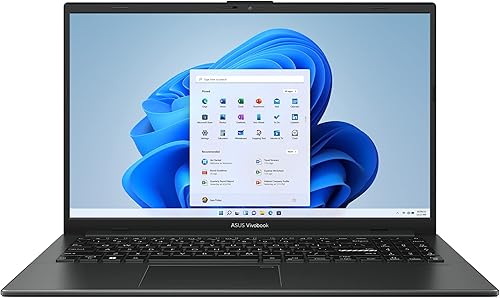 Best for local file space
ASUS Vivobook Go 15 (Ryzen 5 7520U, 8GB, 512GB)
ASUS vs Acer laptop: which offers more for everyday use?
The ASUS Vivobook Go 15 offers more storage than the Aspire Go 15, and the Aspire 14 AI has the most memory and storage in this group. Match that capacity to your apps, saved files and habit of keeping work locally.
The Vivobook Go has a 512GB SSD and 8GB memory. That gives you more room for documents, photos and downloaded media than the Aspire Go's 128GB SSD, while both have 8GB memory.
The Aspire 14 AI has 16GB memory and a 1TB SSD. Its Core Ultra 5 processor and 14-inch touchscreen make it a different option for buyers who want more capacity and touch input.
Storage and memory solve different problems. Storage holds your files and installed programs, while memory helps the laptop keep active apps and browser tabs ready as you switch between them.
If you're unsure about capacity, read our guides to how much laptop storage you need and how much RAM is enough.
Don't assume that the largest drive is automatically the best fit. If you mostly use browser apps and cloud storage, the Aspire Go may offer enough space.
Leave room for Windows, updates, downloads and the files you need offline. If you save media or install many programs, the Vivobook Go gives you more headroom.
Which screen size fits your routine?
Choose a 14-inch screen for a more compact setup or a 15.6-inch screen when you want more viewing area. Screen size affects how the laptop fits your desk, bag and daily tasks.
The Aspire 14 AI has a 14-inch WUXGA touchscreen with a 1920 x 1200 resolution. Touch can help when you prefer tapping, scrolling or working in apps designed for direct input, though a touchscreen isn't necessary for ordinary typing, browsing or video calls.
The Vivobook Go and Aspire Go each have a 15.6-inch display with Full HD resolution. The Aspire Go uses an IPS panel, which can be useful when you view the screen from an angle or share it with someone sitting beside you.
For reading and web research, a larger display can show more content at once. It can also take up more space on a small desk or in a bag.
Consider where you'll use the laptop most often. Our guide to choosing the right laptop size can help you compare screen area with portability.
A common mistake is choosing by diagonal size alone. Compare the screen resolution and panel type too, then think about whether you use an external monitor at home or need the laptop display to do most of the work.
Which laptop suits school, home or work?
The Vivobook Go suits buyers who want a larger screen and more local storage, while the Aspire 14 AI suits people who want touch input and more memory. The Aspire Go is the simpler choice for lighter, cloud-first use.
For school, list the apps your classes require before choosing. Web research, online documents and video calls put different demands on a laptop than large project files or several programs open at once.
The Vivobook Go's 512GB drive offers room for locally saved schoolwork and media, while the Aspire 14 AI has a higher memory capacity for broader multitasking needs.
The Aspire Go can handle a routine centered on web browsing, streaming and schoolwork when you manage its 128GB storage carefully. Acer includes Copilot in Windows and AcerSense controls for battery, storage and apps.
Use cloud storage or an external drive as part of the plan if you want to keep many files.
For home office calls, the ASUS has AI noise-canceling technology, USB-A, USB-C and HDMI. The Aspire 14 AI includes a 1080p FHD IR webcam, Acer QuickPanel and settings for camera and microphone adjustments.
The Aspire Go has a 720p camera with noise reduction features.
For more help matching a laptop to your daily tasks, see what laptop should I buy?. Our guide to ASUS laptops for home and school also covers why a brand label alone doesn't decide whether a model fits.
What ports and travel features should you compare?
Check that the laptop has the connections you need for your monitor, accessories and network. The Aspire Go has two USB-C ports with display and charging support, while the Vivobook Go lists USB-A, USB-C and HDMI connections.
The Aspire Go also has USB-A, HDMI 2.1 and Wi-Fi 6. Its two USB-C ports support DisplayPort and USB charging, so check that your monitor and charging setup match the connection you plan to use.
The Vivobook Go includes a 180-degree lay-flat hinge and a physical webcam shield. Those features may be useful if you want the screen to fold flat on a table or prefer a cover you can close over the camera.
The Aspire 14 AI measures 12.56 x 8.86 x 0.67 inches and weighs 3 pounds. It supports Wi-Fi 6E and Bluetooth 5.3, which can suit a compact work setup with wireless accessories.
Before buying, write down the ports on your current monitor, external drive, mouse and headset. A laptop can have a suitable processor and screen yet still need an adapter for an accessory you use every day.
How do you set up a new laptop well?
Start by updating the operating system, securing your account and checking that your everyday accessories connect. A careful first setup helps you avoid missing files or discovering a connection issue during work.
Connect to a trusted Wi-Fi network, complete the system setup and install available operating system updates. Use a strong sign-in method, enable device security features and set up a backup plan before storing important school or work files.
Install only the apps you need, then check that your printer, headphones, external monitor and storage drive work with the laptop's available connections. For the Aspire Go, make sure you understand how you'll manage the smaller drive before downloading large files.
Set display brightness and power preferences for the way you work. If you'll move between home and school, confirm that your charger, files and needed apps are ready before leaving.
Follow our step-by-step guide to setting up a new laptop for a fuller checklist.
What common buying mistakes should you avoid?
The biggest mistake is comparing brand names while overlooking the configuration. Check memory, storage, screen, ports and the specific work you plan to do.
Don't equate a larger display with a better screen for every buyer. A 15.6-inch screen gives more area, but the Aspire 14 AI's touch display and compact size may be more useful if you move around often or want direct touch input.
Don't choose 128GB storage without deciding where your files will live. Cloud storage can help, but it depends on internet access and doesn't replace local copies for files you need offline.
Don't assume that a feature name guarantees a particular result in every situation. Acer's Aspire 14 AI battery figure of up to 22 hours comes from specific video playback settings, so your own workload, brightness and connections affect daily battery life.
Finally, check the exact configuration before ordering. Models can come in different configurations, and the name of a laptop family alone doesn't tell you which memory, drive or display you'll receive.
Are ASUS and Acer laptops reliable?
A brand name by itself doesn't tell you how a specific laptop will hold up. Compare the features you need and review the current support terms for the exact model.
ASUS says the Vivobook Go meets US military-grade standards for longevity and sustainability. ASUS also says its fast-charge technology can recharge the battery to 50% in 30 minutes, and the laptop includes IceCool thermal technology.
Acer describes the Aspire Go as using recyclable packaging and post-consumer recycled plastic. The Aspire 14 AI's advertised battery life is up to 22 hours under specific video playback settings, so use that figure as a maker estimate rather than a promise for every routine.
For a wider brand comparison, read Dell vs Lenovo laptops. Consider warranty, repair options and support access for the exact laptop you're considering, since those can matter more to long-term ownership than a brand-wide reputation.
How should you choose between ASUS and Acer?
For this ASUS vs Acer laptop comparison, choose the Vivobook Go 15 for a 15.6-inch display with 512GB storage, the Aspire Go 15 for an IPS panel and cloud-first use, or the Aspire 14 AI for a compact touchscreen with 16GB memory and 1TB storage.
Skip the Aspire Go if you expect to keep a large media library or many programs on the laptop and don't want to manage storage. Skip the Vivobook Go if you need a touchscreen or more than 8GB memory.
Skip the Aspire 14 AI if you strongly prefer a 15.6-inch display.
Before you decide, list your must-have apps and estimate how much space your files take. Check the ports for your monitor and accessories.
Then choose the smallest configuration that meets those needs with room to grow. For more model-by-model context, see our Windows laptop brands guide.
Frequently asked questions
Is ASUS or Acer better for a laptop?
Neither brand is always better; compare the exact laptop's memory, storage, screen and connections. The ASUS Vivobook Go 15 has 512GB storage, the Acer Aspire Go 15 has 128GB, and the Acer Aspire 14 AI has 16GB memory, 1TB storage and a touchscreen.
Which is better for college, ASUS or Acer?
Choose by your classes and file needs. The ASUS Vivobook Go 15 offers 512GB storage for saved work and media, while the Acer Aspire Go 15 has a 15.6-inch IPS display and 128GB storage.
For a smaller touch display and 16GB memory, consider the Aspire 14 AI.
Is 128GB storage enough on a laptop?
128GB can work if you mostly use web apps and cloud storage, but it leaves less room for large downloads, photos and installed programs. The Acer Aspire Go 15 has 128GB, while the ASUS Vivobook Go 15 has 512GB and the Aspire 14 AI has 1TB.
Should I choose a 14-inch or 15.6-inch laptop?
Choose a 14-inch laptop when a more compact screen suits your workspace and travel, and choose 15.6 inches when you want more screen area. The Aspire 14 AI has a 14-inch touchscreen; both the Vivobook Go 15 and Aspire Go 15 have 15.6-inch displays.


