Acer Aspire 3 Slim Laptop Review: Worth It? (November 2026)
The Acer Aspire 3 is a sensible fit for everyday browsing, schoolwork and home tasks if 128GB of storage is enough for you. Its 15.6-inch Full HD screen and 8GB of memory suit basic use, while larger files may call for an alternative with more storage.
On this page (8 sections)
- The Acer Aspire 3 review: who should consider it?
- Is 128GB enough for your files and apps?
- How does the Aspire 3 compare with other 15-inch laptops?
- Which Acer Aspire 3 alternative has more storage?
- Is the Aspire 3 a good laptop for school or home?
- What should you check before buying?
- Is the Acer Aspire 3 worth choosing?
- Frequently asked questions
The Acer Aspire 3 is a practical everyday Windows laptop for browsing, documents, schoolwork and video calls. Its 15.6-inch Full HD IPS screen and 8GB memory make a familiar setup, but its 128GB SSD gives you less room for apps and files than some alternatives.
Choose it if you want a basic laptop for home or school and you can manage storage carefully. If you keep large files locally, compare it with the ASUS Vivobook Go 15 below.
The Acer Aspire 3 review: who should consider it?
The Acer Aspire 3 suits everyday tasks that do not need a large local file library. Its Ryzen 3 7320U processor, 8GB LPDDR5 memory and Full HD screen are aimed at practical multitasking and productivity.
Acer Aspire 3 15.6-inch (Ryzen 3 7320U, 8GB): Best for everyday home tasks

- Ryzen 3 7320U processor
- 8GB LPDDR5 memory
- 128GB NVMe SSD
- 15.6-inch Full HD IPS display
A straightforward Windows laptop for browsing, documents and video calls. The 128GB drive is best for people who keep most files in the cloud or on external storage.
Pros
- 15.6-inch Full HD IPS display
- Wi-Fi 6
- Front camera noise reduction features
- Thin and light design
Cons
- 128GB storage can fill quickly
- Memory is onboard
- Windows 11 Home in S mode
Acer describes this model as thin and light, with a 15.6-inch IPS display and Windows 11 Home in S mode. Its HD front camera uses TNR for low-light imagery, and PurifiedVoice applies AI noise reduction to calls.
Consider how you use Windows apps before buying. This model comes with Windows 11 Home in S mode, so check Microsoft's current guidance on S mode if you depend on apps outside its permitted setup.
Acer Aspire 3 review: what stands out?
The clearest strengths are the Full HD IPS screen, Wi-Fi 6 and camera call features. Those details matter for online classes, household browsing and video meetings more than a gaming-focused graphics setup would.
The onboard memory is 8GB, and the SSD is 128GB. The memory is identified as onboard, so don't assume you can upgrade it later; decide whether that configuration fits your expected workload now.
Is 128GB enough for your files and apps?
The Aspire 3's 128GB SSD is enough for a light setup, especially when you use cloud storage and stream media. It can feel tight if you install many large apps or save videos and photos on the laptop.
Operating system files and applications use part of the drive, so the full capacity won't be available for personal files. Keep some free space for updates and working files.
Think about what you already store on your current computer. If you regularly move files to an external drive or cloud account, 128GB may be manageable; if you prefer everything saved locally, a larger SSD is a better fit.
Our guide to how much laptop storage you need can help you estimate the capacity for your files and apps.
How does the Aspire 3 compare with other 15-inch laptops?
The Acer Aspire 3 is strongest as a basic, compact-storage option, while the alternatives below add different conveniences. Compare the storage, ports and keyboard features that matter to your routine.
| Laptop | Processor | Memory | Storage | Standout detail |
|---|---|---|---|---|
| ASUS Vivobook Go 15 | Ryzen 5 7520U | 8GB RAM | 512GB SSD | Physical webcam shield |
| Acer Aspire 3 15.6-inch | Ryzen 3 7320U | 8GB LPDDR5 onboard | 128GB NVMe SSD | Wi-Fi 6 and Full HD IPS |
| Acer Aspire Go 15 | Ryzen 3 30 | 8GB LPDDR5 | 128GB PCIe SSD | Two full-function USB-C ports |
| Dell 15.6-inch Laptop | Intel Core 3 100U | 8GB RAM | Not specified | Separate numeric keypad |
Choose the Aspire Go 15 if USB-C connectivity is a priority and 128GB is enough. The Dell may suit spreadsheet users who want a separate number pad.
The Lenovo IdeaPad Slim 3 review gives you another Windows laptop comparison. For a broader brand comparison, see ASUS vs Acer laptops.
Which Acer Aspire 3 alternative has more storage?
The ASUS Vivobook Go 15 has the most stated storage among these choices, with a 512GB SSD. That gives you more room for locally stored photos, documents and apps than the Aspire 3's 128GB drive.
ASUS Vivobook Go 15 (Ryzen 5 7520U, 8GB, 512GB): Best for more built-in storage
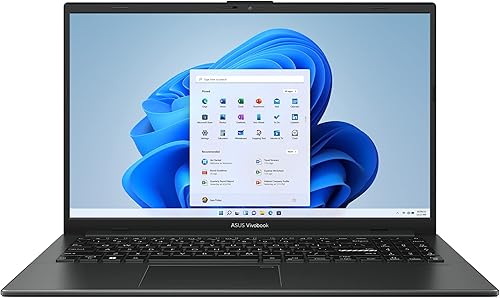
- Ryzen 5 7520U processor
- 8GB RAM
- 512GB SSD
- 15.6-inch Full HD display
The Vivobook Go 15 offers four times the stated storage of the Aspire 3, making it a useful alternative if you keep more files and apps on the laptop.
Pros
- 512GB SSD
- Ryzen 5 processor
- 180-degree lay-flat hinge
- Physical webcam shield
Cons
- Still has 8GB RAM
- No numeric keypad detail provided
Its 15.6-inch Full HD display is suited to general viewing, and ASUS includes a physical webcam shield. The configuration has 8GB RAM, so its larger SSD and Ryzen 5 processor are key differences from the Aspire 3.
The Dell 15.6-inch laptop is worth comparing if your daily work involves entering figures. Its separate numeric keypad and calculator hotkey address a specific typing need, while its storage capacity isn't specified.
Dell 15.6-inch Laptop (Core 3, 8GB): Best for a numeric keypad
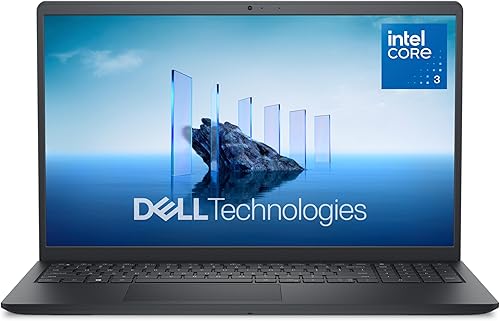
- Intel Core 3 100U processor
- 8GB RAM
- 15.6-inch Full HD display
- Separate numeric keypad
Consider this Dell if its separate numeric keypad fits your work habits. The included 8GB RAM and Full HD display keep it in the same general everyday-use class.
Pros
- Separate numeric keypad
- Full HD display
- Ergonomic lifted hinge
- One-year onsite service
Cons
- Storage capacity isn't specified here
- No fingerprint reader
For a second Acer option, the Aspire Go 15 has 8GB memory and a 128GB SSD. Its two full-function USB-C ports support display output and USB charging, and it includes an HDMI 2.1 port.
Acer Aspire Go 15 (Ryzen 3 30, 8GB): Best for extra USB-C flexibility

- Ryzen 3 30 processor
- 8GB LPDDR5 memory
- 128GB PCIe SSD
- 15.6-inch Full HD IPS display
Another Acer 15.6-inch option with a Full HD IPS screen, 8GB memory and 128GB storage. It adds two full-function USB-C ports and HDMI 2.1.
Pros
- Two USB-C ports with display and charging support
- Wi-Fi 6
- Full HD IPS display
- AcerSense controls
Cons
- Only 128GB storage
- 8GB memory
- Limited buyer feedback
Is the Aspire 3 a good laptop for school or home?
The Aspire 3 can work for web research, writing, streaming and video calls in a household or school routine. A 15.6-inch screen gives you space for documents and browser windows, while a numeric keypad is not specified for this Acer.
For a student, check the software requirements for classes before choosing a Windows laptop. Also consider whether you need to install large creative tools or keep course videos offline, since 128GB can limit that setup.
For household use, think about who will share the laptop and where files will live. Our plain guide to choosing a laptop for home or school walks through those needs, and laptops for different people and tasks helps match a computer to a daily routine.
What should you check before buying?
Confirm the exact configuration and Windows setup before you decide. Aspire model names can cover different hardware, so make sure the processor, memory, storage and display match the configuration you want.
Acer lists this configuration with Windows 11 Home in S mode. If a class or job requires a particular desktop app, check compatibility and Microsoft's instructions for S mode before ordering.
Check your storage habits as well. A quick look at your current downloads, photos and installed programs can show whether 128GB is reasonable or whether a 512GB alternative is more suitable.
Is the Acer Aspire 3 worth choosing?
The Acer Aspire 3 is a good match if you want a straightforward 15.6-inch laptop for routine tasks and expect to store most files online or elsewhere. Its 8GB memory, Ryzen 3 7320U and Full HD IPS display make a coherent everyday configuration.
Choose the ASUS Vivobook Go 15 if you want 512GB of built-in storage. Pick the Aspire Go 15 for its USB-C ports, or the Dell if a separate numeric keypad fits your work.
For more Windows brand options, browse our Windows laptop brands guide. Check the exact configuration and available storage before you choose.
Frequently asked questions
Is the Acer Aspire 3 good for everyday use?
The Acer Aspire 3 can suit everyday browsing, documents, school tasks and video calls. Its Ryzen 3 7320U processor, 8GB memory and Full HD screen cover a practical basic setup, but 128GB storage leaves less room for large downloads, games or a growing photo library.
How much storage does the Acer Aspire 3 have?
This Acer Aspire 3 configuration has a 128GB NVMe SSD. That can work if you mainly use web apps and keep files in cloud storage, but people with many photos, videos or large programs may prefer a laptop with more built-in space.
Can the Acer Aspire 3 handle video calls?
The Aspire 3 has a front-facing HD camera with Acer TNR technology for low-light imagery and Acer PurifiedVoice with AI noise reduction. These are video-call features, though call quality also depends on your room lighting, microphone setup and internet connection.
What is a good alternative to the Acer Aspire 3?
The ASUS Vivobook Go 15 is an alternative if you want 512GB of stated SSD storage and a Ryzen 5 7520U. The Acer Aspire Go 15 keeps the 128GB capacity but adds two full-function USB-C ports, while the Dell 15.6-inch model has a separate numeric keypad.
Frequently asked questions
Is the Acer Aspire 3 good for everyday use?
The Acer Aspire 3 can suit everyday browsing, documents, school tasks and video calls. Its Ryzen 3 7320U processor, 8GB memory and Full HD screen cover a practical basic setup, but 128GB storage leaves less room for large downloads, games or a growing photo library.
How much storage does the Acer Aspire 3 have?
This Acer Aspire 3 configuration has a 128GB NVMe SSD. That can work if you mainly use web apps and keep files in cloud storage, but people with many photos, videos or large programs may prefer a laptop with more built-in space.
Can the Acer Aspire 3 handle video calls?
The Aspire 3 has a front-facing HD camera with Acer TNR technology for low-light imagery and Acer PurifiedVoice with AI noise reduction. These are video-call features, though call quality also depends on your room lighting, microphone setup and internet connection.
What is a good alternative to the Acer Aspire 3?
The ASUS Vivobook Go 15 is an alternative if you want 512GB of stated SSD storage and a Ryzen 5 7520U. The Acer Aspire Go 15 keeps the 128GB capacity but adds two full-function USB-C ports, while the Dell 15.6-inch model has a separate numeric keypad.


