Dell vs Lenovo Laptops: Which Brand to Choose? (November 2026)
For a Dell vs Lenovo laptop, choose the Dell for its numeric keypad and onsite service, or a Lenovo for a touchscreen or a listed 16GB memory and 512GB SSD configuration. Match the exact model to your work, connections and support needs.
On this page (9 sections)
- Dell vs Lenovo laptop: which one should you choose?
- Which Dell or Lenovo laptop suits everyday work?
- Is the Lenovo IdeaPad Slim 3 worth choosing?
- How should you compare memory and storage in a Dell vs Lenovo laptop?
- Which brand offers the support you need?
- How do you set up and care for a new Dell or Lenovo laptop?
- What common mistakes should you avoid when choosing?
- Which Dell vs Lenovo laptop is the best fit for you?
- Sources
For a Dell vs Lenovo laptop, choose the Dell for its numeric keypad and onsite service, or a Lenovo for a touchscreen or a listed 16GB memory and 512GB SSD configuration. Match the exact model to your work, connections and support needs.
The Dell and Lenovo V15 share a Ryzen 5 7520U and a 15.6-inch Full HD screen. The IdeaPad Slim 3 offers a touchscreen and a Ryzen 7 5825U, so this comparison comes down to the features you’ll use every day.
For other models, see our guides to Dell laptops for home and office and Lenovo laptops for home and work. If you’re comparing other makers too, our Windows laptop brand guide is a useful next stop.
 Best for touch input
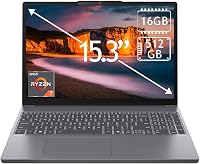
Lenovo IdeaPad Slim 3 15.6-inch Touchscreen (Ryzen 7)

Dell vs Lenovo laptop: which one should you choose?
Choose the IdeaPad Slim 3 for touch input, the Dell for keypad-focused work and onsite service, or the Lenovo V15 for office connections and its memory and storage configuration. These three laptops share some everyday uses, but they offer different ways to work.
The Dell has an HD webcam for video chats, a separate numeric keypad and a calculator hotkey. Lifted hinges give its keyboard a typing angle, and adaptive thermals adjust power and temperature for desk or lap use.
The V15 shares the Dell’s Ryzen 5 7520U processor model, but pairs it with 16GB DDR5 memory, a 512GB SSD and Windows 11 Pro. Its connections include Ethernet, HDMI, USB-C and two USB-A ports.
The IdeaPad Slim 3 is the touch option. It pairs its Ryzen 7 5825U with 16GB DDR4 memory and a 512GB SSD.
| Product | Best for | Screen | Processor | Memory and storage | Our score |
|---|---|---|---|---|---|
| Lenovo IdeaPad Slim 3 15.6-inch Touchscreen (Ryzen 7) | touch input | 15.6 in touchscreen, 1920 x 1080 | AMD Ryzen 7 5825U | 16GB DDR4, 512GB SSD | 8.5 |
| Dell 15.6-inch Laptop (Ryzen 5 7520U) | spreadsheet work | 15.6 in, 1920 x 1080 | AMD Ryzen 5 7520U | 8.0 | |
| Lenovo V15 (Ryzen 5, 16GB, 512GB) | office connections | 15.6 in, 1920 x 1080 | 16GB DDR5, 512GB SSD | 7.9 |
Which Dell or Lenovo laptop suits everyday work?
Pick the Dell if entering numbers is central to your routine, and look at either Lenovo if the listed 16GB memory and 512GB SSD meet your needs. Think about your usual apps, the way you connect accessories and where you work before choosing.
Is the Dell a good fit for home or office?
The Dell is a clear fit for buyers who enter numbers often or want its stated onsite service. Its separate numeric keypad and calculator hotkey make it convenient for repeated spreadsheet entry and calculations.
The built-in HD webcam is intended for video chats, and adaptive thermals adjust the laptop’s power and temperature for desk or lap use. The model has no fingerprint reader, so skip it if fingerprint sign-in is a requirement.
Dell describes 1-year onsite service for covered hardware issues that cannot be resolved remotely. Its stated service can take place at your home, office or another location of your choice.
Does the Lenovo V15 suit office tasks?
The V15 is the stronger match here for a desk setup that needs a range of wired connections. Ethernet can connect to a wired network, while HDMI and USB-C offer ways to connect displays and accessories.
It also has a full-size keyboard with a numeric keypad, a webcam privacy shutter and Windows 11 Pro. Its 16GB DDR5 memory and 512GB SSD are useful if you keep several everyday apps open and store work files on the laptop.
This configuration is seller-upgraded, and the 1-year warranty is provided by the seller. Check who handles service and what the warranty covers before buying, especially if you need a specific support contact for work.
For advice on matching features to a routine, read our guide to choosing a laptop for work, college or home and our plain guide to laptop specs.
Is the Lenovo IdeaPad Slim 3 worth choosing?
Choose the IdeaPad Slim 3 if you want direct touch input and a Ryzen 7 processor in this group. The 15.6-inch screen gives you room to work with documents and apps, while touch input suits tapping and scrolling without reaching for a mouse.
Its Wi-Fi 6 and Bluetooth 5.2 support wireless connections. Ports include USB-A, USB-C, HDMI and a combination headphone and microphone jack, which cover common home and school accessories.
The title identifies Windows 11 Home, while the description says Windows 11 Pro. Confirm which operating system comes with the exact configuration before buying, particularly if you need a specific Windows edition.
There’s no backlit keyboard. If you regularly work in dim rooms, that may be a reason to choose another model or plan to use it in a brighter space.
How should you compare memory and storage in a Dell vs Lenovo laptop?
Both Lenovo models have 16GB memory and a 512GB SSD; those capacities aren't specified here for the Dell. If you’re considering the Dell, confirm its memory and storage configuration before you compare it with either Lenovo.
Memory helps determine how many apps and browser tabs you can keep open comfortably. Storage holds your apps and files, so consider how much room your current computer uses and whether you keep large photo or video collections locally.
Don’t pick a laptop from processor names alone. For help sizing memory and storage to your routine, see how much RAM a laptop needs and how much storage you may need.
Which brand offers the support you need?
The Dell has 1-year onsite service, and the Lenovo V15 has a 1-year seller warranty. The service provider and claim process differ, so make support part of the model comparison.
Dell describes onsite support for eligible hardware issues that cannot be resolved remotely. The V15’s warranty service is provided by its seller, so contact the seller about coverage and how to request help.
Before buying, find the warranty provider, coverage period and steps for getting service. If reliability and day-to-day ownership are part of your decision, read our guide to whether Lenovo laptops are reliable.
How do you set up and care for a new Dell or Lenovo laptop?
Start by connecting to Wi-Fi, completing Windows setup and installing available updates. Then add your account, set a screen lock and connect only the accessories you need.
On a touchscreen, keep your hands clean and use light taps to avoid leaving smudges. For the Dell and V15 keyboards, use the numeric keypad when it fits your work, and close apps you don’t need if you want to keep your workspace tidy.
Use the laptop on a stable surface when possible, and keep air vents clear of bedding, cushions or other soft material. For more help, follow our new laptop setup steps and safe laptop screen cleaning guide.
What common mistakes should you avoid when choosing?
Don’t assume every Dell or Lenovo has the same memory, storage, screen or support terms. Brand names cover many different models, and even the configurations in this comparison have different strengths.
A few checks can prevent a mismatch:
- Confirm the exact configuration. This matters especially for the IdeaPad Slim 3, whose stated Windows edition differs between the title and description.
- Match ports to your desk. The V15 lists Ethernet, HDMI and USB-C. Check that any laptop you choose supports the displays and accessories you already use.
- Check who provides the warranty. Dell describes onsite service, while the V15’s warranty is handled by its seller.
- Don’t pay for a feature you won’t use. If you rarely tap the screen, the IdeaPad’s touchscreen may not help your routine. If you never enter figures, the Dell’s numeric keypad may matter less.
- Look at more than the processor. Memory, storage, screen input, ports and support affect daily use too.
Which Dell vs Lenovo laptop is the best fit for you?
Choose the IdeaPad Slim 3 for touch input and a Ryzen 7, the Dell for frequent number entry and onsite service, or the Lenovo V15 for wired office connections and its listed 16GB memory and 512GB SSD. Check the configuration and support terms before you buy.
If none of these feature mixes matches your needs, start with our guide to choosing a laptop and compare models by the work you do, the ports you need and the support you can use.
Sources
Frequently asked questions
Is Dell or Lenovo better for a laptop?
Neither brand is the better choice for every buyer. This Dell has a numeric keypad and 1-year onsite service, while the Lenovo V15 has 16GB memory, a 512GB SSD, Windows 11 Pro and several office connections.
Choose by the features and support arrangement that fit your work.
Which is better for office work, Dell or Lenovo?
The Lenovo V15 suits a desk setup with Ethernet, HDMI, USB-C, 16GB memory, a 512GB SSD and Windows 11 Pro. The Dell has a numeric keypad and calculator hotkey for entering figures, plus 1-year onsite service.
Check the ports and support terms you need before deciding.
Do Dell and Lenovo laptops have the same warranty?
No; support depends on the exact model and seller. Dell describes 1-year onsite service for eligible hardware issues that cannot be resolved remotely.
The Lenovo V15 configuration includes a 1-year seller warranty, so contact the seller for its service terms.
Should I choose a Lenovo touchscreen laptop?
Choose a touchscreen if you want to tap, scroll or select items directly on screen. The IdeaPad Slim 3 pairs a 15.6-inch Full HD touchscreen with a Ryzen 7 5825U, 16GB memory and a 512GB SSD.
If you mainly type and use a mouse, a non-touch model may suit you just as well.