Samsung Galaxy Book5 360 Review: Worth It? (November 2026)
The Samsung Galaxy Book5 360 is worth buying if you want a light 15.6-inch 2-in-1 with an AMOLED touchscreen and long battery life, and you'll get more out of it if you own other Galaxy devices. Skip it if you need a sharper-than-Full-HD display or a stiffer hinge for drawing.
On this page (8 sections)
The Samsung Galaxy Book5 360 is worth buying if you want a light 15.6-inch 2-in-1 with an AMOLED touchscreen and long battery life, and you'll get more out of it if you own other Galaxy devices. Skip it if you need a sharper-than-Full-HD display or a stiffer hinge for drawing.
This Samsung Galaxy Book5 360 review covers the two models sold under the name and where each one fits. It's a premium pick among Windows 2-in-1s, so the deciding question is whether the screen and Galaxy links matter more to you than raw specs per dollar.
The convertible body runs from laptop to tent to tablet, so one machine serves class time, movie breaks and a quick bit of reading.
Samsung Galaxy Book5 360 at a glance
The Galaxy Book5 360 is a convertible 15.6-inch laptop with a Full-HD AMOLED touchscreen and a 360-degree hinge, so it works as a laptop, a propped-up screen or a tablet. Both models share the display and the convertible body; the difference is the chip, memory and battery claim.
The Copilot AI model lists a Core Ultra 7 256V, 16GB of memory, 512GB of storage and quad speakers with Dolby Atmos. The other model lists a Core Ultra 7 226V, a 512GB SSD and a 3.22 lb CNC aluminum body at 13.7mm thick.
Samsung 15.6” Galaxy Book5 360 Copilot AI: Best for Galaxy phone owners
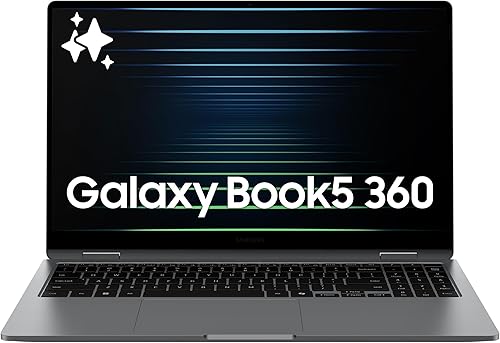
- 15.6 in FHD AMOLED touchscreen
- Intel Core Ultra 7 256V
- 16GB / 512GB
- Up to 31 hours battery
The stronger of the two Galaxy Book5 360 models, with 16GB of memory and a Core Ultra 7 chip. The AMOLED touchscreen and long battery life make it a comfortable daily laptop for study and office work.
Pros
- Bright AMOLED touchscreen
- 16GB of memory for heavy tabs
- Samsung claims up to 31 hours of battery
- Works well with Galaxy phones and tablets
Cons
- Full-HD resolution only
- 60Hz refresh rate
- Premium price tier for the specs
Our score weighs specs, features and buyer feedback against what you're shopping for, which here means a light, long-lasting 2-in-1 for study, streaming and office tasks. The Copilot AI model earns the higher score for its 16GB of memory and the longer battery figure, while the lighter model trades some of that for portability.
The gap between the two is about memory headroom and carrying weight, not about which feels faster in everyday tasks.
Who the Galaxy Book5 360 suits
It suits students, commuters and Galaxy phone owners who want one device for class, streaming and light work. The 2-in-1 design means the same machine becomes a tablet when you want to read or watch in tent mode.
Flip it into laptop mode to finish an assignment, then prop it up in tent mode and tap a show on the touchscreen when you're done.
If your day is mostly email, documents and video calls, the AMOLED screen and long battery matter more than a faster chip. Phone Link mirrors your phone's notifications to the laptop, so you can keep up with messages without picking up the phone.
Live Captions adds real-time English subtitles for meetings and video streams, which helps when the speaker is hard to hear or the language isn't yours.
It's a weaker fit for people who draw or take handwritten notes. The touchscreen responds to a finger and the hinge bends all the way back, but nothing in what ships includes a stylus.
It's also not the laptop for heavy video editing or gaming, since the graphics are integrated. Quick Share and Auto Hotspot are the everyday Galaxy extras: files move between the laptop and your other Galaxy devices, and the laptop stays online without Wi-Fi.
For a general comparison of Windows brands, see are ASUS laptops good for how Samsung sits next to its main rivals.
The specs that matter in daily use
The headline spec is the 15.6-inch Full-HD AMOLED touchscreen, and it's the reason to pick this over a plain budget laptop. AMOLED panels produce deep blacks and strong contrast, so streaming and photo viewing look better than on a standard LCD.
The antireflective finish also helps when you work near a window. At 1920 x 1080, the picture is comfortable at arm's length, though a 15.6-inch panel at that resolution won't show the fine text sharpness of a higher-density screen.
Both models run an Intel Core Ultra 7 processor with a 60Hz refresh rate. The Copilot AI model pairs its Core Ultra 7 256V with 16GB of memory and 512GB of storage.
The other model lists a Core Ultra 7 226V and 512GB SSD but no memory figure, so the first model is the safer pick if you keep many browser tabs open. The 226V chip tops out at 4.5 GHz and includes Intel Arc integrated graphics, which is fine for streaming and light photo work but not for serious gaming.
Samsung claims up to 31 hours of battery for the Copilot AI model. That's a maker claim from ideal conditions, and real use with a bright AMOLED screen will land lower, but the direction is right: this is an all-day laptop.
The lighter model ships with a 65W USB-C adapter, so topping up over lunch is quick when you forget to charge overnight.
The AI features sit on top. AI Select lets you circle an image or QR code on screen to search, Photo Remaster cleans up blurry photos in Samsung Gallery, Cocreator in Paint turns a sketch into artwork from a prompt, and Live Captions turns speech into English captions during calls.
A dedicated Copilot key launches Microsoft's assistant with one press. These tools help light office work, though they won't speed up a heavy editing session.
Setting up the Galaxy Book5 360 for a Galaxy owner
Setup goes fastest if you sign into the same Samsung and Windows accounts on your laptop and your Galaxy phone, because that's what makes the linking features work. Budget a little time for updates on the first boot, then pair your phone.
The laptop's Bluetooth 5.4 and Wi-Fi keep the link steady, and the matching account login is the step people skip most often.
Phone Link is the first thing to connect. Once paired, your phone's notifications appear on the laptop in real time, and you can read texts and view images without reaching for the phone.
Quick Share comes next: it moves photos, videos and large documents between Galaxy devices over Wi-Fi. Auto Hotspot is worth switching on for travel, since it keeps the laptop connected to your phone's data when there's no Wi-Fi.
If you also own a Galaxy Tab, set it up as a second display on the model that supports it. Multi Control on the lighter model goes further and lets the laptop's touchpad and keyboard drive your phone, tablet and even a Samsung TV or Smart Monitor.
Keep the charger handy for the first few days until you learn your own battery rhythm, then trim startup apps and lower screen brightness a notch. The lighter model's Core Ultra chip includes an NPU rated up to 47 TOPS for on-device AI tasks.
Everyday care for a 2-in-1 screen and hinge
Treat the AMOLED touchscreen and the 360-degree hinge as the two parts that need the most care. Wipe fingerprints with a soft microfiber cloth and avoid household cleaners that can damage the coating.
A screen protector helps if the laptop spends time in a backpack. Because the panel is touch-enabled and gets handled in tablet mode, smudges build up faster than on a plain laptop screen.
The hinge bends all the way back, but don't force it past its stop or press down on the open lid when it's flat. Close the laptop by the center of the lid, not one corner, so the hinge stays even over time.
The CNC aluminum body on the lighter model resists dents better than plastic, but the thin 13.7mm shell still flexes if you grab it by the screen edge.
Keep vents clear when the machine sits on a bed or cushion. The thin body leaves little room for airflow, so a hard flat surface keeps the fans quieter and the chip cooler.
Charge with the supplied USB-C adapter and store the cable loosely rather than wrapped tight around the plug. The USB-C port also carries video over HDMI adapters and connects to a mouse, headphone or speaker, so a small hub covers most desk setups.
Back up to cloud storage or an external drive now and then, and copy files off any microSD card before you eject it.
The trade-offs before you buy
The biggest trade-off is the Full-HD resolution on a 15.6-inch screen. That's fine for everyday work, but text and photos won't look as crisp as on a sharper panel, and the 60Hz refresh rate means scrolling feels standard rather than smooth.
The AMOLED contrast partly makes up for the lower pixel count when you watch video, but it can't add detail that isn't there.
The premium price tier is the second consideration. You're paying for the AMOLED panel, the thin aluminum body and the Galaxy features, not for class-leading performance.
A cheaper laptop handles documents and browsing for less. The AI features also depend on an internet connection and a Samsung account, and Samsung notes that search results and translations may vary, so treat them as helpers rather than guaranteed tools.
Drawing and note-taking is the third gap. The touchscreen and hinge suit finger use and streaming, but without a pen in the box this isn't a natural fit for artists or students who write by hand.
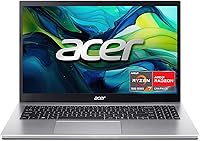
For a value-focused look at where budget machines land, read our Acer Aspire 3 review and see what you give up in screen quality. The memory question is the fourth: the Copilot AI model's 16GB is the safer base for heavy multitasking, while the lighter model leaves that figure unstated, so check before you commit if you run many apps at once.
Alternatives worth comparing
The Galaxy Book5 360 competes with lighter-value Windows laptops and other Samsung models, so the right choice depends on whether the screen and Galaxy links are worth the premium to you. Both models run the same AMOLED touchscreen and convertible hinge, so the comparison comes down to weight, memory and the extra Galaxy features.
The lighter Galaxy Book5 360 model
This model is the one to pick if carrying weight matters more than memory headroom. At 13.7mm thick and 3.22 lb, it slips into a backpack easily and still gives you the AMOLED touchscreen and 360-degree hinge.
Its Core Ultra 7 226V runs at up to 4.5 GHz and pairs with Intel Arc integrated graphics. The lighter model also adds Multi Control across your Galaxy phone, tablet, TV and Smart Monitor, plus Galaxy Tab second-screen mode.
The catch is that the memory figure isn't stated in its specs, so the 16GB model is the safer buy for heavy multitasking. The ASUS vs Acer comparison shows how other Windows 2-in-1s stack up on value.
A cheaper everyday Windows laptop
If the Galaxy extras aren't important to you, a cheaper laptop covers the same basics. Our Lenovo reliability guide covers what to expect from another major Windows brand.
Pick the Galaxy Book5 360 only when the AMOLED screen, long battery and Galaxy device links justify the extra spend for your daily routine. The quad speakers with Dolby Atmos on the Copilot AI model are a nice extra for movie nights, but they won't change the maths for someone who mainly writes documents.
Verdict: should you buy the Galaxy Book5 360?
Buy the Galaxy Book5 360 Copilot AI model if you want a light 2-in-1 with a great screen and you already live in Samsung's ecosystem. Its 16GB of memory and up-to-31-hour battery claim make it the more comfortable daily machine of the two, and the AMOLED touchscreen is the reason to pay for it.
The lighter model is the better pick when 3.22 lb and 13.7mm matter more than memory headroom, and its Multi Control and Galaxy Tab second-screen features make it a strong companion for a Galaxy tablet owner.
Skip it if you need a sharper display, a smooth high-refresh panel or a laptop for drawing with a pen. Those buyers should compare a rival Windows 2-in-1 before deciding.
Our Samsung Galaxy Book5 360 review lands on a simple rule: choose it for the screen and Galaxy links, not for raw power per dollar. If you want the convertible form and the AMOLED panel in the lightest shell, the 226V model earns its place; if you want the most future-proof memory setup, the Copilot AI model is the one to buy.
Frequently asked questions
Does the Galaxy Book5 360 come with a pen?
Samsung doesn't list a stylus in what ships with either Galaxy Book5 360 model. The touchscreen works with your finger, and the 360-degree hinge lets you prop it in tent or tablet mode.
How long does the Galaxy Book5 360 battery last?
Samsung claims up to 31 hours of power for the Copilot AI model. That figure comes from the maker and depends on screen brightness, apps and Wi-Fi use, so expect less on a heavy day.
Can you use a Galaxy Tab as a second screen on the Galaxy Book5 360?
Yes. The second model supports using a Galaxy Tab as an extra display in Extension, Duplicate or Rotation mode.
You link the devices with a click over Wi-Fi.
Is the Galaxy Book5 360 good for video calls?
It handles calls well thanks to Live Captions for real-time English subtitles and quad speakers with Dolby Atmos on the Copilot AI model. Phone Link also mirrors your phone's notifications to the screen.
What is the difference between the two Galaxy Book5 360 models?
The Copilot AI model lists 16GB of memory and a Core Ultra 7 256V chip with 31 hours of battery. The other model lists a Core Ultra 7 226V and a 3.22 lb aluminum body but no memory figure.
Should you buy the Galaxy Book5 360 or a cheaper Windows laptop?
Buy the Galaxy Book5 360 for the AMOLED touchscreen and Galaxy device links. A cheaper laptop like the Acer Aspire 3 makes more sense if you mainly write documents and browse.