Lenovo IdeaPad 1i Review: Worth It? (November 2026)
The Lenovo IdeaPad 1i is a sensible everyday laptop for most people who want a 15.6-inch touchscreen, 16GB of memory and a fast SSD at a modest price. Skip it if you need a light machine to carry all day or a screen for color-critical work.
On this page (8 sections)
The Lenovo IdeaPad 1i is a solid everyday laptop, and this review finds it best for home, office and student work where a large touchscreen and plenty of memory matter more than low weight. Its 15.6-inch full HD IPS touch display, Intel Core i5-1235U processor and 16GB of RAM cover browsing, documents, video calls and streaming without strain.
The trade-offs are a 3.74 lb body that's heavy for daily carrying and integrated Intel UHD graphics that rule out serious gaming. If either matters, the alternatives below fit better.
Otherwise this IdeaPad 1i review shows a balanced machine for the money.
The Lenovo IdeaPad 1i at a glance
The IdeaPad 1i pairs a bright 15.6-inch touchscreen with enough memory and storage to skip the usual budget-laptop compromises. It's a clamshell in Abyss Blue with a full set of ports and Windows 11 Home.
Lenovo IdeaPad 1i Laptop: Best for everyday home and office work
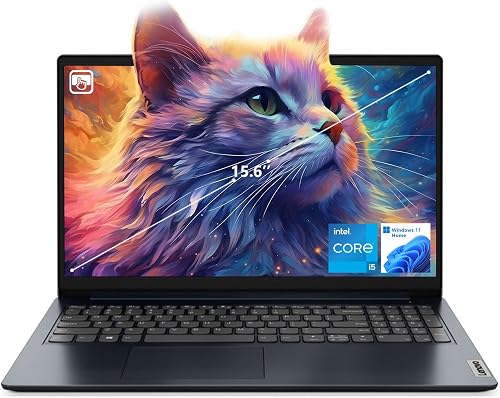
- 15.6-inch FHD IPS touchscreen
- Intel Core i5-1235U, 10 cores
- 16GB DDR4 RAM
- 512GB PCIe NVMe SSD
- Wi-Fi 6 and Bluetooth 5.2
- Windows 11 Home
A well-rounded 15.6-inch touchscreen laptop for browsing, office apps and streaming. The i5 chip and 16GB of RAM keep everyday multitasking comfortable, and the SSD makes startup and file transfers quick.
Pros
- 16GB of RAM handles many tabs and apps at once
- Fast 512GB NVMe SSD for startup and file transfers
- Bright 300-nit IPS touchscreen
- Wi-Fi 6 and Bluetooth 5.2
- Full port selection with HDMI and an SD card reader
Cons
- At 3.74 lb it is not a light travel laptop
- No dedicated graphics for gaming or heavy editing
- Battery life is not stated in the specs
The configuration here is the useful part: 16GB of DDR4 RAM and a 512GB PCIe NVMe SSD, plus Wi-Fi 6 and Bluetooth 5.2. That mix is what makes this model worth a look rather than the base version with less memory.
When the Lenovo IdeaPad 1i makes sense
Buy it if your day is a browser with many tabs, email, spreadsheets and video calls, and the laptop mostly stays on a desk or moves between rooms. The large touchscreen and 16GB of RAM make that workload smooth.
Skip it if you need a machine for long commutes on foot or a creative course that depends on color-accurate work. A lighter laptop or one with a wider color range serves those needs better.
It also helps to think about how you'll connect it. The HDMI 1.4 port lets you drive an external monitor or a projector, so the laptop can sit closed under a stand while you work on a bigger screen.
The SD card reader is a quiet convenience for anyone who moves photos off a camera, and Wi-Fi 6 gives the laptop a wireless connection that matches current routers. None of that changes the core picture: this is a machine for ordinary desk work, and it's configured well for it.
Who is the IdeaPad 1i best for?
The IdeaPad 1i suits home users, office workers and students who want one dependable screen for daily tasks. Its 15.6-inch FHD IPS panel gives you room to work in two windows side by side.
The touchscreen adds a practical layer: tapping links, scrolling long pages and marking up documents feels natural. The anti-glare coating and 300 nits of brightness help in a bright room, though it won't overpower direct sunlight.
Students will like the 16GB of RAM for research tabs and note apps running together. Office workers get a comfortable keyboard layout and a numeric keypad, which matters for spreadsheets.
It's less suited to frequent travelers. At 3.74 lb plus a charger, it's a bag weight you feel on a long walk.
Think of it as a desk-first laptop you can move around the house.
The size cuts both ways. A 15.6-inch screen is easier on the eyes for long document sessions than a 13-inch panel, and the numeric keypad speeds up data entry.
But the same footprint makes it awkward on a train tray table or a small café table. For a household laptop that stays mostly in one place, that's an easy trade to accept.
For someone who works from a different spot every day, it isn't.
The specs that matter in daily use
The Intel Core i5-1235U is the engine here, with 10 cores and 12 threads and a maximum turbo speed of 4.4 GHz. In plain terms, it handles everyday multitasking and light photo editing without the lag that cheaper chips show.
Memory and storage do more for perceived speed than the processor. 16GB of DDR4 RAM means fewer slowdowns when you keep many tabs open, and the 512GB PCIe NVMe SSD boots Windows quickly and moves files fast.
The display is a 15.6-inch FHD IPS touch panel at 1920 x 1080, 60Hz, rated at 300 nits with a 45% NTSC color range. The IPS technology keeps colors stable from side angles.
The color range is modest, so this isn't a photo-editing screen.
Ports cover the basics well: one USB-C 3.2 Gen 1, one USB-A 2.0, one USB-A 3.2 Gen 1, HDMI 1.4, an SD card reader and a headphone/microphone jack. Wi-Fi 6 and Bluetooth 5.2 keep wireless connections current.
Graphics are Intel UHD integrated, fine for video playback and light games.
The processor's design is worth a sentence for non-technical readers. The i5-1235U splits its 10 cores into performance and efficiency types, so light tasks like browsing sip power while heavier ones like a spreadsheet recalculation get more muscle.
That balance is why it feels quick for everyday work without needing a fan that roars. The 8GB of cache on the chip also keeps frequently used data close at hand.
For the price class, this is a capable and efficient part, and the 16GB of RAM lets it stretch.
Setting up the IdeaPad 1i for the first time
Setup is standard Windows 11 Home onboarding: connect power, choose your region and keyboard, join Wi-Fi and sign in with a Microsoft account. The SSD means the initial updates and app installs move quickly.
Expect some time for Windows updates to finish on the first few sessions. Let them complete before judging speed, since a laptop still installing updates in the background feels slower than it is.
Create a local or cloud backup habit early. Turn on OneDrive or another backup for documents, and keep important files in at least two places.
Set the display brightness and scaling to suit your eyes. The 1920 x 1080 panel at 15.6 inches is comfortable at 100% scaling for most people, and the touch layer works well with tablet-style apps.
Uninstall preinstalled apps you won't use. Fewer startup programs mean faster sign-in times and less background load on the i5 processor.
The Windows 11 Home license also brings a set of management features the listing calls out, such as Mobile Device Management, Group Policy support and Assigned Access. Most home buyers won't touch these, but they matter if the laptop is bought for a small business or a school that hands machines to several people.
Assigned Access, for example, can lock a device to a single app, which is handy for a shared kiosk or a front-desk machine. Knowing the features exist means you don't have to pay extra for a business edition just to get basic control.
Looking after the touchscreen and battery
Care for the touchscreen with a soft microfiber cloth and avoid harsh cleaners on the anti-glare coating. Wipe fingerprints when the laptop is off, and don't press hard on the panel.
Keep the hinge area clear and close the lid gently. The narrow bezel looks good, but it means less margin around the glass, so store the laptop in a sleeve when you carry it.
Battery habits matter more than any setting. Charge it before it drops to zero, and if you mostly work plugged in, avoid leaving it at 100% in a hot room for days.
Keep the vents clear. A laptop resting on a bed or cushion pulls in dust and lint, and the i5 processor will slow down when it can't cool itself.
Clean the keyboard with a soft brush and compressed air. Crumbs under the keys are a common cause of sticky keys on any laptop, and this one is no exception.
Screen care deserves one more note. The anti-glare finish is there to cut reflections, and it does that well in a bright room, but it also shows smudges more than a glossy panel would.
A quick wipe after a session with sticky fingers keeps it looking clean and keeps the touch layer responsive. Avoid window cleaner or alcohol sprays on the coating, since they can leave streaks or wear it down over time.
A dry cloth is usually enough.
The trade-offs before you buy
The main trade-off is weight, at 3.74 lb plus the charger. That's reasonable for a 15.6-inch laptop, but light 13- and 14-inch models are easier to carry every day.
Graphics are the second limit. Intel UHD integrated graphics run video, browsing and light games, but modern 3D titles and heavy video editing need a dedicated GPU.
This isn't a gaming laptop.
The color range is modest at 45% NTSC. For documents, streaming and general use that's fine.
For professional photo work or color-graded video, look for a laptop with a wider gamut.
The battery life isn't stated in the specifications, so plan around charging rather than assuming all-day use. Check the seller's details on battery capacity if endurance is critical for you.
Finally, consider the processor family. The i5-1235U is efficient and capable, but newer chips exist.
Compare against the alternatives below if you want the latest generation.
One more point on the chip: it's a 12th-generation part built on the Alder Lake design. That's a proven platform rather than the newest one on the shelf, and the practical effect is that you get solid everyday speed without paying a premium for the latest release.
For most buyers the difference won't show up in daily use. It only matters if you compare spec sheets side by side and want the freshest silicon.
Alternatives worth comparing
If the IdeaPad 1i isn't quite right, two Lenovo models and a brand comparison are worth checking. Each one changes a different part of the package.
Lenovo IdeaPad Slim 3 15.6-inch Touchscreen (Ryzen 7)
The Slim 3 touchscreen model is the stronger pick for heavier multitasking, with an AMD Ryzen 7 5825U, 8 cores and 16 threads. Its 16GB of DDR4 RAM and 512GB NVMe SSD match the IdeaPad 1i.
The Ryzen 7's Radeon integrated graphics are stronger than Intel UHD for light creative work. This is the better choice if you'll edit photos or run more demanding apps.
Our Lenovo IdeaPad Slim 3 review covers the details.
Lenovo IdeaPad Slim 3i 15.6" FHD Laptop
The Slim 3i targets budget buyers with an Intel N150 chip, 8GB of RAM and a 128GB SSD. It's a lighter-duty machine for web browsing and basic documents.
The smaller memory and storage suit light use, so it's a step down from the IdeaPad 1i for multitasking. It makes more sense when the price matters most and your workload stays simple.
See the best Lenovo laptops guide for more picks.
Choosing between Lenovo and Dell
If you're still deciding on a brand, the Dell vs Lenovo comparison weighs build, keyboards and support. Lenovo's IdeaPad line tends to offer strong specs for the money.
And if long-term reliability is on your mind, are Lenovo laptops reliable looks at the brand's track record for everyday use.
Verdict: is the Lenovo IdeaPad 1i worth buying?
Buy the Lenovo IdeaPad 1i if you want a desk-first 15.6-inch touchscreen laptop for home, office or study. The i5-1235U, 16GB of RAM and 512GB SSD handle daily multitasking well, and the bright IPS panel and full port selection round it out.
Skip it if you carry a laptop all day or need serious graphics power. The 3.74 lb weight and Intel UHD graphics are the limits, and the Slim 3 Ryzen 7 model is the better step up for heavier work.
For most people with a desk and a mix of browsing, documents and video calls, this IdeaPad 1i review ends with a clear recommendation: it's a dependable everyday laptop at a modest price.
Frequently asked questions
Is the Lenovo IdeaPad 1i good for students?
Yes, for most coursework. The 15.6-inch touchscreen, 16GB of RAM and 512GB SSD handle writing, research, video calls and note-taking comfortably.
The 3.74 lb weight is the main drawback if you carry it across a large campus every day.
Can the Lenovo IdeaPad 1i run games?
Only light games. It uses Intel UHD integrated graphics, so simple titles and older games run, but modern 3D games need a laptop with a dedicated graphics card.
The i5 processor and 16GB of RAM are fine for everyday apps.
Does the Lenovo IdeaPad 1i have a touchscreen?
Yes. This configuration has a 15.6-inch Full HD IPS touchscreen with anti-glare coating and 300 nits of brightness.
The touch layer is handy for scrolling, tapping links and sketching, and the matte finish reduces glare.
Is 16GB of RAM enough for everyday use?
Yes. 16GB lets you keep a browser with many tabs open alongside email, video calls and office documents without the slowdown you get from 8GB.
That headroom is one of the main reasons to choose this model over cheaper 8GB laptops.
How does the Lenovo IdeaPad 1i compare with the IdeaPad Slim 3?
The Slim 3 15.6-inch model has an AMD Ryzen 7 processor, an 8-core chip with strong built-in graphics. The IdeaPad 1i runs on an Intel Core i5-1235U.
Both come with 16GB of RAM and a 512GB SSD, so the choice mostly comes down to processor preference.