Apple MacBook Air Retina Laptop Review: Worth It? (November 2026)
Buy the Apple 2026 MacBook Air 13-inch with the M5 chip if you want a light everyday laptop with a sharp 13.6-inch Liquid Retina display and long battery life. Skip it if you need a bigger screen or more ports than two Thunderbolt 4 connections.
On this page (8 sections)
The Apple 2026 MacBook Air 13-inch is the easy pick for most people who want a light MacBook with a great screen. The M5 chip, 16GB of memory and up to 18 hours of battery life make it a strong everyday laptop.
Its weak spots are the two Thunderbolt 4 ports and the smaller 13.6-inch screen.
This Apple MacBook Air Retina laptop review covers what the display looks like in daily use, what the M5 chip means for real work, how setup and care go and when a bigger model is the better buy.
The MacBook Air 13-inch at a glance
The 2026 MacBook Air pairs Apple's M5 chip with a 13.6-inch Liquid Retina display in a 2.71-pound body. Apple says the battery lasts up to 18 hours.
It ships in Silver and includes 16GB of unified memory and a 512GB SSD.
Apple 2026 MacBook Air 13-inch Laptop: Best for everyday portable work
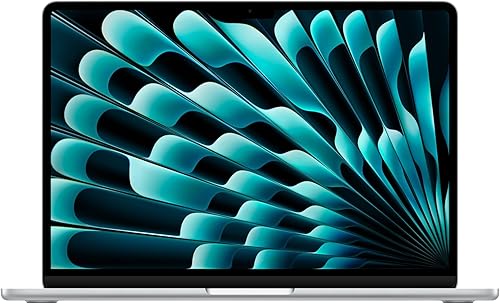
- 13.6-inch Liquid Retina display
- M5 chip with 16GB unified memory
- 512GB SSD
- Up to 18 hours of battery life
A light 13-inch laptop with a crisp color display, Apple's M5 chip and battery life that covers a full day of classes or office work.
Pros
- Crisp 13.6-inch Liquid Retina display with 1 billion colors
- M5 chip with 16GB unified memory handles multitasking
- Up to 18 hours of battery life
- Wi-Fi 7 and two Thunderbolt 4 ports
- 12MP Center Stage camera for calls
Cons
- Only two Thunderbolt 4 ports
- 13.6-inch screen is smaller than a 15-inch model
- Apple Intelligence features need a recent macOS version
The score weighs specs, features and buyer feedback against what you're shopping for. This model earns a 9.7 because it covers the core needs of a portable laptop without obvious gaps for most buyers.
What the M5 chip changes for you
The M5 chip brings a faster CPU and unified memory, and Apple says this smooths multitasking and creative workflows. A more powerful Neural Engine and next-generation GPU give apps room for AI features.
For daily use that means switching between a browser with several tabs, a document and a video call stays fluid. Photo edits and light video projects also run without the fan noise of older Intel MacBooks.
Apple Intelligence is the headline use for that hardware. It helps you write, express yourself and get things done, and Apple says its privacy protections keep your data from being accessed by anyone else, including Apple.
For students that covers drafting essays and summarizing notes without sending your work to an outside service. The catch is that these features need a recent macOS version, so an older Mac you hand down won't get the same set.
Who the 13-inch MacBook Air suits
This laptop fits students, office workers and anyone who carries a computer most days. At 2.71 pounds and 0.44 inches thick, it slips into a backpack and comes out ready.
Apple says the battery covers a full day of classes without a charger.
Writers, researchers and people who live in email and spreadsheets will find the M5 chip more than enough. The 13.6-inch screen is sharp for reading and editing documents, and the 12MP Center Stage camera keeps you framed in video calls.
The camera has a second trick that helps students and remote workers. Desk View shares a top-down view of your workspace, so you can show a page, a sketch or a textbook page to classmates without angling the laptop awkwardly.
The three-mic array and four-speaker system with Spatial Audio and Dolby Atmos support make calls and lectures sound clear.
Who should pick a different Mac
Skip the 13-inch if your work needs lots of screen real estate. Video editors, designers and people who keep several windows open side by side will feel cramped on a 13.6-inch panel.
A 15-inch model solves that.
Skip it too if you connect many accessories. With two Thunderbolt 4 ports, one often goes to a charger unless you use the MagSafe port.
A hub or dock makes life easier for desk setups.
Heavy multi-display work is another reason to look elsewhere. The Air supports up to two external displays, which is generous for its size, but a desktop with more ports and a hub handles a wall of monitors more cleanly.
Decide how many screens you actually use before you buy.
Specs that matter in daily use
The display and battery are the specs you'll notice most. The 13.6-inch Liquid Retina panel shows 1 billion colors with rich contrast and crisp text.
Presentations, photos and video all look vivid, and small print in documents stays readable.
Battery life matters just as much. Apple says up to 18 hours of use, which means you can leave the charger at home on most days.
That is a real advantage for students moving between buildings or commuters working on a train.
The display earns its keep in small moments too. Long reading sessions stay comfortable because text renders so sharply, and streaming looks good enough to skip the TV in a dorm room.
Color coverage matters more if you touch up photos or build slide decks for class.
Memory, storage and ports
16GB of unified memory is the practical baseline for modern multitasking. It lets the M5 chip keep many apps open at once without slowing down.
The 512GB SSD gives you room for a typical photo library, apps and documents.
Connectivity covers two Thunderbolt 4 ports, a MagSafe charging port and a headphone jack. Apple's N1 wireless chip adds Wi-Fi 7 and Bluetooth 6.
The laptop also supports up to two external displays, which matters if you work at a desk.
Wi-Fi 7 and Bluetooth 6 matter more than they sound for a laptop you carry around. Newer networks and newer accessories both connect on the faster standards, so the Air is not the weak link when your campus or office upgrades.
The headphone jack is a small but welcome extra for wired headphones and mics.
The dimensions in practice
The 8.46 by 11.97 inch footprint is compact enough for a small lecture desk or a train tray table. At 0.44 inches closed, it slides into slim backpack sleeves.
The light weight matters more than the thinness when you walk between buildings all day.
How setup goes on the MacBook Air
Setup is quick if you already use an Apple account. You sign in, pick a few settings and let iCloud fill in your photos, messages and files.
Owners of an iPhone can hand off the setup and keep calls and messages in sync.
Installing apps works through the App Store or direct downloads. Built-in apps like FaceTime and Messages are ready, and macOS adds virus protection and free software updates.
The Touch ID button stores your fingerprint for sign-ins and purchases.
Mac and iPhone work together in ways that save time. You can see and control what's on your iPhone from the Mac, start an email on one device and finish it on the other, and snap a photo on the phone and watch it appear on the laptop.
You can even take a call without reaching for the phone. If your phone is an Android, those handoffs don't exist and the case for the Air rests on the hardware alone.
Moving files from another computer
If you're switching from a Windows laptop or Chromebook, plan some time to move documents and photos. Use an external drive or cloud storage to bring your files across.
Check that the apps you rely on run on macOS before you make the switch.
Our comparison of Chromebook vs MacBook helps if you're deciding between a simple browser-first machine and a full Mac.
Day-to-day care for the MacBook Air
The MacBook Air needs little maintenance beyond regular cleaning. Wipe the screen with a soft, dry cloth and keep the keyboard free of crumbs.
Avoid sprays directly on the display or ports.
Treat the aluminum body with care, since drops can dent the corners and damage the hinge. A sleeve or case adds protection in a backpack.
The fanless design means the laptop stays quiet, so you don't need to clear dust from vents the way you would on a gaming laptop.
Battery habits that help
Keep the charge between roughly 20 and 80 percent when you can, and avoid leaving it plugged in at full charge for days. macOS battery settings help manage charging automatically. Store it at a moderate temperature rather than a hot car or a cold garage.
Use the MagSafe port for charging at your desk so the Thunderbolt 4 ports stay free for drives and monitors. That small habit keeps your ports available and reduces strain on the cable.
If the cable catches on a chair, MagSafe releases instead of pulling the laptop to the floor.
The trade-offs to weigh before buying
The two main trade-offs are screen size and port count. The 13.6-inch display is sharp, but it is smaller than a 15-inch panel.
If you edit video or juggle several windows, the extra width on the 15-inch model is worth considering.
The two Thunderbolt 4 ports are fine for most people but tight for heavy accessories. A dock or hub solves this, though it costs extra.
If you already own lots of USB-A gear, you'll need adapters.
Price tier and value
This model sits in the premium tier. You pay for the M5 chip, the Retina display, the long battery life and the light build.
For students and office workers, those features earn their keep every day.
If your needs are basic, a cheaper laptop can do the job. Our look at whether the MacBook Air M5 is worth the money helps you decide if the extra cost fits your budget and your work.
Alternatives to the 13-inch MacBook Air
The 13-inch Air is the best all-round pick for most buyers. Two alternatives cover the cases where it isn't the right fit: a bigger-screen MacBook and a low-cost Chromebook.
MacBook Air 15-inch
Choose the 15-inch model if you want more screen room without giving up the light MacBook feel. The bigger display helps with side-by-side documents and longer video timelines.
It costs more and weighs a little more, but the extra width is the reason to pick it.
Our MacBook Air 13 vs 15 comparison walks through the size and screen differences so you can pick the right one.
A 2-in-1 laptop or Chromebook
A 2 in 1 laptop makes sense if you want a touchscreen and a tablet mode for notes or drawing. A Chromebook is the budget-friendly option if your work happens mostly in a browser and you don't need macOS apps.
The MacBook Air wins on display quality, battery life and access to Apple's app ecosystem. A Chromebook wins on price and simplicity for light web use.
Verdict: buy or skip the MacBook Air 13-inch?
Buy the Apple 2026 MacBook Air 13-inch if you want a light laptop with a sharp Retina display and all-day battery life. The M5 chip and 16GB of memory handle study, office work and light creative projects without fuss.
Skip it if you need a large screen for video editing or lots of ports for accessories. In those cases, the 15-inch MacBook Air or a 2-in-1 gives you more room.
For most people, this Apple MacBook Air Retina laptop review ends with a clear buy recommendation.
If a smaller screen would cramp your work, read our MacBook Air 13 vs 15 guide before you decide. And if budget is the deciding factor, compare the Chromebook vs MacBook route first.
Frequently asked questions
Is the MacBook Air Retina screen good for everyday use?
Yes. The 13.6-inch Liquid Retina display shows 1 billion colors with sharp text and strong contrast.
Photos and video look vivid, and long documents stay easy on the eyes, so it works well for study, writing, spreadsheets and streaming.
How long does the 2026 MacBook Air battery last?
Apple says the M5 MacBook Air runs for up to 18 hours on a charge. That covers a full day of classes or office work without the charger.
Real-world time depends on screen brightness and the apps you keep open.
Does the MacBook Air have enough ports?
It has two Thunderbolt 4 ports, a MagSafe charging port and a headphone jack. That suits most people, and the laptop supports up to two external displays.
If you connect several accessories at once, plan on a hub or dock.
Is the M5 MacBook Air good for students?
Yes. It weighs 2.71 pounds, so it carries easily between classes, and Apple says the battery lasts up to 18 hours.
The M5 chip and 16GB of memory handle writing, research, video calls and most coursework without slowdown.


