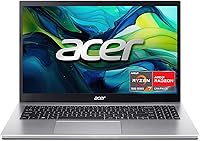
Acer Aspire Lite 15 Review: Worth It? (November 2026)
The Acer Aspire Lite 15 is a buy for students and office workers who want 16GB of RAM and a sharp 15.6-inch IPS screen in a light body. Skip it if you need serious graphics power or lots of local storage.
On this page (9 sections)
- The Acer Aspire Lite 15 at a glance
- Who the Acer Aspire Lite 15 suits
- The specs that matter in daily use
- Setting up the Acer Aspire Lite 15
- Ports, keyboard and travel use
- Care and maintenance for long life
- The trade-offs to know before buying
- Alternatives worth comparing
- Is the Acer Aspire Lite 15 worth it?
The Acer Aspire Lite 15 is a buy for everyday study and office work. Its 16GB of RAM, 256GB NVMe SSD and 15.6-inch FHD IPS screen cover the basics well, and the light body travels easily.
Buyers who need dedicated graphics or lots of local storage should look elsewhere.
This Acer Aspire Lite 15 review weighs the parts that affect daily use, not just the headline specs. You'll see where the money goes, who the laptop fits, and which alternatives make more sense for gaming or tight budgets.
The Acer Aspire Lite 15 at a glance
The Aspire Lite 15 pairs an Intel Core N150 processor with 16GB of RAM and a 256GB NVMe SSD. That memory figure is the standout: it's the part that keeps a browser full of study tabs and a video call running without stutter.
Acer Aspire Lite 15 Laptop with Office: Best for students and office multitasking

- Intel Core N150, 4 cores
- 16GB RAM
- 256GB NVMe SSD
- 15.6-inch FHD IPS display
A light 15.6-inch laptop with enough memory for heavy browser and document days. The FHD IPS panel and full-size numeric keyboard suit long study sessions.
Pros
- 16GB RAM handles dozens of tabs and apps
- FHD IPS anti-glare screen with wide viewing angles
- Full-function USB-C, dual USB-A and HDMI 2.1
- Wi-Fi 6 and Bluetooth 5.2
- Light, slim body for commuting
Cons
- Integrated Intel UHD graphics limit gaming and heavy video editing
- 256GB SSD fills quickly with large media files
- Core N150 favors everyday speed over heavy processing
The screen is a 15.6-inch FHD IPS panel with anti-glare ComfyView coating and wide viewing angles. A full-size numeric keyboard helps with spreadsheets and data entry.
Acer rates battery life at up to 11 hours.
The processor runs 4 cores and 4 threads with a boost up to 3.7GHz and a 15W power draw, which is why the body stays cool and quiet through a long study session. The software bundle covers Windows 11 plus an Office package, and the listed storage includes cloud space alongside the local SSD.
Acer sells it as the 2026 Edition and ships it in Pure Silver without a mouse, so plan on adding one or using the touchpad.
Its score of 9.2 reflects how well the specs fit what most laptop shoppers want: smooth everyday multitasking, a clear screen and a body light enough for a backpack.
Who the Acer Aspire Lite 15 suits
This laptop fits students, remote staff and home users whose work lives in a browser and a document. Lecture recordings, handwritten notes on the touch-capable display, video calls and spreadsheet edits all sit within its comfort zone.
The 16GB of memory matters most here. It lets you keep dozens of tabs, homework software and a music app open without the slowdown that 8GB machines show.
If your day looks like that, this machine earns its keep. The 256GB SSD also holds textbooks, projects and lecture recordings without pushing you to the cloud on day one.
Skip it if your work means video editing at scale, 3D modeling or modern games. The integrated Intel UHD graphics and Core N150 processor aren't built for that.
Choose it for portability and memory, not horsepower. A dedicated graphics chip is the only honest answer for those jobs, and this laptop doesn't have one.
It also suits shared family use. A light silver body, a full keyboard and Windows 11 make it easy for several people to share one machine for school, email and streaming.
The 15W chip keeps heat and fan noise low when the laptop sits on a kitchen table or a dorm desk for hours.
The specs that matter in daily use
The 16GB of RAM and 256GB NVMe SSD do more for everyday speed than the processor headline. Memory decides how many apps and tabs stay open; the NVMe drive decides how fast the laptop boots and loads programs.
The drive uses PCIe Gen3 NVMe, which is quick for a machine in this class.
Intel lists the Core N150 as a 4-core, 4-thread chip with a boost up to 3.7GHz and a 15W power draw. Acer states the same 3.7GHz maximum in the specs.
The low power figure is why the fan stays quiet and the battery stretches to Acer's 11-hour claim. A low-power chip also means less throttling when the laptop sits on a soft surface like a bed or cushion.
The 15.6-inch FHD IPS panel runs at 1920 x 1080. IPS gives wide viewing angles, so two people can watch or review a document side by side.
Anti-glare coating helps under overhead lights and near windows. The 1080p resolution is the practical baseline for long reading sessions; text stays sharp without scaling tricks.
The 256GB SSD is the part to watch. It's plenty for documents, a browser and Office files.
It fills fast if you store raw video, big photo libraries or a large game collection. An external drive solves that cheaply.
The cloud storage in the bundle covers backups and file sharing, not a local media library.
Wi-Fi 6 matters more than shoppers expect. It holds a steadier connection in a crowded house or a campus network than older Wi-Fi 5 radios, which helps during video calls and uploads.
Bluetooth 5.2 does the same for wireless headphones and mice.
Setting up the Acer Aspire Lite 15
Setup runs through Windows 11 and the bundled Office package, and a Microsoft account is the first thing you'll need. Create or sign in to one during first boot, then let Windows finish its updates before installing your own programs.
Activate Office with the included license, then sign in to the apps. Save files to OneDrive if you want the cloud storage that comes with the package, or to the local SSD if you prefer.
Both are valid; pick one and stick with it. Mixing the two without a plan is how people lose track of documents.
Remove preinstalled apps you won't use and set the display scaling to a comfortable size. At 15.6 inches and 1080p, most people find 100% or 125% scaling readable without squinting.
Leave the anti-glare coating alone; it needs no screen protector.
Connect Wi-Fi 6 on the 5GHz band when your router supports it. Pair Bluetooth headphones or a mouse, and test the HD webcam and stereo speakers in a short video call before your first class or meeting.
The built-in webcam sits at the top of the screen, so check the angle when the lid is tilted back.
Set a backup routine early. Windows offers OneDrive folder backup, and the bundled cloud storage makes it easy to keep documents safe if the SSD ever fails.
Do this in week one, not month six.
Ports, keyboard and travel use
The Aspire Lite 15 covers full-function USB-C, two USB-A ports and HDMI 2.1, so a monitor, mouse and phone charger can share the body. Wi-Fi 6 and Bluetooth 5.2 handle wireless accessories without dongles.
HDMI 2.1 means the laptop can drive a modern external display for a desk setup at home.
The full-size numeric keypad is a real help for spreadsheets, accounting homework and data entry. It also makes the deck wider than a compact 14-inch laptop, so check that your bag has room.
The keyboard layout suits long typing sessions once you adjust to the key travel.
At a 15.6-inch screen size, this isn't a tiny ultrabook. It's light enough for daily commuting and cafe work, and the anti-glare screen means you can sit near a window without fighting reflections.
A backpack with a padded laptop sleeve is the simplest way to carry it.
The 11-hour battery figure is the reason it works as an unplugged machine. Charge it overnight, then leave the charger at home for a day of lectures or a shift at a desk away from an outlet.
Pack the charger for long travel days when streaming or heavy multitasking will eat into that figure.
If size is your main worry, a smaller 14-inch model may suit you better. Our Acer Aspire 14 laptop review covers the trade-offs between screen room and portability.
Care and maintenance for long life
Keep the SSD under about 20GB free and the laptop will stay responsive. Windows needs room for updates and temporary files, and a full drive slows everything down.
Move large media to an external drive or cloud storage.
Clean the screen with a soft microfiber cloth and a little water. Avoid alcohol sprays on the anti-glare coating.
Wipe the keyboard with a dry cloth and keep crumbs out of the key gaps. The silver finish hides fingerprints better than dark finishes, but it still shows smudges on the lid.
Charge the battery between roughly 20% and 80% when you can. For long desk sessions, leave the charger connected and let the system manage the battery.
Avoid leaving it plugged in at full charge in a hot car or bag. Heat is the main enemy of a lithium ion battery, and a closed laptop in a hot bag is the worst case.
Run Windows Update monthly and keep Office patched. Uninstall programs you no longer use to free space.
A light dusting of the vents every few months helps the low-power chip stay cool and quiet. Don't block the vents with a blanket or cushion during long sessions.
Back up to the cloud or an external drive on a schedule. The 256GB SSD is the only copy of your files unless you make one, and a backup is cheaper than a data recovery bill.
The trade-offs to know before buying
The biggest trade-off is graphics and storage, not everyday speed. The Core N150 and Intel UHD graphics handle documents, streaming and video calls well.
They struggle with modern games, heavy video editing and 3D work. If those are your priorities, this isn't the machine.
The 256GB SSD is workable but modest. If you keep a large photo library or download lots of video, budget for an external drive from the start.
The memory is the opposite story: 16GB gives you headroom that cheaper 8GB laptops lack. That's the spec that keeps this laptop feeling quick three years in.
The Core N150 is an efficiency chip. It runs cool and quiet, but it won't match a performance processor for sustained heavy tasks.
For coursework and office work, that's a fine trade. The 15W design also means the fan rarely spins up, which helps in a quiet library or a shared room.
Check the display resolution on any cheaper alternative. Many budget laptops still ship with a 1366 x 768 panel; this one gives you full 1920 x 1080 IPS, which matters for long reading and spreadsheet sessions.
The anti-glare coating is another detail cheaper models skip.
The package ships without a mouse. Budget a few dollars for one, or plan to use the touchpad for everyday work.
The touchpad handles basic pointing fine; a mouse is better for spreadsheets and design work.
Alternatives worth comparing
Two Acer models sit close in price and purpose. Each fits a different buyer, so compare by what you'll actually do rather than by the badge alone.
Acer Aspire 3 15.6-inch (Ryzen 3 7320U, 8GB)
The Aspire 3 trades memory for a lower price. Its Ryzen 3 7320U and 8GB of LPDDR5 RAM suit browsing, streaming and simple homework.
The Ryzen chip boosts to 4.1GHz and pairs with Radeon graphics, and the 15.6-inch FHD IPS screen has narrow bezels. The 128GB NVMe SSD is smaller, so you'll lean on cloud storage sooner.
Its 8GB of onboard LPDDR5 memory is soldered and can't be upgraded, so the memory gap with the Aspire Lite 15 is permanent. Our full Acer Aspire 3 review digs into where it holds up and where it doesn't.
acer Aspire Go 15 AI Ready Laptop
The Aspire Go 15 runs an 8-core Intel Core 3 N355 with 8GB of DDR5 memory and 128GB of UFS storage. It adds a Copilot key and an Acer battery figure of up to 12.5 hours.
It's the better pick for buyers who want AI assistance and maximum time away from the charger; the Aspire Lite 15 wins on memory and storage for multitasking. Two details tip the scales for students.
The Aspire Go 15 has dual full-function USB-C ports with DisplayPort and charging support, plus AcerSense controls for battery and storage. Its 128GB UFS storage is slower than the Aspire Lite 15's NVMe SSD and its 8GB of memory is less than half.
The Aspire Go 15 also carries Energy Star certification and EPEAT Gold registration, which matters to buyers who weigh sustainability.
If you're weighing brands more broadly, our ASUS vs Acer laptop comparison covers build, value and support. Readers also ask are ASUS laptops good for school and home, which we answer in a separate guide.
Is the Acer Aspire Lite 15 worth it?
Yes, the Acer Aspire Lite 15 is worth it for students and office workers who want memory headroom and a sharp screen without spending on graphics they won't use. The 16GB of RAM, FHD IPS panel, full-size keyboard and light body fit everyday work well.
The 11-hour battery figure and Wi-Fi 6 round out a package that covers a full day away from a desk.
Buy it if your day is tabs, documents, video calls and streaming. Pick the Aspire 3 if budget comes first and 8GB is enough.
Choose the Aspire Go 15 if AI tools and a longer battery figure matter more to you. Each one is a reasonable laptop; the right pick depends on which spec you can't live without.
Skip all three if gaming or video editing is the main job; you'll want dedicated graphics instead. For the majority of learners and remote staff, this Acer Aspire Lite 15 review lands on a clear buy.
The memory and screen are the reasons, and they're the parts you'll notice every day.
Frequently asked questions
Is the Acer Aspire Lite 15 good for college students?
Yes, for note taking, lectures and research. Its 16GB of RAM keeps many tabs and apps open at once, and the FHD IPS screen stays clear at wide angles.
Pair it with a modest external drive if you keep large video projects.
Can the Acer Aspire Lite 15 run games?
Only light and older titles. Intel UHD integrated graphics are built for everyday visuals, not demanding games.
Pick a laptop with a dedicated graphics chip if gaming is a main use.
How long does the Acer Aspire Lite 15 battery last?
Acer gives a battery life figure of up to 11 hours. Real use varies with screen brightness, browser load and video playback, so expect fewer hours on long streaming or multitasking sessions.
Does the Acer Aspire Lite 15 come with Office?
The laptop ships with an Office package plus Windows 11 preloaded. Setup requires a Microsoft account to activate the software, so create or sign in to one during first boot.