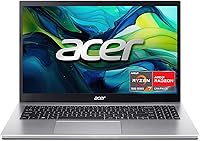
Acer Aspire Go 15 AI Ready Laptop Review: Worth It? (November 2026)
The Acer Aspire Go 15 AI Ready is worth buying for basic study and office work, thanks to its 15.6-inch FHD IPS screen, Ryzen 3 7320U chip and Copilot key. Skip it if you edit video, game heavily or need lots of local storage beyond its 128GB SSD.
On this page (8 sections)
- The Acer Aspire Go 15 AI Ready at a glance
- Who the Aspire Go 15 AI Ready suits best
- The specs that matter in daily use
- Setting up the Aspire Go 15 for the first time
- Care and maintenance for a long life
- The trade-offs to weigh before you buy
- Alternatives worth comparing
- Verdict: buy it for everyday work, skip it for heavy loads
The Acer Aspire Go 15 AI Ready is a sensible buy for everyday study and office work, and its 15.6-inch FHD IPS screen is the standout feature at this end of the market. The Ryzen 3 7320U, 8GB of LPDDR5 memory and 128GB SSD cover browsing, writing, email and video calls well.
Buy it if that's your daily routine; skip it if you need serious graphics or lots of local storage.
This Acer Aspire Go 15 AI Ready laptop review walks through the specs that matter in daily use, the setup steps worth knowing and the honest trade-offs. The short version: it's a well-rounded basic laptop, as long as you plan around its storage and graphics limits.
The Acer Aspire Go 15 AI Ready at a glance
The Aspire Go 15 AI Ready is a clamshell laptop built for simple, connected productivity. Acer pairs a large 1080p IPS panel with a modest AMD processor and a Copilot key, aiming at students, home users and office workers who mostly live in a browser and a word processor.
Acer Aspire Go 15 AI Ready Laptop: Best for everyday study and office work

- 15.6-inch FHD IPS display
- AMD Ryzen 3 7320U
- 8GB LPDDR5 memory
- 128GB PCIe SSD
A 15.6-inch everyday laptop with a bright IPS screen and Copilot built into Windows 11. Good for writing, browsing and video calls, with limits on storage and graphics.
Pros
- Large 1080p IPS screen with narrow bezels
- Copilot key for quick AI assistance
- Dual full-function USB Type-C ports
- Wi-Fi 6 and HDMI 2.1
Cons
- 128GB SSD fills up quickly
- Integrated Radeon 610M graphics suit light tasks only
- Windows 11 Home in S Mode limits app installs until switched
The silver finish and narrow bezels keep it looking tidy on a desk. Its real appeal is the combination of a big, sharp screen and modern connectivity at a budget-friendly tier, without extras you may never use.
Acer positions the Aspire Go as the simple option in its lineup, so the design leans practical rather than flashy. The full model name is the AG15-21P-R5YG, which is the identifier to use when you check the exact configuration in a store.
The clamshell form factor is the familiar laptop shape, with the screen folding down over the keyboard for transport. At 15.6 inches it is a desk-first machine rather than a bag-first one.
That size is the point: it gives you room for two windows side by side without shrinking text.
What you get in the box
Acer includes the laptop, an AC adapter and a power cord. There's no sleeve or mouse, so budget for a basic bag if you'll carry it between classes or meetings.
The charger is the only accessory you need to get started.
Who should skip it
Skip this laptop if your work involves video editing, 3D modeling or modern gaming. The integrated Radeon 610M graphics and the 8GB of soldered memory aren't built for those loads.
Also skip it if you keep a large local photo or video library, because the 128GB SSD leaves little room after Windows and updates. Heavy multitaskers who routinely keep many large programs open at once should also think twice, since the memory can't grow later.
Who the Aspire Go 15 AI Ready suits best
This laptop fits students, home office workers and casual users who want one dependable machine for writing, research and streaming. The 15.6-inch screen makes split-screen work comfortable, and the Ryzen 3 7320U keeps everyday apps responsive.
It also suits anyone curious about AI tools. The Copilot key opens Microsoft's assistant with one press, which is handy for summarizing notes or drafting emails.
That's the "AI Ready" part of the name, and it runs through Windows 11 rather than a separate app. Because Copilot works through your Microsoft account and an internet connection, the laptop doesn't need special hardware to use it.
Buyers who mostly read and type will get the most from it. A typical day of lectures, documents, spreadsheets and a video call sits comfortably inside its limits.
The large screen also helps people who read a lot, such as students working through long PDFs or office staff comparing two documents at once. If you carry a laptop all day, though, compare it with smaller 14-inch models first; a 15.6-inch chassis is heavier and bulkier in a backpack.
Our Acer Aspire Go 14 AI review covers the smaller sibling if portability matters more than screen size.
Households sharing one laptop also fit the profile. The screen is big enough for two people to watch something together, and the Copilot key gives less technical users a simple way into AI help.
It is less suited to a single user who wants a light machine for the commute.
The specs that matter in daily use
The 15.6-inch FHD IPS display is the part you'll notice most, and it's the strongest reason to pick this model. A 1920 x 1080 resolution on an IPS panel gives wide viewing angles and a sharp, detailed picture for web pages, documents and streaming.
The 60Hz refresh rate is the standard for everyday panels, and it suits office work and video fine.
The AMD Ryzen 3 7320U is a quad-core processor with a maximum speed of 4.1 GHz. That's enough for dozens of browser tabs, spreadsheets and video calls, though it won't keep pace with demanding creative software.
The 8GB of LPDDR5 memory supports smooth multitasking within everyday limits. LPDDR5 is low-power memory built into the board, so it helps battery life but rules out later upgrades.
Graphics come from the integrated AMD Radeon 610M, which shares system memory. It handles video playback and basic photo edits fine, but it's not a gaming GPU.
The 128GB PCIe SSD keeps startup and app loading quick, yet the capacity is the tightest part of the package.
Wi-Fi 6 and Bluetooth 5.1 cover wireless connections, and HDMI 2.1 lets you add an external monitor. Two full-function USB Type-C ports mean you can charge devices or connect accessories without a hub.
Acer's BluelightShield setting reduces blue light for longer evening sessions.
AcerSense is the software layer that ties some of this together. It manages battery life, storage and apps from one screen, so you can free space or adjust power settings without hunting through Windows menus.
Acer PurifiedVoice and the noise-reduction solution improve how you sound on video calls. Those are small features, but they matter for students on remote classes or staff on daily meetings.
Setting up the Aspire Go 15 for the first time
Setup is standard Windows 11 Home, and the first decision you'll face is whether to stay in S Mode. S Mode restricts installs to the Microsoft Store, which keeps the laptop lean but blocks most desktop programs.
Switching it off is free and one-way, and most users will want to do it early so they can install the apps they need. Once switched, Windows 11 Home behaves like the normal version and the change can't be reversed.
After the initial Windows updates, connect to Wi-Fi 6 and sign in with your Microsoft account to activate Copilot. The Copilot key sits on the keyboard, so you can test it right away.
Add your email and cloud storage accounts next, since the 128GB SSD won't hold a big local library. Cloud storage is the practical answer to the small drive, and setting it up on day one saves cleanup later.
Try AcerSense, Acer's built-in control panel, which manages battery life, storage and apps from one place. Acer also includes PurifiedVoice and a noise-reduction solution for clearer video calls.
Set the screen brightness and BluelightShield level to suit your room before you settle into daily use. If you use an external monitor, HDMI 2.1 makes the connection simple, and the dual USB-C ports leave room for a mouse and a phone charger at the same time.
S Mode in practice
S Mode is easy to misunderstand. It is not a different operating system; it is a security setting inside Windows 11 Home.
It limits apps to the Microsoft Store, which means browsers, Office and most everyday tools are available, but many desktop programs are not.
For a student who only needs a browser and Office, staying in S Mode is a reasonable choice. It keeps the machine quick and reduces the chance of installing something harmful.
For anyone who needs a specific desktop app, the switch is a quick step at setup rather than a reason to avoid the laptop. Decide before you install a lot of software, because switching later means revisiting your app list.
Care and maintenance for a long life
Keep the laptop clean, cool and backed up, and it will serve you well for years. Wipe the screen with a soft microfiber cloth and avoid harsh sprays.
Brush dust from the vents every few months and use it on a hard surface so air can flow underneath. A laptop that runs hot slows down and wears out faster, so airflow is the simplest habit to keep.
Battery care matters on a machine like this. Acer's Lithium Ion battery lasts longer if you avoid leaving the laptop plugged in at full charge all day; AcerSense can help manage charging habits.
Store it in a dry place and don't leave it in a hot car. If you mostly use it at a desk, unplugging now and then helps the battery stay healthy.
Because the 128GB SSD is small, set up automatic cloud backup or an external drive from day one. Keep Windows and apps updated for security.
Check storage in AcerSense every so often and clear old downloads before the drive gets full. For general upkeep tips that apply to any brand, see our Acer Aspire 3 review, which covers similar maintenance habits for budget Acer models.
The screen needs the least attention. IPS panels hold their picture well, and the main risk is pressure from a heavy bag.
Close the lid before you pack it and avoid stacking books on top. A simple sleeve adds protection for very little cost.
The trade-offs to weigh before you buy
The 128GB SSD and the soldered 8GB memory are the main limits. Windows and updates take a chunk of that storage, so you'll be managing space from the start.
Since the LPDDR5 memory can't be upgraded, buy this laptop only if 8GB suits your workload. Cloud storage or an external drive is not optional for anyone with a photo or document library.
Graphics are the second trade-off. The Radeon 610M is integrated and shares memory, so it's fine for video and light photo work but not for modern games or heavy editing.
If either of those matters, look at a laptop with a dedicated GPU. The shared memory also means graphics use takes a slice of the same 8GB, so heavy graphics work leaves less for apps.
S Mode is a minor hurdle rather than a deal-breaker, but it does mean an extra setup step. And the 15.6-inch size trades portability for screen space.
If you want a smaller machine or a different brand's keyboard and support, our ASUS vs Acer laptop comparison helps you weigh the two brands. The 60Hz refresh rate is also worth noting if you are used to smoother gaming panels, though for documents and video it makes no practical difference.
Alternatives worth comparing
The Aspire Go 15 AI Ready is a strong everyday pick, but a few nearby options may fit specific needs better. Compare these before you decide.
Each one is a different answer to the same question: what do you give up to keep the price sensible?
Acer Aspire 3 Slim
If you like Acer's value approach but want a different chassis, the Aspire 3 Slim line is the natural comparison. It targets the same student and home-office buyer, so check the screen and ports against this model.
The key question is whether the slimmer body still gives you the screen size you want. If you mostly work at a desk, the larger Aspire Go screen may be the better trade.
ASUS models in the same tier
ASUS competes directly in this budget range. Our ASUS vs Acer breakdown covers build, support and value, which helps if brand service matters to you.
For a laptop you'll keep for years, the support network and keyboard feel can matter as much as the spec sheet. Compare the screen size and port layout as well as the price tier.
A Dell for home and office
Dell's mainstream models are the other common choice for home and office buyers. Our guide to the best Dell laptops lists options if you'd rather stay with Dell's support network.
Dell tends to be the safer pick for buyers who value office-grade support, while Acer tends to lead on screen size for the money in this tier.
Verdict: buy it for everyday work, skip it for heavy loads
The Acer Aspire Go 15 AI Ready is a buy for basic study and office work, and the 15.6-inch FHD IPS screen plus the Copilot key make it a comfortable daily machine. The Ryzen 3 7320U and 8GB of memory keep everyday apps moving, and Wi-Fi 6, HDMI 2.1 and dual USB-C ports cover modern connections.
For the price tier, the screen is the part that stands out most.
Skip it if you need large local storage, dedicated graphics or upgradeable memory. Those buyers should look at a model with a bigger SSD or a discrete GPU.
For everyone else, this Acer Aspire Go 15 AI Ready laptop review lands on a clear recommendation: it's a well-priced everyday laptop that does the basics well. Plan for cloud storage from day one, decide on S Mode early and keep the vents clear.
If a smaller screen or a different brand suits you better, the linked comparisons above are the next stop.
Frequently asked questions
Is the Acer Aspire Go 15 good for students?
Yes, for most classroom and homework tasks. The 15.6-inch FHD IPS screen is comfortable for reading documents and watching lectures, and the Ryzen 3 7320U with 8GB memory handles web browsing, email and word processing without strain.
What does AI Ready mean on this Acer laptop?
It refers to Copilot in Windows, Microsoft's AI assistant, which you open with the dedicated Copilot key on the keyboard. The laptop runs this through Windows 11 Home, so the AI features depend on your Microsoft account and internet connection.
Can I upgrade the memory or storage on the Aspire Go 15?
The 8GB LPDDR5 memory is soldered, so it can't be upgraded later. Storage is a 128GB PCIe SSD; plan on cloud storage or an external drive from the start if you keep large files.
What is S Mode and should I turn it off?
S Mode is a locked-down Windows 11 setting that only allows apps from the Microsoft Store. It keeps the laptop faster and safer, but you'll need to switch it off for most desktop programs; the switch is free and one-way.
Does the Acer Aspire Go 15 have a backlit keyboard?
The keyboard is a standard layout with the Copilot key, and Acer doesn't list backlighting for this model. If you often type in dim rooms, compare models that name a backlit keyboard before you buy.