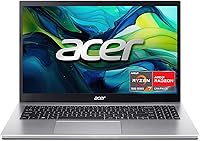
Acer Aspire Go 15 AG15-31P Laptop Review: Worth It? (November 2026)
The Acer Aspire Go 15 AG15-31P is a sensible buy for light everyday work like email, browsing and streaming on its 15.6 inch Full HD screen. Skip it if you edit video or keep large game libraries, because the 128GB storage and i3-N305 chip set a modest ceiling.
On this page (10 sections)
- The Acer Aspire Go 15 AG15-31P at a glance
- Who should buy the Acer Aspire Go 15 AG15-31P?
- The specs that matter in daily use
- Setting up the laptop for the first time
- Ports, connectivity and everyday practicality
- Battery life, weight and carrying the laptop
- Care and upkeep for the Aspire Go 15
- The trade-offs to know before you buy
- Alternatives worth comparing
- Verdict: should you buy the Acer Aspire Go 15 AG15-31P?
The Acer Aspire Go 15 AG15-31P is a sensible buy for light everyday work, and this Acer Aspire Go 15 AG15-31P laptop review looks at whether its mix of screen, speed and storage fits the way most people use a laptop at home or in class. It covers the basics well, but the small drive is a real limit.
The model pairs a 15.6 inch Full HD IPS display with an Intel Core i3-N305 processor and 8GB of LPDDR5 memory. Buy it if you mostly browse, write and stream.
Pick something else if you need lots of local storage or heavy graphics.
The Acer Aspire Go 15 AG15-31P at a glance
The Aspire Go 15 AG15-31P is a budget 15.6 inch laptop built around the essentials: a sharp screen, modern Wi-Fi and a USB-C port that also carries video and power. The Core i3-N305 and 8GB of LPDDR5 memory are enough for everyday multitasking.
acer Aspire Go 15 Slim Laptop: Best for everyday home and school tasks

- 15.6 inch Full HD IPS display
- Intel Core i3-N305 processor
- 8GB LPDDR5 RAM
- 128GB onboard storage
- Wi-Fi 6 and USB-C
A light 15.6 inch laptop for browsing, writing and streaming, with a sharp Full HD screen and modern Wi-Fi 6. The small onboard drive is the main limit.
Pros
- Full HD IPS screen is clear for text and video
- USB-C port handles data, display and charging
- Wi-Fi 6 and Bluetooth 5.1
- Acer rates battery life at 10 hours
Cons
- 128GB storage fills quickly with big files
- Windows 11 Home in S mode needs a switch before most app installs
The AG15-31P-3947 version ships in silver with Windows 11 Home in S mode. Acer also sells closely named versions of this laptop, so check the exact model number before you order.
What comes in the box
Acer includes the laptop, an AC adapter and a power cord. There's no sleeve or mouse in the box, so budget for a bag if you carry it daily.
The 720p HD camera handles video calls, and Acer's TNR technology is meant to improve low-light images.
Who should buy the Acer Aspire Go 15 AG15-31P?
Buy this laptop if your day is email, web browsing, writing, spreadsheets and streaming. The 15.6 inch 1080p IPS screen gives you a roomy canvas, and the narrow bezels keep the body from feeling bulky on a desk.
It also fits students who want one machine for class notes and video calls. Wi-Fi 6 and Bluetooth 5.1 cover modern networks and wireless accessories, and the full-size keyboard makes long typing sessions easier.
Skip it if you edit video, run design software or keep a large photo library. The 128GB onboard storage leaves little room, and the integrated Intel UHD Graphics won't handle demanding 3D work.
Gamers should look elsewhere too.
If you're weighing brands more broadly, our ASUS vs Acer laptop comparison helps you decide which maker's budget line fits you better.
The specs that matter in daily use
The 15.6 inch Full HD IPS display is the part you'll notice most. At 1920 x 1080 and 60Hz, text stays crisp and video looks clean, and the IPS panel keeps colors steadier when you view from an angle.
Acer adds BluelightShield to lower blue light levels. That's a comfort setting for long reading sessions, not a fix for eye strain, so still take breaks.
The Intel Core i3-N305 runs up to 3.8 GHz. It handles a browser with many tabs, office documents and video calls without strain, but it isn't built for heavy creative work.
The 8GB of LPDDR5 memory is soldered in place and can't be upgraded later.
Storage is 128GB of Universal Flash onboard. That's quick for a budget laptop but small, so plan on cloud storage or an external drive.
Check the storage figure on the exact model number you buy, because Acer's naming gets close between versions.
Setting up the laptop for the first time
Start by switching out of S mode if you need desktop apps. Windows 11 Home in S mode only installs apps from the Microsoft Store and locks the browser to Edge.
You can leave S mode once through the Store settings, and the change is one-way.
Then run Windows Update and let it finish before you install your own software. Updates can take a while on a fresh machine and may need a restart or two.
Sign in with your Microsoft account so your files and settings sync. Set up cloud backup early, because the small onboard drive fills faster than you expect.
A microSD card or external drive adds cheap room for photos and downloads.
The Copilot key launches Microsoft's AI assistant in Windows. It's handy for drafting text or quick questions, though Copilot is still in preview and results vary.
Treat its answers as a starting point rather than a final word.
If you're comparing this laptop with Acer's smaller budget line, our Acer Aspire 3 review covers how the two differ in specs and price tier.
Ports, connectivity and everyday practicality
The port selection covers most desk and travel setups without a hub. You get one USB-C port (USB 3.2 Gen 2, up to 10 Gbps) with DisplayPort and USB charging, two USB 3.2 Gen 1 ports, one HDMI 2.1 port, a headphone jack and a Kensington lock slot.
That means you can connect an external monitor over HDMI or USB-C, plug in a mouse and still have a port free for a flash drive. Charging over USB-C is convenient when you carry a single cable for phone and laptop.
Wi-Fi 6 with dual-band 2.4GHz and 5GHz support helps on crowded home or campus networks. Bluetooth 5.1 or above connects headphones and a wireless mouse.
The 720p HD camera uses Acer's TNR technology for better low-light images. Acer PurifiedVoice with AI noise reduction cleans up your voice on calls.
For frequent meetings, a separate webcam still gives better picture quality.
Battery life, weight and carrying the laptop
Acer rates the battery at 10 hours, which covers a full study day of writing and browsing if you keep brightness moderate. Video calls and streaming drain it faster, so carry the adapter on long days.
The laptop is a slim 15.6 inch model, so it fits most backpacks and messenger bags. Adding a protective sleeve is worth it for daily commutes.
The {{product B0FNN33MJB | A hard 15.6 inch shell with shock padding and a splash-resistant cover for daily commutes.}} keeps the screen and corners safer in a crowded bag.
The sleeve measures 14.8 x 10.0 x 0.6 inches inside and weighs 668 grams. It fits this laptop's size class and several other 15.6 inch models, so it's a practical extra if you already carry a bag without a padded laptop pocket.
Care and upkeep for the Aspire Go 15
Keep the laptop clean and cool and it will serve you longer. Wipe the screen with a soft microfiber cloth and avoid harsh cleaners.
Use a can of compressed air now and then to clear dust from the vents.
Don't block the fan intake on soft surfaces like beds or cushions. Heat is the main enemy of a budget laptop, so use it on a hard desk or a lap tray that lets air flow.
Unplug the charger during storms and store the laptop in a sleeve when it's not in use. Keep liquids away from the keyboard; spills are the most common cause of dead laptops.
Check storage regularly and clear downloads and old files. With 128GB, a full drive slows Windows and blocks updates.
Run the built-in Disk Cleanup and move large media to the cloud or an external drive.
AcerSense software monitors device health, battery life and storage and can free space. It's a handy built-in tool, though it won't replace your own backup routine.
Back up important files to the cloud or an external drive at least weekly.
The trade-offs to know before you buy
The 128GB drive is the biggest compromise. It's fine for documents, but photos, video and games fill it quickly, so you'll lean on cloud storage or an external drive from day one.
The memory is soldered, too, so 8GB is your ceiling for the laptop's life.
S mode is another hurdle for some buyers. If you rely on desktop apps outside the Microsoft Store, you'll need to switch out of S mode, and that change is one-way.
It's easy, but it's a step you should plan for.
The Core i3-N305 and Intel UHD Graphics suit light work, not heavy creative or gaming loads. For video editing or 3D design, choose a laptop with a stronger processor and a dedicated graphics card.
For simple everyday tasks, this Acer is enough.
The silver finish is neutral and professional, but it shows smudges. A sleeve helps here too.
None of these are dealbreakers for the right buyer, and each one is a reason to think about your own workload first.
Alternatives worth comparing
If the Aspire Go 15 doesn't quite fit, these two options cover different needs. One suits buyers who want a well-known brand for office work.
The other is a closer look at Acer's own budget line.
Best Dell laptop for home and office
If brand support and a familiar office feel matter more to you, our best Dell laptop guide lines up Dell models for home and office work. Dell often offers stronger service options and a wider range of configurations, though prices and specs vary by model.
Compare the Dell's screen size, memory and storage with the Aspire Go's before you decide. A Dell with more storage may suit you better if you keep large files, while this Acer stays the lighter, simpler choice for basic tasks.
The Acer Aspire Go 15 in its wider family
The Aspire Go 15 also comes in other versions, and the Acer Aspire Go 15 review covers the line as a whole. That's useful if you're comparing this AG15-31P model with sibling versions that differ in storage or processor.
If a sibling version offers more storage for a similar price tier, it may be the better buy for you. The screen and everyday speed are the same story across the line, so storage is often the deciding difference.
Verdict: should you buy the Acer Aspire Go 15 AG15-31P?
Yes, buy the Acer Aspire Go 15 AG15-31P if you want a light, affordable 15.6 inch laptop for browsing, writing, streaming and video calls. The Full HD IPS screen, Wi-Fi 6 and USB-C port make everyday use pleasant, and the Core i3-N305 keeps basic multitasking smooth.
Skip it if you edit video, play demanding games or keep a big local file library. The 128GB drive and soldered 8GB memory set a firm ceiling.
Pick a laptop with more storage and a stronger processor for that kind of work.
For most home and student buyers who live in a browser and a word processor, this Acer is an easy recommendation. Add a sleeve and a cloud backup habit, and it will handle daily life well.
For office buyers who want brand service options, compare a Dell before you commit.
If you're still unsure between Acer's budget lines, our Acer Aspire 3 review and the ASUS vs Acer laptop comparison help you see where each brand puts its money. Buy the Aspire Go 15 for the screen and simplicity; look elsewhere only if storage or speed is your priority.
Frequently asked questions
What does Windows 11 in S mode mean on this laptop?
S mode restricts apps to the Microsoft Store and locks the default browser to Edge for safer, faster everyday use. You can switch out of S mode once through the Store settings, and the change is one-way.
Most people switching to standard Windows for desktop apps do this on day one.
How long does the Acer Aspire Go 15 AG15-31P battery last?
Acer rates the battery at 10 hours, and real results depend on screen brightness, Wi-Fi use and the apps you run. Browsing and writing last longer than video calls or streaming.
Carry the AC adapter for long days away from an outlet and charge over USB-C when you can.
Does the Acer Aspire Go 15 AG15-31P have a backlit keyboard?
The laptop's specifications do not mention a backlit keyboard, so plan on typing in a lit room. The silver finish and full-size layout still suit desk work.
If you often work in dim rooms, compare models that list backlighting before you buy.