Acer Chromebook Plus 514 Review: Worth It? (November 2026)
The Acer Chromebook Plus 514 is a solid everyday Chromebook for students, commuters and cloud-first workers who want a 14-inch touchscreen, long battery life and AI tools built in. Pick the Spin 514 instead if you need a convertible hinge and a faster Core i5.
On this page (8 sections)
- The Acer Chromebook Plus 514 at a glance
- Who should buy the Acer Chromebook Plus 514
- The specs that matter in daily use
- Setting up the Acer Chromebook Plus 514
- How long the Acer Chromebook Plus 514 lasts
- The trade-offs to know before buying
- Alternatives worth comparing
- Verdict: should you buy the Acer Chromebook Plus 514?
The Acer Chromebook Plus 514 is a well-rounded 14-inch Chromebook for everyday tasks. This Acer 514 Chromebook Plus review finds that the touchscreen, 512GB SSD and 11 hours of rated battery cover study, browsing, video calls and document work without fuss.
It's not the fastest laptop in its class. The Core i3-N355 is built for cloud-first daily use, not heavy video editing.
But at 3.09 lb with MIL-STD 810H durability, it travels well and takes knocks.
The Acer Chromebook Plus 514 at a glance
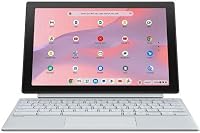
The ist computers Acer Chromebook Plus 514 is the version we'd point most buyers toward. It combines a 14-inch WUXGA touchscreen with a roomy 512GB SSD and a chassis rated to military durability standards.
ist computers Acer Chromebook Plus 514 Laptop: Best for everyday cloud work

- 14-inch WUXGA IPS touchscreen
- Intel Core i3-N355, 8-core
- 8GB LPDDR5X RAM
- 512GB SSD
The pick for most buyers. It pairs a sharp touch display and a roomy 512GB SSD with 11 hours of battery and a chassis that meets MIL-STD 810H durability standards.
Pros
- Touchscreen WUXGA display with 300-nit brightness
- 512GB SSD is generous for a Chromebook
- 11 hours of rated battery life
- Wi-Fi 6E and Bluetooth 5.3
- Runs 3 external monitors without a dock
Cons
- The Core i3-N355 is built for everyday work, not heavy editing
- The touchscreen adds weight to a light design
- It's a clamshell, so no tablet or tent mode
The screen is the standout. It's a 1920x1200 IPS panel at 300 nits, so documents and video stay sharp and bright enough for most indoor rooms.
The touch layer makes scrolling and tapping quick. The 7.8 mm narrow bezel and wide viewing angles keep the picture immersive.
Storage is the other surprise. A 512GB SSD is far more than most Chromebooks offer, which means local files, downloads and offline apps don't crowd the drive.
Load times stay short, so opening a big PDF or a set of tabs feels snappy.
The rest of the package is practical. You get DTS Audio, a 1080p webcam with a privacy shutter, Wi-Fi 6E and Bluetooth 5.3.
The white backlit keyboard matters more than it sounds when you're working past sunset. Acer's listing notes the model ships resealed to upgrade the system, and the one-year warranty comes from Acer.
Who should buy the Acer Chromebook Plus 514
This Chromebook fits students, commuters and cloud-first workers who want a dependable daily laptop without paying for a convertible hinge or a high-end chip. The 3.09 lb weight and 11-hour rating make it easy to carry from class to desk.
If your day is email, browser tabs, Google Docs, video calls and streaming, the Core i3-N355 and 8GB of LPDDR5X memory handle it. The backlit keyboard helps for evening work.
It's also a reasonable fit for schools and small teams that need secure, auto-updating machines. ChromeOS stays current on its own, and Google's Auto Update Expiration runs to June 2035.
The 1080p webcam with privacy shutter suits Google Meet and Zoom sessions in classrooms and hybrid offices.
The included 12 months of Google AI Pro adds practical value for this group. You get Gemini Advanced, NotebookLM and 5TB of cloud storage, plus Gemini built into Gmail and Docs.
Students drafting essays or staff summarizing meetings can put those tools to work on day one.
Skip it if your work leans on heavy desktop software or video editing. And skip it if you want tablet or tent modes, since the standard 514 is a clamshell.
For broader options, see our roundup of the best Chromebooks for everyday use.
The specs that matter in daily use
The display, processor and memory are what you'll notice most. The 14-inch WUXGA panel gives you a tall 16:10 workspace, so you see more of a document or a webpage before scrolling.
The 300-nit brightness holds up under normal indoor light, though it's not built for direct sun.
The Core i3-N355 runs 8 cores up to 3.9GHz. That's plenty for streaming, spreadsheets and a dozen tabs.
It's a 14th-generation part paired with Intel Graphics, which covers video playback and light image work without a separate graphics card.
8GB of LPDDR5X RAM keeps multitasking smooth for typical Chromebook workloads. The 512GB SSD shortens load times and leaves room for offline files.
If you keep a lot of photos or downloaded video, that space matters more than raw speed.
Connectivity is generous. You get 2x USB-C 3.2 Gen 1, 2x USB-A 3.2 Gen 1, HDMI 1.4 and a headphone jack.
The USB-C ports carry both DisplayPort and charging. Wi-Fi 6E and Bluetooth 5.3 cover modern wireless.
The laptop can drive 3 external monitors without a docking station, up to 4K at 60Hz over USB-C and 4K at 30Hz over HDMI. One caveat: the product title lists "1920 x 1080" while the bullet and spec sheet say 1920x1200.
Trust the WUXGA 1920x1200 figure when comparing, since the taller 16:10 panel is the actual display. The listed refresh rate is 60Hz.
Chromebook Plus and the AI tools
Chromebook Plus is Google's label for laptops that meet a minimum hardware bar, and this model clears it with room to spare. The payoff is the software layer.
The Quick Insert key opens help for writing and creates high-resolution images. Gemini can organize creative drafts and optimize materials.
Google Photos brings AI features like Magic Eraser and an HDR effect to clean up photos without a separate editor.
Adobe tools are part of the mix too. If your work involves light photo touch-ups or quick design edits, the built-in apps cover it without a subscription to a full desktop suite.
None of this makes the laptop a workstation, but it removes a lot of small friction from everyday creative tasks.
Setting up the Acer Chromebook Plus 514
Setup takes minutes, not hours, because ChromeOS signs in with your Google account. Power on, connect to Wi-Fi and sign in to sync your apps, bookmarks and settings.
The first-run flow asks you to choose a PIN or password and set up a fingerprint or face option where supported. Then the Play Store and Chrome apps fill in.
The box includes the laptop, the AC adapter and the user manual, so there's nothing extra to buy before you start.
Install the apps you rely on, then pin the ones you use daily to the shelf. The Quick Insert key and Gemini tools are built in for writing help and image creation.
The backlit keyboard is worth switching on in the settings early if you often work in dim rooms.
Turn on Google AI Pro if you want the 12 months of extra storage and advanced Gemini features included with Chromebook Plus. That's 5TB of cloud storage plus Gemini in Gmail and Docs.
It's the feature most worth claiming right after sign-in, since the clock on the included year starts at purchase.
If you need Word, Excel or PowerPoint, set up the web versions. Our explainer on whether Chromebooks can run Microsoft Office covers what works and what doesn't.
If you plan to use external monitors, test the USB-C and HDMI ports early so you know which cable and resolution combo works with your setup.
How long the Acer Chromebook Plus 514 lasts
Google supports this model with software updates through June 2035, so the software side has years left. The hardware is built to match: the chassis meets MIL-STD 810H durability standards.
The rated battery life is 11 hours. That covers a full day of classes or a long commute without hunting for an outlet.
Fast charge technology tops it up when you do stop. Battery life will vary with brightness and what you run, so treat 11 hours as a ceiling for light use rather than a promise.
The 512GB SSD helps longevity too. Less pressure on local storage means fewer workarounds and less worry about running out of space as apps grow.
A roomy drive also means you can keep offline copies of course material or project files without juggling cloud sync.
The 810H rating is about more than drops. It covers a set of environmental tests, so the laptop is built to shrug off the bumps, dust and temperature swings of commuting and campus life.
That doesn't make it indestructible, but it raises the odds it survives a backpack ride.
Care matters as much as specs. Keep the vents clear, avoid leaving it in a hot car and use a sleeve when carrying it.
Wipe the touchscreen with a soft, slightly damp cloth. Clean the keyboard gently and keep liquids away from the ports.
For a broader look at how ChromeOS laptops age, read how long a Chromebook lasts. The 810H build and 2035 update window put this model on the longer side.
The trade-offs to know before buying
The Core i3-N355 limits heavy work, and that's the main thing to weigh. It's an efficient everyday chip, not a creative workstation.
Video editing and dense spreadsheets may feel slow. The 8-core design helps with many small tasks at once more than with one heavy one.
The clamshell design is the second trade-off. There's no tent, stand or tablet mode, so you can't flip it flat for drawing or propped viewing.
The Spin 514 covers that need.
Portability has a small cost. The 3.09 lb weight is light for a 14-inch touch laptop, but the touch layer makes it heavier than a plain display would be.
You feel that in a one-shoulder bag over a long walk.
Battery life is rated, not guaranteed. Real-world time depends on brightness, tabs and what you run.
Expect less than 11 hours if you push the screen bright all day. Running several external monitors over USB-C also draws power, so a long desk session is a good time to keep the charger handy.
Finally, remember this is ChromeOS. If you need full desktop Windows or macOS apps, a Chromebook isn't the right tool no matter how good the hardware is.
Alternatives worth comparing
Three versions of this laptop family fit different needs. Each one earns its place below.
Acer Chromebook Plus Spin 514
The Acer Chromebook Plus Spin 514 is the convertible sibling. It adds a 360-degree hinge and a faster Intel Core i5-1334U with 10 cores up to 4.6GHz and 12MB of cache.
Its 512GB PCIe NVMe M.2 SSD and 8GB DDR5 RAM match the storage and memory of the standard model. The FHD camera with privacy shutter, backlit keyboard, 14-inch WUXGA touch display and DTS audio all carry over.
The four modes are the real draw: laptop for daily work, tent or stand for sharing a video, and tablet for reading or drawing with a finger. It also meets MIL-STD 810H.
Battery life is rated at 10 hours, one hour less than the clamshell, which is the price of the hinge and the stronger chip.
Acer Chromebook Plus 514 Touch
The Acer Chromebook Plus 514 Touch with the matte screen is the endurance option. Acer rates it at up to 17 hours of battery life, well beyond the other two.
It runs a Core i3-1315U, an older 6-core chip with 8 threads, up to 4.5GHz and 10MB of smart cache. Storage is 256GB on a PCIe Gen4 SSD, half the standard model.
But the 14-inch WUXGA matte touchscreen at 300 nits and a 16:10 aspect ratio cuts glare in bright rooms. Wi-Fi 7 is the newest wireless standard here, the USB-C ports run at 3.2 Gen 2 speeds up to 10Gbps, and a protective sleeve is included.
Pick this one if battery life and a glare-free screen matter more to you than storage and chip generation.
Which one to choose
Pick the standard 514 for balanced everyday value, the Spin for tablet and tent modes, or the matte touch model for the longest rated battery. The Core i5 in the Spin is the strongest chip of the three.
If you're unsure how a Chromebook fits your work, our roundup of the best Chromebooks puts these models next to other brands and price tiers.
Verdict: should you buy the Acer Chromebook Plus 514?
Buy the Acer Chromebook Plus 514 if you want a dependable 14-inch Chromebook with a bright touchscreen, plenty of storage and all-day battery for study and cloud work. This Acer 514 Chromebook Plus review finds few weak points for that buyer.
It handles the everyday mix well: 8GB of LPDDR5X memory, a 512GB SSD, Wi-Fi 6E and a 1080p webcam with a privacy shutter. The MIL-STD 810H build and June 2035 update window add confidence.
Add the 12 months of Google AI Pro and the Quick Insert key, and the software side keeps pace with the hardware.
The decision rule is simple. Choose the standard 514 for value and balance, the Spin 514 if you need a convertible hinge and a faster Core i5, or the matte touch model if rated battery life is your top priority.
Skip all three if you need full desktop software or heavy creative apps. For everyone else, the standard 514 is the easiest one to recommend.
Frequently asked questions
Does the Acer Chromebook Plus 514 come with a touchscreen?
The ist computers model has a 14-inch WUXGA IPS touchscreen with 300-nit brightness. The matte-screen model is also a touch display.
If touch matters to you, confirm the exact model number, since Acer sells Chromebook Plus 514 variants with and without it.
How long will the Acer Chromebook Plus 514 get updates?
Google's Auto Update Expiration for the ist computers model is June 2035. The matte touch model runs on the same ChromeOS update schedule family.
That gives you years of security patches and feature updates after purchase.
Can the Acer Chromebook Plus 514 run Microsoft Office?
It runs ChromeOS, so you use the web versions of Word, Excel and PowerPoint, or the Android Office apps. Chromebooks do not install the full desktop Office suite.
For most document work the web apps are enough.
Is the Acer Chromebook Plus 514 good for students?
Yes. The 14-inch screen, 11-hour battery and MIL-STD 810H durability suit classes, note taking and video calls.
The 512GB SSD leaves room for local files, and the backlit keyboard helps in dim rooms.
Does the Acer Chromebook Plus 514 include a stylus?
No stylus is included with the standard model. The touchscreen works with a finger, and the convertible Spin is the more natural fit if you plan to draw or take handwritten notes.
Check the box contents for your exact variant.